Virus.Obfuscator.XQ
Threat Scorecard
EnigmaSoft Threat Scorecard
EnigmaSoft Threat Scorecards are assessment reports for different malware threats which have been collected and analyzed by our research team. EnigmaSoft Threat Scorecards evaluate and rank threats using several metrics including real-world and potential risk factors, trends, frequency, prevalence, and persistence. EnigmaSoft Threat Scorecards are updated regularly based on our research data and metrics and are useful for a wide range of computer users, from end users seeking solutions to remove malware from their systems to security experts analyzing threats.
EnigmaSoft Threat Scorecards display a variety of useful information, including:
Popularity Rank: The ranking of a particular threat in EnigmaSoft’s Threat Database.
Severity Level: The determined severity level of an object, represented numerically, based on our risk modeling process and research, as explained in our Threat Assessment Criteria.
Infected Computers: The number of confirmed and suspected cases of a particular threat detected on infected computers as reported by SpyHunter.
See also Threat Assessment Criteria.
| Threat Level: | 80 % (High) |
| Infected Computers: | 351 |
| First Seen: | October 5, 2012 |
| Last Seen: | June 23, 2022 |
| OS(es) Affected: | Windows |
The detection of Virus.Obfuscator.XQ on your system indicates a potential threat to your computer's security and integrity. This detection name suggests a type of malicious software that may be designed to evade detection or obstruct analysis, but without more specific information, it's essential to approach removal and mitigation with general best practices for dealing with Trojan-type threats.
Table of Contents
What Is Virus.Obfuscator.XQ?
Virus.Obfuscator.XQ, as indicated by its name, likely refers to a piece of malware that employs obfuscation techniques to hide its true nature or purpose. Obfuscation in malware is a method used to make the code difficult for humans and security software to understand, thereby potentially avoiding detection. The term "Virus" in its name might be misleading, as it doesn't necessarily imply a self-replicating virus but rather indicates it's a type of malicious software. The "Obfuscator" part suggests its ability to hide or disguise its activities, and "XQ" could be a specifier or variant identifier.
How Virus.Obfuscator.XQ Operates
Given the general nature of the detection, specifics about how Virus.Obfuscator.XQ operates cannot be detailed without more context. However, Trojans, which this seems to be classified under, typically operate by disguising themselves as legitimate software. Once installed, they can perform a variety of malicious actions, such as stealing sensitive information, downloading additional malware, or providing unauthorized access to the infected computer. The obfuscation aspect means it's designed to be stealthy, potentially using encryption, code packing, or anti-debugging techniques to evade detection by security software.
Symptoms of Infection
Symptoms of a Virus.Obfuscator.XQ infection can vary widely, depending on its intended purpose. Common indicators of a Trojan infection include unexpected changes to computer settings, unusual network activity, slower than usual computer performance, and appearance of unwanted or suspicious programs. Sometimes, infections may not exhibit noticeable symptoms immediately, which is why regular scans with reputable security software are crucial.
- Unexplained changes in computer behavior or settings
- Appearance of unwanted or suspicious programs
- Slower than usual computer performance
- Unusual network activity
How to Remove Virus.Obfuscator.XQ
Removing Virus.Obfuscator.XQ requires careful steps to ensure the malware is completely eradicated from the system. Here’s a general guide:
- Boot your computer in Safe Mode with Networking to limit the malware's ability to run and interfere with removal efforts.
- Use a reputable anti-malware tool, such as SpyHunter, to perform a full scan of your system. This can help identify and remove the malware and any associated files.
- Manually uninstall any suspicious programs that were installed around the time of the suspected infection.
- Reset your web browsers (Chrome, Firefox, Edge, etc.) to their default settings to remove any malicious extensions or settings changes made by the malware.
- After removal, reboot your computer and perform another scan to ensure no remnants of the malware remain.
Conclusion
The removal of Virus.Obfuscator.XQ and mitigation of its effects require a combination of the right tools and careful action. It's essential to stay vigilant and keep your security software up to date to protect against future infections. Regular backups of important data and being cautious when downloading software or clicking on links can also help prevent malware infections. If you're unsure about any part of the removal process, consider seeking help from a professional to ensure your computer is thoroughly cleaned and secure.
Aliases
15 security vendors flagged this file as malicious.
| Antivirus Vendor | Detection |
|---|---|
| AVG | Crypt_s.RN |
| Fortinet | W32/ZAccess.YGY!tr.bdr |
| Ikarus | Trojan.Crypt_s |
| BitDefender | Gen:Variant.Kazy.91948 |
| Kaspersky | Backdoor.Win32.ZAccess.ygy |
| McAfee | Generic.dx!bfww |
| Panda | Trj/OCJ.C |
| Fortinet | W32/ZAccess.HR!tr |
| AntiVir | TR/Obfuscate.XQ.11 |
| Kaspersky | Backdoor.Win32.ZAccess.bctd |
| K7AntiVirus | Trojan |
| CAT-QuickHeal | Backdoor.ZAccess.bctd |
| Panda | Generic Malware |
| AVG | Agent |
| Fortinet | W32/ZAccess.YGL!tr.bdr |
SpyHunter Detects & Remove Virus.Obfuscator.XQ
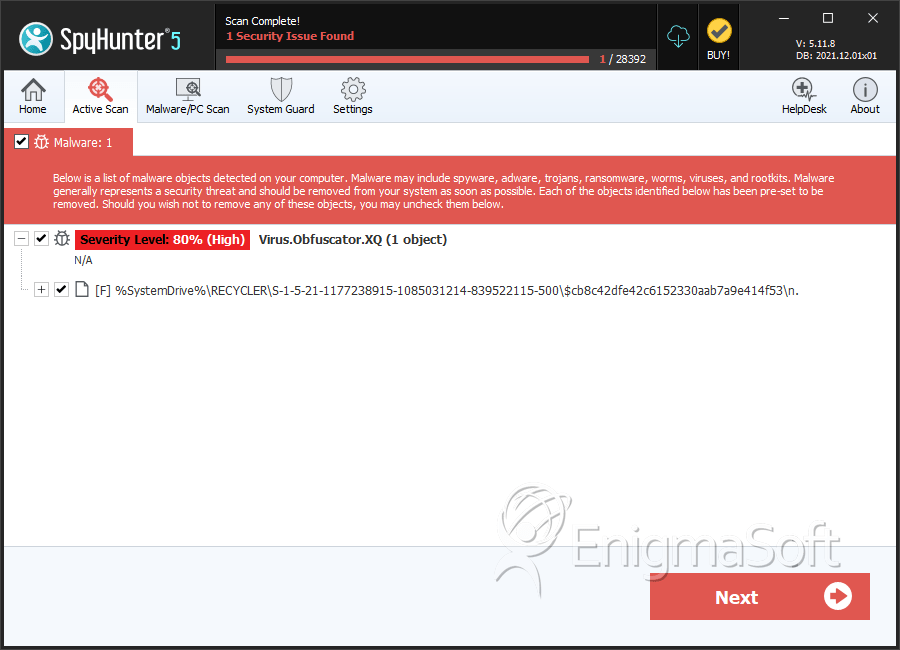
File System Details
| # | File Name | MD5 |
Detections
Detections: The number of confirmed and suspected cases of a particular threat detected on
infected computers as reported by SpyHunter.
|
|---|---|---|---|
| 1. | n | ff4e97192cee30423b9aa403ab00dfcc | 119 |
| 2. | n. | b170b87bdb40f5024f069f3d49b4c210 | 10 |


