Trojan.Ransom.KV
Threat Scorecard
EnigmaSoft Threat Scorecard
EnigmaSoft Threat Scorecards are assessment reports for different malware threats which have been collected and analyzed by our research team. EnigmaSoft Threat Scorecards evaluate and rank threats using several metrics including real-world and potential risk factors, trends, frequency, prevalence, and persistence. EnigmaSoft Threat Scorecards are updated regularly based on our research data and metrics and are useful for a wide range of computer users, from end users seeking solutions to remove malware from their systems to security experts analyzing threats.
EnigmaSoft Threat Scorecards display a variety of useful information, including:
Popularity Rank: The ranking of a particular threat in EnigmaSoft’s Threat Database.
Severity Level: The determined severity level of an object, represented numerically, based on our risk modeling process and research, as explained in our Threat Assessment Criteria.
Infected Computers: The number of confirmed and suspected cases of a particular threat detected on infected computers as reported by SpyHunter.
See also Threat Assessment Criteria.
| Threat Level: | 80 % (High) |
| Infected Computers: | 4 |
| First Seen: | February 14, 2013 |
| OS(es) Affected: | Windows |
The detection of Trojan.Ransom.KV indicates that your system has been compromised by a type of malware that is designed to extort money from you by locking or threatening to lock your files. This type of threat is particularly dangerous as it can lead to significant data loss and financial consequences if not addressed promptly. Understanding the nature of this threat and how it operates is crucial in taking the right steps to remove it and prevent future infections.
Table of Contents
What Is Trojan.Ransom.KV?
Trojan.Ransom.KV, as detected, suggests a malware that combines the characteristics of a Trojan horse with those of ransomware. A Trojan horse is a type of malware that disguises itself as a legitimate software, while ransomware is designed to block access to a computer system or files until a ransom is paid. The name itself implies a potential for file encryption or locking, but without specific details, it's essential to consider general principles of ransomware and Trojan infections to understand and combat this threat effectively.
How Trojan.Ransom.KV Operates
Malware like Trojan.Ransom.KV typically operates by first gaining unauthorized access to a system, often through user interaction such as opening malicious emails or downloading infected software. Once inside, it may spread to other parts of the system, encrypting files or locking the system to demand a ransom. The malware may also communicate with its command and control servers to report the infection and receive further instructions. It's crucial to disconnect from the internet as soon as possible after detecting such malware to prevent further damage.
Symptoms of Infection
Symptoms of an infection can vary but commonly include files becoming inaccessible, with ransom demands displayed on the screen. Other signs may include unusual system behavior, such as slow performance, or the appearance of unknown files and programs. Sometimes, the malware may not immediately announce its presence, operating in the background to gather information or spread to other systems before making its demands known.
- Files are encrypted or locked, and a ransom is demanded.
- Unusual system behavior, such as slow performance or crashes.
- Appearance of unknown files, programs, or desktop backgrounds.
How to Remove Trojan.Ransom.KV
- Boot your computer in Safe Mode with Networking to limit the malware's ability to operate and connect to the internet for updates and removal tools.
- Perform a full scan of your system using a reputable anti-malware tool, such as SpyHunter, to detect and remove the malware. Ensure the tool is updated with the latest definitions.
- Uninstall any recently installed suspicious programs that could be related to the malware.
- Reset your web browsers (Chrome, Firefox, Edge) to their default settings to remove any malicious extensions or settings changes made by the malware.
- After removal, reboot your computer and perform another full scan to ensure the malware has been completely removed and no remnants remain.
Conclusion
Removing Trojan.Ransom.KV requires careful and immediate action to prevent further damage. By understanding how such malware operates and following a systematic approach to removal, you can minimize the risk of data loss and protect your system from future infections. It's also essential to maintain good cybersecurity practices, including regular backups, avoiding suspicious downloads and emails, and keeping your system and security software up to date.
Aliases
15 security vendors flagged this file as malicious.
| Antivirus Vendor | Detection |
|---|---|
| Panda | Trj/Ransom.AB |
| AVG | Generic30.CMMS |
| Fortinet | W32/Blocker.AGRK!tr |
| Ikarus | Trojan-Ransom.Win32.Blocker |
| AhnLab-V3 | Win-Trojan/Ransom.81136 |
| Microsoft | Trojan:Win32/Ransom.KV |
| TrendMicro | TROJ_SIGEKAF.SM |
| AntiVir | TR/Crypt.XPACK.Gen7 |
| F-Secure | Trojan:W32/Kamala.A |
| Comodo | TrojWare.Win32.Trojan.Agent.Gen |
| Sophos | Mal/Zbot-KN |
| Kaspersky | Trojan-Ransom.Win32.Blocker.agrk |
| Avast | Win32:LockScreen-QE [Trj] |
| Symantec | Trojan.Ransomlock!g36 |
| K7AntiVirus | Trojan |
SpyHunter Detects & Remove Trojan.Ransom.KV
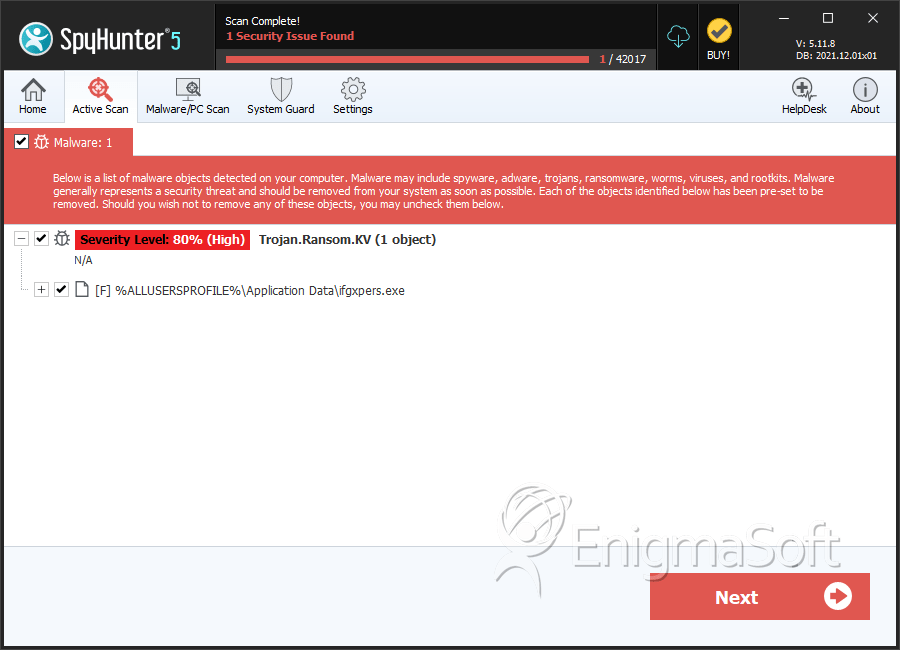
File System Details
| # | File Name | MD5 |
Detections
Detections: The number of confirmed and suspected cases of a particular threat detected on
infected computers as reported by SpyHunter.
|
|---|---|---|---|
| 1. | ifgxpers.exe | fba8bbf5b9a6079ace6621b879aec31a | 4 |


