PUP.PC Cure Pro
Threat Scorecard
EnigmaSoft Threat Scorecard
EnigmaSoft Threat Scorecards are assessment reports for different malware threats which have been collected and analyzed by our research team. EnigmaSoft Threat Scorecards evaluate and rank threats using several metrics including real-world and potential risk factors, trends, frequency, prevalence, and persistence. EnigmaSoft Threat Scorecards are updated regularly based on our research data and metrics and are useful for a wide range of computer users, from end users seeking solutions to remove malware from their systems to security experts analyzing threats.
EnigmaSoft Threat Scorecards display a variety of useful information, including:
Popularity Rank: The ranking of a particular threat in EnigmaSoft’s Threat Database.
Severity Level: The determined severity level of an object, represented numerically, based on our risk modeling process and research, as explained in our Threat Assessment Criteria.
Infected Computers: The number of confirmed and suspected cases of a particular threat detected on infected computers as reported by SpyHunter.
See also Threat Assessment Criteria.
| Popularity Rank: | 4,272 |
| Threat Level: | 10 % (Normal) |
| Infected Computers: | 2,116 |
| First Seen: | March 27, 2019 |
| Last Seen: | October 4, 2026 |
| OS(es) Affected: | Windows |
The detection of PUP.PC Cure Pro on your system indicates the presence of a potentially unwanted program (PUP) that may be causing issues with your computer's performance and security. It is essential to understand the nature of this threat and take appropriate steps to remove it and prevent future infections.
Table of Contents
What Is PUP.PC Cure Pro?
PUP.PC Cure Pro is a type of malware that is classified as a potentially unwanted program. This means that while it may not be as malicious as other types of malware, such as viruses or Trojans, it can still cause problems with your system and compromise your privacy. PUPs are often installed unintentionally, and they can be difficult to remove without the right tools and knowledge.
How PUP.PC Cure Pro Operates
PUP.PC Cure Pro, like other PUPs, operates by installing itself on your system and then executing its payload. This can include a range of activities, such as displaying unwanted advertisements, collecting your personal data, and modifying your system settings. PUPs can also install additional malware or unwanted software, which can further compromise your system's security and performance.
In many cases, PUPs are installed through deceptive means, such as bundled software installations or fake updates. They can also be spread through infected websites, email attachments, or infected software downloads. Once installed, PUPs can be challenging to detect and remove, as they often disguise themselves as legitimate programs or system files.
Symptoms of Infection
If your system is infected with PUP.PC Cure Pro, you may notice a range of symptoms, including slowed system performance, unwanted advertisements or pop-ups, and modified system settings. You may also notice that your browser homepage or search engine has been changed, or that you are being redirected to unwanted websites. In some cases, PUPs can also cause system crashes, freezes, or errors.
- Unwanted advertisements or pop-ups
- Modified system settings or browser configurations
- Slowed system performance or crashes
- Unexplained changes to your system or browser
How to Remove PUP.PC Cure Pro
- Boot your system in Safe Mode with Networking to prevent the PUP from loading and to allow for easier removal.
- Perform a full scan of your system using a reputable anti-malware tool, such as SpyHunter, to detect and remove the PUP and any associated malware.
- Uninstall any suspicious programs or software that may be related to the PUP.
- Reset your browser settings, including Chrome, Firefox, and Edge, to their default configurations to remove any unwanted changes or extensions.
- Reboot your system and perform a follow-up scan to ensure that the PUP and any associated malware have been completely removed.
Conclusion
Removing PUP.PC Cure Pro from your system requires careful attention to detail and the right tools. By following the steps outlined above, you can help to ensure that your system is clean and free from this potentially unwanted program. It is also essential to take steps to prevent future infections, such as being cautious when installing software, avoiding suspicious websites, and keeping your operating system and software up to date. By staying vigilant and taking proactive measures, you can help to protect your system and your personal data from the threats posed by PUPs like PUP.PC Cure Pro.
SpyHunter Detects & Remove PUP.PC Cure Pro
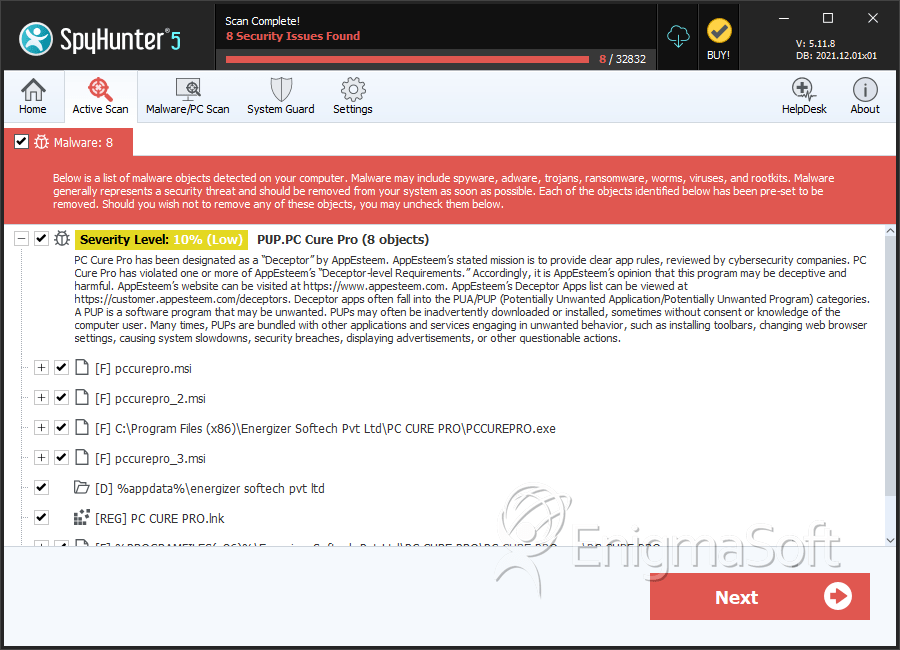
File System Details
| # | File Name | MD5 |
Detections
Detections: The number of confirmed and suspected cases of a particular threat detected on
infected computers as reported by SpyHunter.
|
|---|---|---|---|
| 1. | 6f9ac0025c514487accc28c1aa0e5ae2 | 6f9ac0025c514487accc28c1aa0e5ae2 | 447 |
| 2. | PCCUREPRO.exe | e50c3e86101a18de4bad57139473125e | 414 |
| 3. | pccurepro.msi | fccbddbbb2d737641214a3c94c541377 | 17 |
| 4. | pccurepro_2.msi | e1f00810e04e379e0d8fee524e9c8236 | 8 |
| 5. | PCCUREPRO_2.exe | c2a41f9cd804051019fc733bb0d32e25 | 4 |
| 6. | pccurepro_3.msi | 5a678410c132a5ed294c9f00cf7f29b4 | 4 |
| 7. | PC CURE PRO.exe | e60bfbc7e303db29066fdb4f8ad7e80d | 3 |
Registry Details
Directories
PUP.PC Cure Pro may create the following directory or directories:
| %appdata%\energizer softech pvt ltd |