PUP.Connectify
Threat Scorecard
EnigmaSoft Threat Scorecard
EnigmaSoft Threat Scorecards are assessment reports for different malware threats which have been collected and analyzed by our research team. EnigmaSoft Threat Scorecards evaluate and rank threats using several metrics including real-world and potential risk factors, trends, frequency, prevalence, and persistence. EnigmaSoft Threat Scorecards are updated regularly based on our research data and metrics and are useful for a wide range of computer users, from end users seeking solutions to remove malware from their systems to security experts analyzing threats.
EnigmaSoft Threat Scorecards display a variety of useful information, including:
Popularity Rank: The ranking of a particular threat in EnigmaSoft’s Threat Database.
Severity Level: The determined severity level of an object, represented numerically, based on our risk modeling process and research, as explained in our Threat Assessment Criteria.
Infected Computers: The number of confirmed and suspected cases of a particular threat detected on infected computers as reported by SpyHunter.
See also Threat Assessment Criteria.
| Popularity Rank: | 11,143 |
| Threat Level: | 10 % (Normal) |
| Infected Computers: | 34 |
| First Seen: | July 8, 2026 |
| Last Seen: | September 27, 2026 |
| OS(es) Affected: | Windows |
Security researchers and anti-malware engines sometimes flag certain applications as PUP.Connectify. The "PUP" prefix stands for Potentially Unwanted Program. This classification is used when a program is not inherently destructive malware, such as a virus or ransomware, but exhibits behaviors that users often find intrusive, undesirable, or detrimental to their computing experience. Because this detection falls under the PUP category, the software may have been installed alongside another application or without clear user consent. This report provides an overview of how this detection behaves and outlines general steps for its removal.
Table of Contents
What Is PUP.Connectify?
PUP.Connectify is a detection name used to identify software that security vendors consider potentially unwanted. Programs flagged under the PUP designation are typically legitimate applications that have been distributed using aggressive advertising, bundling, or deceptive marketing practices. While the software associated with this detection is not designed to destroy data or steal sensitive information like traditional malware, it is often installed without the user's explicit awareness. Users may find that the program introduces unwanted changes to their system, such as altering browser configurations or displaying excessive commercial content, which is why anti-malware tools flag it for removal.
How PUP.Connectify Operates
Software detected as PUP.Connectify typically operates by integrating deeply into the operating system to ensure its persistence. These programs frequently rely on software bundling, meaning they are distributed as an optional addition within the installers of other free applications. Users who rush through the installation process using default or "Express" settings may inadvertently allow the PUP onto their systems. Once installed, the program may modify system settings, alter browser preferences, or set up scheduled tasks to ensure it runs automatically when the computer starts. The primary goal of such software is usually to generate revenue for its developers through advertising, data collection, or by redirecting user web traffic to affiliated sites.
Symptoms of Infection
Users whose systems are affected by PUP.Connectify may notice a variety of symptoms. Common signs include:
- Unexpected changes to the web browser's homepage, new tab page, or default search engine.
- An increase in the frequency of pop-up advertisements, banners, or in-text links while browsing the internet.
- Sluggish system performance or slow internet speeds, as the unwanted program may consume background resources.
- The presence of unfamiliar browser extensions, toolbars, or desktop shortcuts that were not intentionally installed.
- Web searches or typed URLs being redirected to unfamiliar promotional websites.
How to Remove PUP.Connectify
To completely remove PUP.Connectify from your system, follow these general steps:
- Restart your computer and boot into Safe Mode with Networking. This environment limits the startup of non-essential processes, which can prevent the unwanted program from interfering with the removal process.
- Run a full system scan using a reputable anti-malware tool such as SpyHunter. Allow the software to detect and quarantine any files or registry entries associated with the PUP.
- Access your operating system's control panel or settings menu and manually uninstall any suspicious or unfamiliar programs that may be related to the detection.
- Reset your web browsers (Google Chrome, Mozilla Firefox, and Microsoft Edge) to their default settings. This will remove unwanted extensions, clear temporary data, and revert any unauthorized changes to your homepage and search engine.
- Reboot your computer normally to ensure all changes take effect, then run a second full scan with your anti-malware tool to confirm that PUP.Connectify has been completely eradicated.
Conclusion
While PUP.Connectify is not classified as severe malware, its presence on a computer can lead to a frustrating and compromised user experience. By understanding how potentially unwanted programs are distributed and the symptoms they cause, users can better protect their systems. Practicing safe browsing habits, paying close attention during software installations, and utilizing a robust anti-malware solution are essential steps in preventing and removing unwanted applications. Maintaining proactive security measures will help ensure a stable, efficient, and private computing environment.
SpyHunter Detects & Remove PUP.Connectify
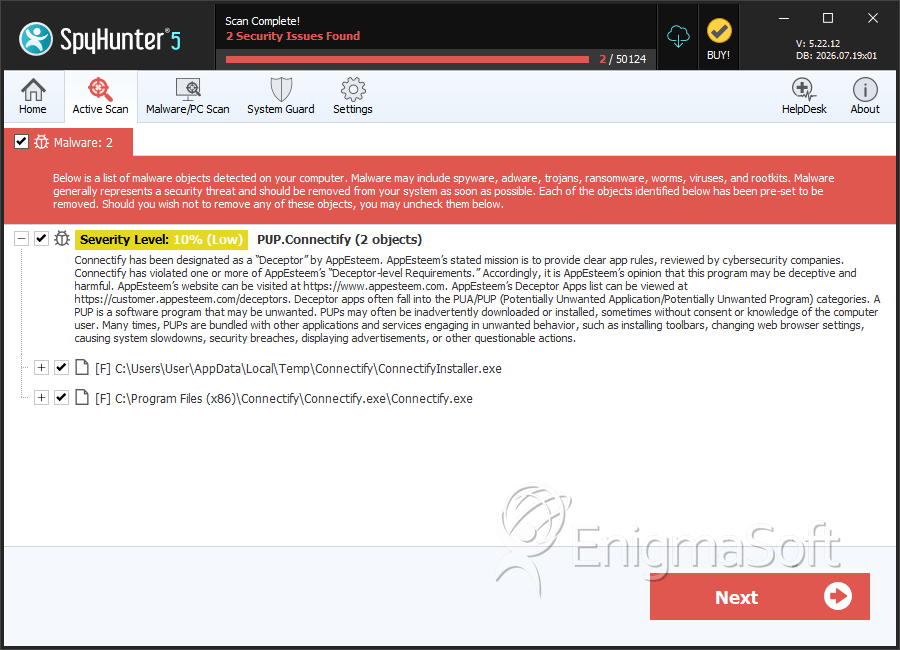
File System Details
| # | File Name | MD5 |
Detections
Detections: The number of confirmed and suspected cases of a particular threat detected on
infected computers as reported by SpyHunter.
|
|---|---|---|---|
| 1. | ConnectifyInstaller.exe | 2cc8b657733e183e68a52431a4a18067 | 14 |
| 2. | Connectify.exe | 5cf276b11e75b03747b261fb65e8763c | 12 |


