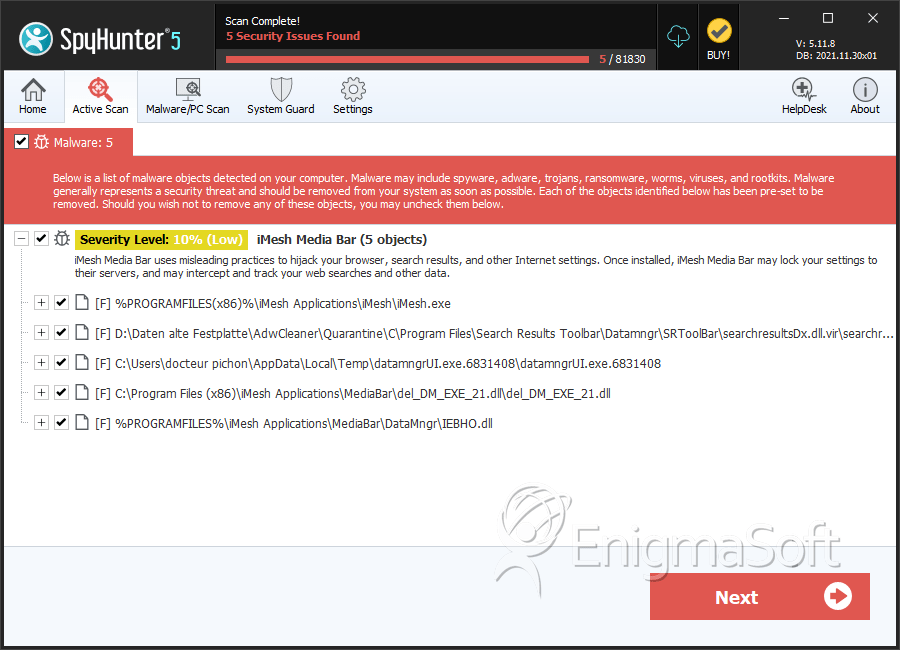
iMesh Media Bar
The detection of iMesh Media Bar on your system indicates a potential security threat that requires immediate attention. This report aims to provide you with essential information about the nature of this threat, its operational characteristics, symptoms of infection, and most importantly, steps to remove it from your computer.
Table of Contents
What Is iMesh Media Bar?
iMesh Media Bar is identified as a Trojan-type threat, which is a broad category of malware designed to deceive users into installing it on their systems. Trojans often masquerade as useful software but, in reality, they can cause significant harm by stealing sensitive information, installing additional malware, or providing unauthorized access to the infected computer. The name "iMesh Media Bar" suggests it might be related to multimedia or internet browsing, but without specific details, it's crucial to approach its removal with a comprehensive strategy.
How iMesh Media Bar Operates
Trojan-type threats like iMesh Media Bar typically operate by exploiting user trust or vulnerabilities in software. They can be distributed through various means, including email attachments, downloads from untrusted websites, or infected software packages. Once installed, the malware can execute a range of malicious activities, from data theft and espionage to using the infected computer as part of a botnet for distributed denial-of-service (DDoS) attacks or spamming. The exact operational mode of iMesh Media Bar would depend on its specific design and the intentions of its creators.
Symptoms of Infection
Symptoms of an iMesh Media Bar infection can vary widely but may include unusual system behavior such as slow performance, frequent crashes, or the appearance of unwanted programs or toolbars in your web browser. You might also notice increased network activity, even when you're not using the internet, or find that your browser settings have been altered without your consent. In some cases, the infection might not display obvious symptoms, making it difficult to detect without the use of antivirus software.
How to Remove iMesh Media Bar
- Boot your computer in Safe Mode with Networking to prevent the malware from loading and to give you a cleaner environment to work in.
- Download and run a full scan with a reputable anti-malware tool, such as SpyHunter, to detect and remove all components of the iMesh Media Bar malware.
- Uninstall any recently installed programs that you don't recognize or that were installed around the time the malware was detected.
- Reset your web browsers (Chrome, Firefox, Edge, etc.) to their default settings to remove any malicious extensions or settings changes made by the malware.
- Reboot your computer and run another full scan with your anti-malware tool to ensure that all remnants of the malware have been removed.
Conclusion
Removing iMesh Media Bar from your computer requires careful and thorough steps to ensure that all components of the malware are eliminated. It's also essential to adopt preventive measures to avoid future infections, such as being cautious with email attachments and downloads, keeping your operating system and software up to date, and regularly scanning your computer with anti-malware tools. By taking these steps, you can protect your personal data and maintain the security and integrity of your computer system.
SpyHunter Detects & Remove iMesh Media Bar