1stBrowser
Threat Scorecard
EnigmaSoft Threat Scorecard
EnigmaSoft Threat Scorecards are assessment reports for different malware threats which have been collected and analyzed by our research team. EnigmaSoft Threat Scorecards evaluate and rank threats using several metrics including real-world and potential risk factors, trends, frequency, prevalence, and persistence. EnigmaSoft Threat Scorecards are updated regularly based on our research data and metrics and are useful for a wide range of computer users, from end users seeking solutions to remove malware from their systems to security experts analyzing threats.
EnigmaSoft Threat Scorecards display a variety of useful information, including:
Popularity Rank: The ranking of a particular threat in EnigmaSoft’s Threat Database.
Severity Level: The determined severity level of an object, represented numerically, based on our risk modeling process and research, as explained in our Threat Assessment Criteria.
Infected Computers: The number of confirmed and suspected cases of a particular threat detected on infected computers as reported by SpyHunter.
See also Threat Assessment Criteria.
| Popularity Rank: | 15,326 |
| Threat Level: | 10 % (Normal) |
| Infected Computers: | 3,508 |
| First Seen: | May 26, 2015 |
| Last Seen: | February 9, 2026 |
| OS(es) Affected: | Windows |
The 1stBrowser app by SIEN S.A. may be offered to you as the best web browser for shopping and may be installed on your PC from a freeware bundle automatically. You may be interested to know that the slogan of the 1stBrowser app is that it knows what you need and when you need it. The 1stBrowser may not be far off the mark because it uses tracking technologies to help advertiser deliver targeted marketing content. Additionally, the 1stBrowser send your Internet logs and download history to advertisers that are interested in developing better marketing strategies. You might want to know that when the 1stBrowser app arrives on your PC, it modifies your Windows settings to be your default browser, and it can change your default search engine without your explicit consent. Also, the 1stBrowser app may not load the native ads on pages you like and place ads from its partners that may not be safe and redirect you to harmful domains. Security experts perceive the 1stBrowser app as a Potentially Unwanted Program (PUP) with adware capabilities that may not provide you with a secure environment to browse the Internet. Web surfers might want to switch the 1stBrowser with a safer alternative and can clean residual components of 1stBrowser by using a credible anti-spyware instrument.
Table of Contents
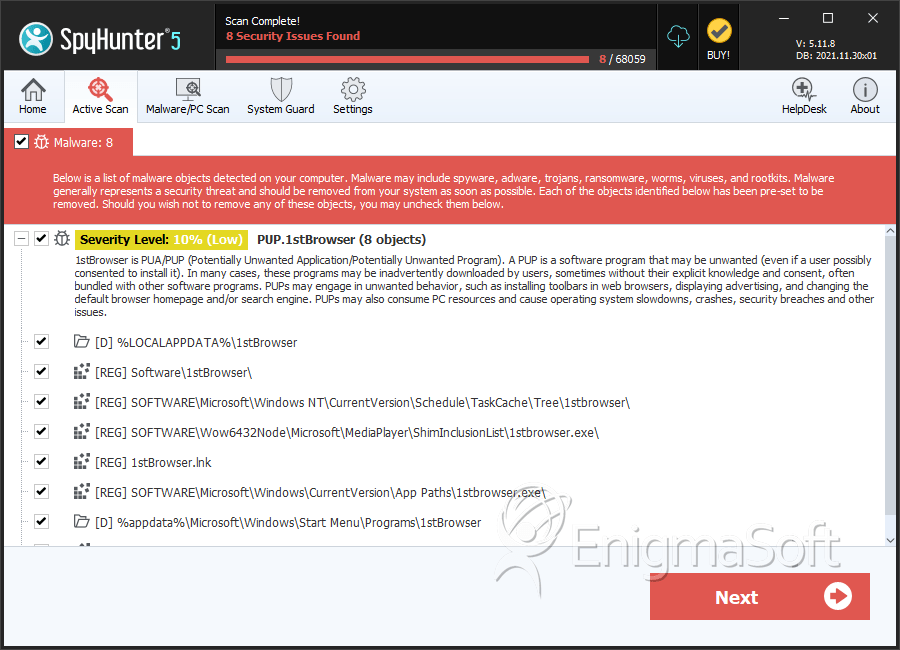
SpyHunter Detects & Remove 1stBrowser
Registry Details
Directories
1stBrowser may create the following directory or directories:
| %LOCALAPPDATA%\1stBrowser |
| %UserProfile%\Local Settings\Application Data\1stBrowserUninstall |
| %appdata%\Microsoft\Windows\Start Menu\Programs\1stBrowser |
Analysis Report
General information
| Family Name: | PUP.1stBrowser |
|---|---|
| Signature status: | Self Signed |
Known Samples
Known Samples
This section lists other file samples believed to be associated with this family.|
MD5:
2c0b8b02395f804457fe6b3672cc51fb
SHA1:
5fd75db07dcfe6910254be3572d549bca540c47b
SHA256:
DCC56633E394F346CBAE23011427AA203EE2CBCB08629E7A06D61076AD4F3624
File Size:
2.07 MB, 2074760 bytes
|
|
MD5:
2ccef87a7bb26f6cb35ee787f3a21e0c
SHA1:
bc195bcc612d0a04b3ebf7092c49d54e9b2e776b
SHA256:
86D9BAAE57B8DD98EE021C34E9810510E2D42AE9B52653BE789E430708ECA2BD
File Size:
3.83 MB, 3832456 bytes
|
|
MD5:
6ebcf53c0e53309ab21f69bd73520d26
SHA1:
9c4626f3ccefae82963ec0f7886efde335dbedae
SHA256:
70DD2E11FB8AA2B2DB7992FA993C44F887BDA38DEF79DA8C0345EB97C835881A
File Size:
2.21 MB, 2211944 bytes
|
Windows Portable Executable Attributes
- File doesn't have "Rich" header
- File doesn't have debug information
- File doesn't have exports table
- File has TLS information
- File is 32-bit executable
- File is either console or GUI application
- File is GUI application (IMAGE_SUBSYSTEM_WINDOWS_GUI)
- File is Native application (NOT .NET application)
- File is not packed
- IMAGE_FILE_DLL is not set inside PE header (Executable)
Show More
- IMAGE_FILE_EXECUTABLE_IMAGE is set inside PE header (Executable Image)
File Icons
File Icons
This section displays icon resources found within family samples. Malware often replicates icons commonly associated with legitimate software to mislead users into believing the malware is safe.


Windows PE Version Information
Windows PE Version Information
This section displays values and attributes that have been set in the Windows file version information data structure for samples within this family. To mislead users, malware actors often add fake version information mimicking legitimate software.| Name | Value |
|---|---|
| Company Name |
|
| File Description |
|
| File Version |
|
| Internal Name |
|
| Legal Copyright |
|
| Original Filename |
|
| Product Name |
|
| Product Version |
|
Digital Signatures
Digital Signatures
This section lists digital signatures that are attached to samples within this family. When analyzing and verifying digital signatures, it is important to confirm that the signature’s root authority is a well-known and trustworthy entity and that the status of the signature is good. Malware is often signed with non-trustworthy “Self Signed” digital signatures (which can be easily created by a malware author with no verification). Malware may also be signed by legitimate signatures that have an invalid status, and by signatures from questionable root authorities with fake or misleading “Signer” names.| Signer | Root | Status |
|---|---|---|
| SIEN SA | GlobalSign CodeSigning CA - SHA256 - G2 | Self Signed |
Block Information
Block Information
During analysis, EnigmaSoft breaks file samples into logical blocks for classification and comparison with other samples. Blocks can be used to generate malware detection rules and to group file samples into families based on shared source code, functionality and other distinguishing attributes and characteristics. This section lists a summary of this block data, as well as its classification by EnigmaSoft. A visual representation of the block data is also displayed, where available.| Total Blocks: | 9,388 |
|---|---|
| Potentially Malicious Blocks: | 93 |
| Whitelisted Blocks: | 9,127 |
| Unknown Blocks: | 168 |
Visual Map
? - Unknown Block
x - Potentially Malicious Block
Similar Families
Similar Families
This section lists other families that share similarities with this family, based on EnigmaSoft’s analysis. Many malware families are created from the same malware toolkits and use the same packing and encryption techniques but uniquely extend functionality. Similar families may also share source code, attributes, icons, subcomponents, compromised and/or invalid digital signatures, and network characteristics. Researchers leverage these similarities to rapidly and effectively triage file samples and extend malware detection rules.- Downloader.Agent.LU
- Expiro.P
- Farfli.AV
- Kryptik.GTG
- Lumma.DA
Show More
- Lumma.FG
- OpenSupdater.JB
- SecurityXploded.A
- ShellcodeRunner.FN
- Shopper.A
- Ursnif.C
Files Modified
Files Modified
This section lists files that were created, modified, moved and/or deleted by samples in this family. File system activity can provide valuable insight into how malware functions on the operating system.| File | Attributes |
|---|---|
| c:\users\user\appdata\local\temp\crashdump.dmp | Generic Write,Read Attributes |
Windows API Usage
Windows API Usage
This section lists Windows API calls that are used by the samples in this family. Windows API usage analysis is a valuable tool that can help identify malicious activity, such as keylogging, security privilege escalation, data encryption, data exfiltration, interference with antivirus software, and network request manipulation.| Category | API |
|---|---|
| Anti Debug |
|
| User Data Access |
|
| Network Winhttp |
|


