PUP.DriverAgent-Plus
Threat Scorecard
EnigmaSoft Threat Scorecard
EnigmaSoft Threat Scorecards are assessment reports for different malware threats which have been collected and analyzed by our research team. EnigmaSoft Threat Scorecards evaluate and rank threats using several metrics including real-world and potential risk factors, trends, frequency, prevalence, and persistence. EnigmaSoft Threat Scorecards are updated regularly based on our research data and metrics and are useful for a wide range of computer users, from end users seeking solutions to remove malware from their systems to security experts analyzing threats.
EnigmaSoft Threat Scorecards display a variety of useful information, including:
Popularity Rank: The ranking of a particular threat in EnigmaSoft’s Threat Database.
Severity Level: The determined severity level of an object, represented numerically, based on our risk modeling process and research, as explained in our Threat Assessment Criteria.
Infected Computers: The number of confirmed and suspected cases of a particular threat detected on infected computers as reported by SpyHunter.
See also Threat Assessment Criteria.
| Popularity Rank: | 21,471 |
| Threat Level: | 10 % (Normal) |
| Infected Computers: | 7,471 |
| First Seen: | March 27, 2019 |
| Last Seen: | September 9, 2026 |
| OS(es) Affected: | Windows |
Your system has been detected to have PUP.DriverAgent-Plus, which falls under the category of potentially unwanted programs (PUPs). This detection indicates that your computer may be compromised by a program that, while not necessarily malicious, can still pose risks to your system's security and performance. Potentially unwanted programs often find their way onto computers through bundled software downloads, where they are included alongside the primary program you intended to install. Understanding what PUP.DriverAgent-Plus is, how it operates, its symptoms, and how to remove it is crucial for maintaining your computer's health and protecting your personal data.
Table of Contents
What Is PUP.DriverAgent-Plus?
PUP.DriverAgent-Plus, as a potentially unwanted program, is software that you may not have intentionally installed. It could be a driver updater, system optimizer, or another type of utility that claims to improve your computer's performance but often ends up causing more issues than it solves. These programs can lead to unwanted advertisements, slow down your system, and even collect your personal data without your consent. The term "PUP" reflects the program's potential to cause problems, even if it doesn't contain malicious code like viruses or Trojans.
How PUP.DriverAgent-Plus Operates
PUP.DriverAgent-Plus operates by integrating itself into your system, often through legitimate-looking installation processes. Once installed, it may start running in the background, consuming system resources and potentially displaying unwanted advertisements or notifications. It might also claim to scan your computer for issues and then prompt you to pay for a full version or a subscription to fix these problems. In many cases, the issues it identifies are not real, or the program is not capable of fixing them, making it a scam.
Symptoms of Infection
Symptoms of a PUP infection can vary but commonly include an increase in pop-up advertisements, a slower computer performance, and unexpected changes to your browser settings or homepage. You might also notice toolbars or extensions in your browser that you didn't install, or find programs running in the background that you're not familiar with. If you've noticed any of these symptoms, it's essential to take action to remove the PUP and protect your system.
How to Remove PUP.DriverAgent-Plus
- Enter Safe Mode with Networking: This will help prevent the PUP from running and interfering with the removal process. To do this, restart your computer and press the key to enter the boot menu (this key varies by manufacturer but is often F12, F2, or Del). From there, you can select Safe Mode with Networking.
- Perform a Full Scan with a Reputable Tool: Use an anti-malware tool like SpyHunter to scan your computer for any malicious or unwanted programs. These tools are designed to detect and remove PUPs and other threats that traditional antivirus software might miss.
- Uninstall Suspicious Programs: Go through your list of installed programs and uninstall anything that you don't recognize or that was installed around the time your issues started. Be cautious and only uninstall programs you're sure are safe to remove.
- Reset Your Browser: If you've noticed changes to your browser settings, reset Chrome, Firefox, Edge, or any other browser you use to their default settings. This will remove any unwanted extensions or changes made by the PUP.
<li!!!!!!!!!!!!!!!!!!!!!!!!!!!!!!!!!!!!!!!!!!!!!!!!!!!!!!!!!!!!!!!!!!!!!!!!!!!!!!!!!!!!!!!!!!!!!!!!!!!!!!!!!!!!!!!!!!!!!!!!!!!!!!!!!!!!!!!!!!!!!!!!!!!!!!!!!!!!!!!!!!!!!!!!!!!!!!!!!!!!!!!!!!!!!!!!!!!!!!!!!!!!!!!!!!!!!!!!!!!!!!!!!!!!!!!!!!!!!!!!!!!!!!!!!!!!!!!!!!!!!!!!!!!!!!!!!!!!!!!!!!!!!!!!!!!!!!!!!!!!!!!!!!!!!!!!!!!!!!!!!!!!!!!!!!!!!!!!!!!!!!!!!!!!!!!!!!!!!!!!!!!!!!!!!!!!!!!!!!!!!!!!!!!!!!!!!!!!!!!!!!!!!!!!!!!!!!!!!!!!!!!!!!!!!!!!!!!!!!!!!!!!!!!!!!!!!!!!!!!!!!!!
SpyHunter Detects & Remove PUP.DriverAgent-Plus
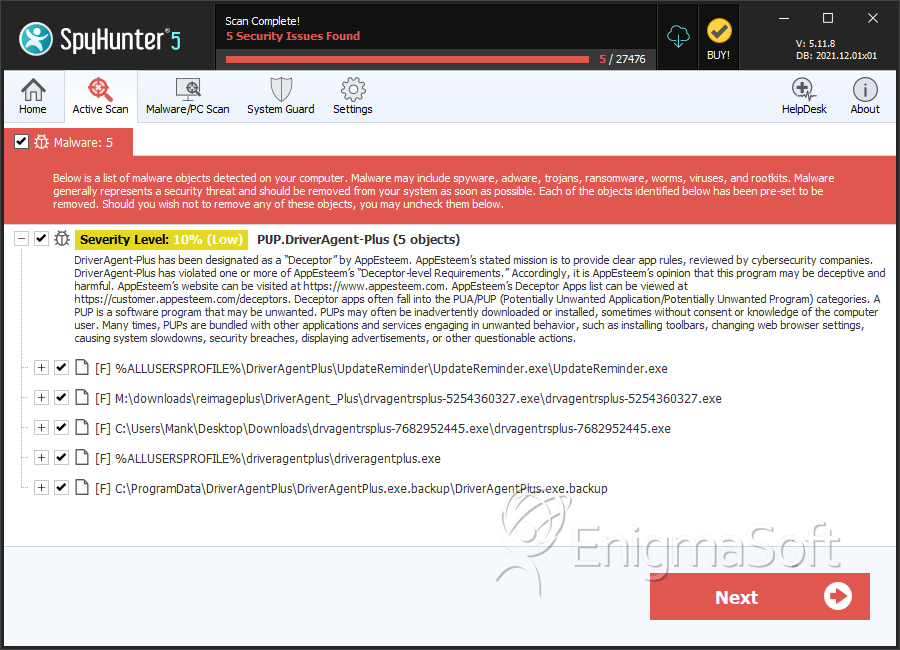
File System Details
| # | File Name | MD5 |
Detections
Detections: The number of confirmed and suspected cases of a particular threat detected on
infected computers as reported by SpyHunter.
|
|---|---|---|---|
| 1. | UpdateReminder.exe | 0cfc62c1fc267f739694dbaea0098082 | 489 |
| 2. | drvagentrsplus-5254360327.exe | 890082b66be63d2dcfe3a2f7a7ec32f2 | 217 |
| 3. | drvagentrsplus-7682952445.exe | 80baa04fee4d7510411dee9bad6a99e2 | 148 |
| 4. | DriverAgentPlus.exe.backup | fd4ae384377f5e43c99de8dca3798824 | 9 |
| 5. | driveragentplus.exe | e2976dd02c685d4931576a5a407ba92d | 5 |