XP Antivirus 2013
Threat Scorecard
EnigmaSoft Threat Scorecard
EnigmaSoft Threat Scorecards are assessment reports for different malware threats which have been collected and analyzed by our research team. EnigmaSoft Threat Scorecards evaluate and rank threats using several metrics including real-world and potential risk factors, trends, frequency, prevalence, and persistence. EnigmaSoft Threat Scorecards are updated regularly based on our research data and metrics and are useful for a wide range of computer users, from end users seeking solutions to remove malware from their systems to security experts analyzing threats.
EnigmaSoft Threat Scorecards display a variety of useful information, including:
Ranking: The ranking of a particular threat in EnigmaSoft’s Threat Database.
Severity Level: The determined severity level of an object, represented numerically, based on our risk modeling process and research, as explained in our Threat Assessment Criteria.
Infected Computers: The number of confirmed and suspected cases of a particular threat detected on infected computers as reported by SpyHunter.
See also Threat Assessment Criteria.
| Threat Level: | 50 % (Medium) |
| Infected Computers: | 27 |
| First Seen: | October 1, 2012 |
| Last Seen: | October 7, 2022 |
| OS(es) Affected: | Windows |
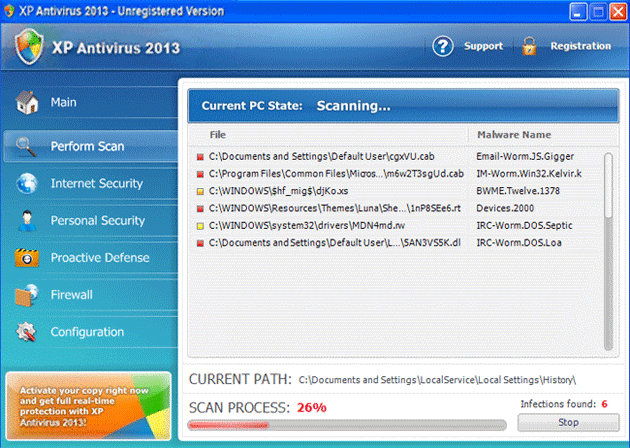
XP Antivirus 2013 Image
XP Antivirus 2013 is a rogue security program with a large number of clones. In previous years, ESG security researchers received reports of attacks involving versions of this threat with names such as XP Antivirus 2010, XP Antivirus 2011 and XP Antivirus 2012. As 2013, criminals have started to release versions of their rogue security software with the string '2013' appended to the programs' names. It is important to note that XP Antivirus 2013 is no different from previous versions of this malware threat, and that, apart from slight changes to the interface and the difference in the program's name, is essentially the same as numerous other fake security programs. If XP Antivirus 2013 is installed on your computer, ESG security researchers strongly recommend using a powerful, fully updated anti-malware program to remove this threat.
XP Antivirus 2013, one more member of the FakeXPA family has, among its clones Antivirus 360, AntivirusBEST, Nortel Antivirus, Alpha Antivirus, Anti-virus Professional, Antivirus 2010, Cyber Security, MaCatte Antivirus 2009, Eco Antivirus, Antivir, Personal Security, Ghost Antivirus, Antivirus 7, Antivirus GT, Earth Antivirus, Antivirus 8, AVG Antivirus 2011, E-Set Antivirus 2011.
Table of Contents
XP Antivirus 2013 Has a Unique Characteristic that Sets It Apart from Other Malware
One aspect of XP Antivirus 2013 that is unique in comparison to other fake security software families is that XP Antivirus 2013 can change its name and appearance depending on the victim's operating system. Once installed, XP Antivirus 2013 detects the operating system installed on the infected computer. Then, XP Antivirus 2013 will download the text and graphics corresponding to a version of XP Antivirus 2013 appropriate for the targeted computer. While XP Antivirus 2013 is designed to attack computers running the Windows XP operating system, computers infected with this very same threat will be attacked by fake security programs with names such as Vista Antivirus 2013 or Win 7 Antivirus 2013. It is important to note that this is purely a cosmetic change and that the infection will essentially be the same.
Once XP Antivirus 2013 is installed on the victim's computer, XP Antivirus 2013 makes harmful changes to the Windows Registry and to your computer's settings. These invasive changes allow XP Antivirus 2013 to display error messages that appear to come from your operating system, as well as run automatically when the infected computer starts up and block certain applications or access to certain files. All of this is done in an attempt to convince inexperienced computer users that their computer has become infected with numerous Trojans and viruses. XP Antivirus 2013 is disguised as an anti-virus program, and when the victim attempts to fix these nonexistent infections using XP Antivirus 2013, this fake security program will prompt the victim to pay for a 'full version' of this rogue security application.
File System Details
| # | File Name |
Detections
Detections: The number of confirmed and suspected cases of a particular threat detected on
infected computers as reported by SpyHunter.
|
|---|---|---|
| 1. | %CommonAppData%\[RANDOM CHARACTERS].exe | |
| 2. | %LocalAppData%\[RANDOM CHARACTERS].exe | |
| 3. | %Temp%\[RANDOM CHARACTERS].exe | |
| 4. | %AppData%\Roaming\Microsoft\Windows\Templates\[RANDOM CHARACTERS].exe |



