Smart Protection 2012
Threat Scorecard
EnigmaSoft Threat Scorecard
EnigmaSoft Threat Scorecards are assessment reports for different malware threats which have been collected and analyzed by our research team. EnigmaSoft Threat Scorecards evaluate and rank threats using several metrics including real-world and potential risk factors, trends, frequency, prevalence, and persistence. EnigmaSoft Threat Scorecards are updated regularly based on our research data and metrics and are useful for a wide range of computer users, from end users seeking solutions to remove malware from their systems to security experts analyzing threats.
EnigmaSoft Threat Scorecards display a variety of useful information, including:
Ranking: The ranking of a particular threat in EnigmaSoft’s Threat Database.
Severity Level: The determined severity level of an object, represented numerically, based on our risk modeling process and research, as explained in our Threat Assessment Criteria.
Infected Computers: The number of confirmed and suspected cases of a particular threat detected on infected computers as reported by SpyHunter.
See also Threat Assessment Criteria.
| Threat Level: | 100 % (High) |
| Infected Computers: | 38 |
| First Seen: | January 19, 2012 |
| Last Seen: | March 12, 2023 |
| OS(es) Affected: | Windows |
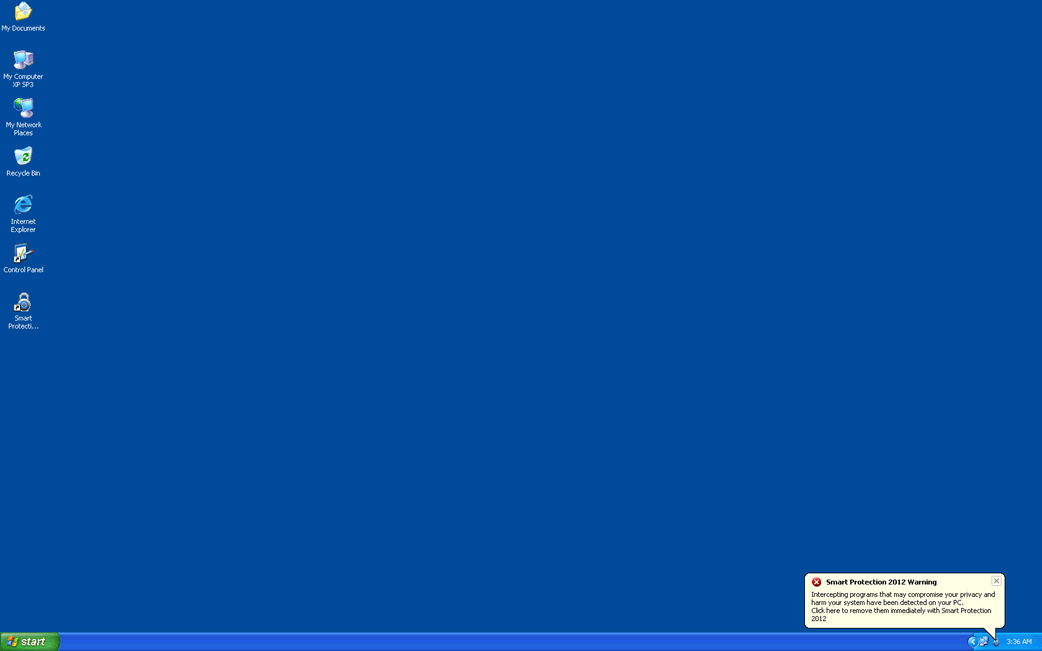
Smart Protection 2012 Image
Smart Protection 2012 is a fake antivirus application that is installed by a Trojan infection. According to ESG security researchers, Smart Protection 2012 has absolutely no anti-virus capabilities. Although this fake antivirus program installs various files and has all external characteristics of a normal anti-virus application, Smart Protection 2012's interface is just for show. This application belongs to the WinWeb Security family and uses an outstanding online scam created to take advantage of inexperienced computer users and to scam them into buying useless software.
Smart Protection 2012 is a clone of other anti-virus programs such as System Security, Antivirus Security, Total Security 2009, Security Tool, Trojan.RogueAV.a.gen, System Adware Scanner 2010, FakeAlert-KW.e, Advanced Security Tool 2010, System Tool 2011, Security Shield, MS Removal Tool, Total Security, System Security 2011, Essential Cleaner, Security Shield Pro 2011, Personal Shield Pro, Security Shield 2011, Security Sphere 2012, Advanced PC Shield 2012, Futurro Antivirus.
The worst part of Smart Protection 2012 is the fact that Smart Protection 2012 will deliberately cause problems on the victim's computer system in order to cause the victim to panic. If you have installed Smart Protection 2012 on your computer system, it is essential that you use a real anti-virus program to remove Smart Protection 2012 from your hard drive. Failure to remove Smart Protection 2012 makes your computer more vulnerable to additional malware infections as well as placing you at risk for identity theft. A good reason to remove Smart Protection 2012 is also the fact that your computer's normal operation is severely affected as long as this fake security program remains on your hard drive.
Table of Contents
How Smart Protection 2012 Attempts to Steal Your Money
The Smart Protection 2012 scam is quite simple. This fake antivirus program will tries to persuade its victim that their computer is under a severe malware attack. Then, Smart Protection 2012 will offer to remove the imaginary problem as long as the victim is willing to register Smart Protection 2012 by purchasing a registration code. Of course, since Smart Protection 2012 has no anti-virus capabilities, paying for this fake security program is not a good idea. Some ways in which Smart Protection 2012 attempts to convince its victims of the presence of a severe malware infection are listed below:
- Smart Protection 2012 displays constant fake error messages and security alerts, some of these appearing to come from the victim's computer system rather than from Smart Protection 2012 itself.
- The presence of Smart Protection 2012 on a computer system will usually cause it to become slow and unstable, adding to the illusion of a severe malware attack.
- Smart Protection 2012 has also been known to cause browser redirects to malicious websites promoting rogue security programs. Smart Protection 2012 may also block user's ability to connect to other websites.
Aliases
2 security vendors flagged this file as malicious.
| Anti-Virus Software | Detection |
|---|---|
| Panda | Suspicious file |
| AntiVir | TR/Dropper.Gen2 |
SpyHunter Detects & Remove Smart Protection 2012
Smart Protection 2012 Video
Tip: Turn your sound ON and watch the video in Full Screen mode.
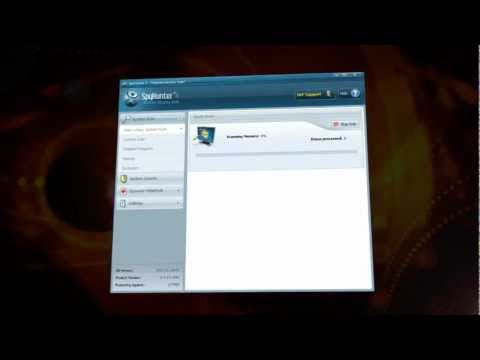
File System Details
| # | File Name | MD5 |
Detections
Detections: The number of confirmed and suspected cases of a particular threat detected on
infected computers as reported by SpyHunter.
|
|---|---|---|---|
| 1. | B7E8586B0003F65D001EE87DB4EB2367.exe | 5768fbcf56ee42e51697c9a65bc09259 | 1 |
| 2. | %CommonAppData%\\.exe | ||
| 3. | %AppData%\Microsoft\Windows\Start Menu\Smart Protection 2012.lnk | ||
| 4. | %CommonAppData%\[RANDOM CHARACTERS]\[RANDOM CHARACTERS] | ||
| 5. | %AllUsersProfile%\[RANDOM CHARACTERS]\ | ||
| 6. | %CommonAppData%\[RANDOM CHARACTERS]\ | ||
| 7. | %UserProfile%\Desktop\Smart Protection 2012.lnk | ||
| 8. | %AppData%\Microsoft\Windows\Start Menu\Programs\Smart Protection 2012.lnk | ||
| 9. | 529C5390000413CA0A1CB82DB4EB2367.exe | 092d1896584e15ae367a9a06a93a0ac8 | 0 |



