Antivirus 2009 Info & Removal Guide

GoldSparrow By GoldSparrow on June 24 2008 in Rogue Anti-Spyware Program | 148 views
Rate it:
1 Star2 Stars3 Stars4 Stars5 Stars (No Ratings Yet)
Loading ... Loading ...

The purpose of this “Antivirus 2009” article is to educate users on how to identify and remove Antivirus 2009. This guide will be updated as more information becomes available. If you have any information about Antivirus 2009 or you would like to share your experience dealing with Antivirus 2009, we encourage you to post your comments. If you find this article useful and wish to conveniently view our recently added or updated articles, subscribe to our RSS feed.

Do you have Antivirus 2009?

Antivirus 2009 Speedy Detection Test: Click here to run SpyHunter’s Scanner to check for Antivirus 2009 and other malware infections lurking on your PC.

Antivirus 2009 Description


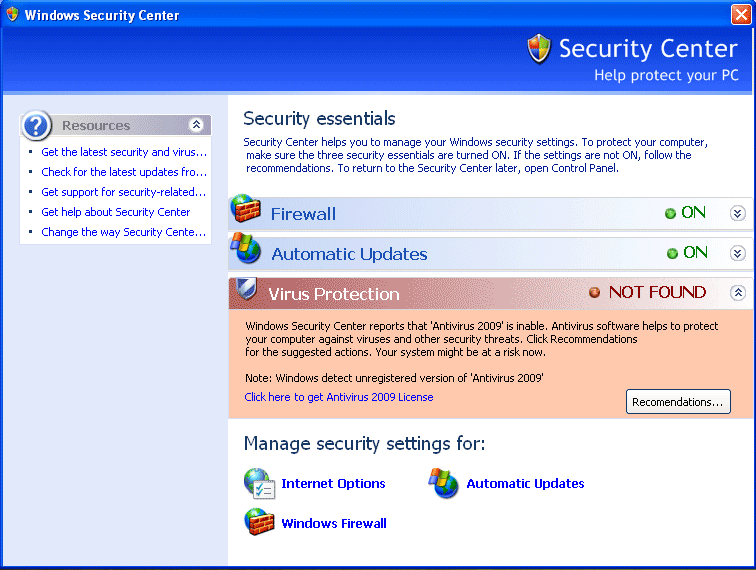
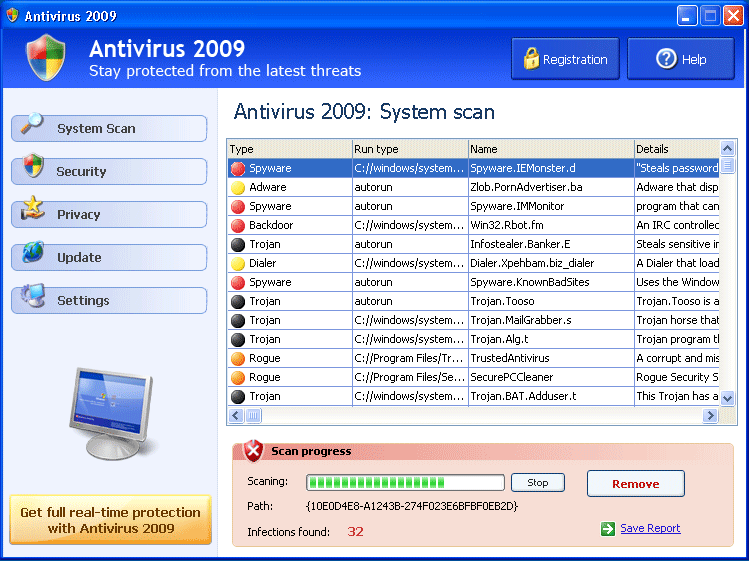
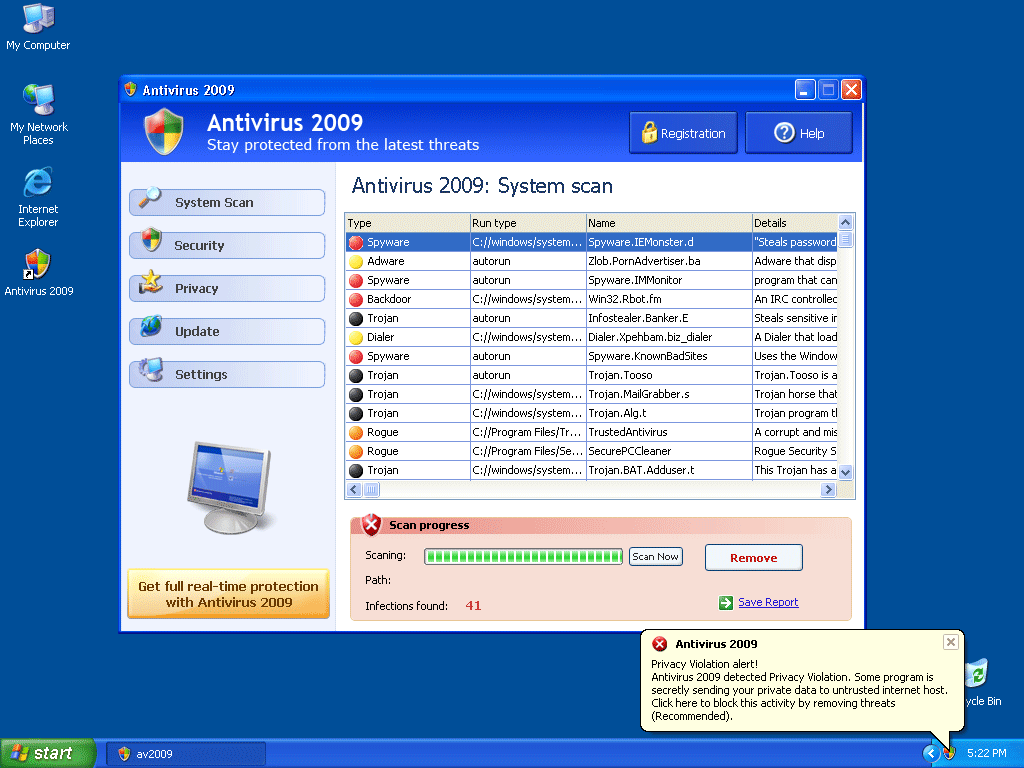
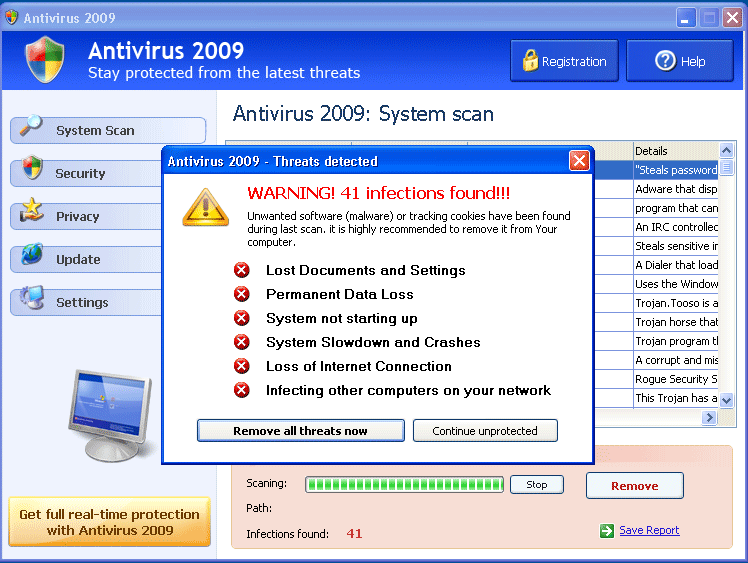
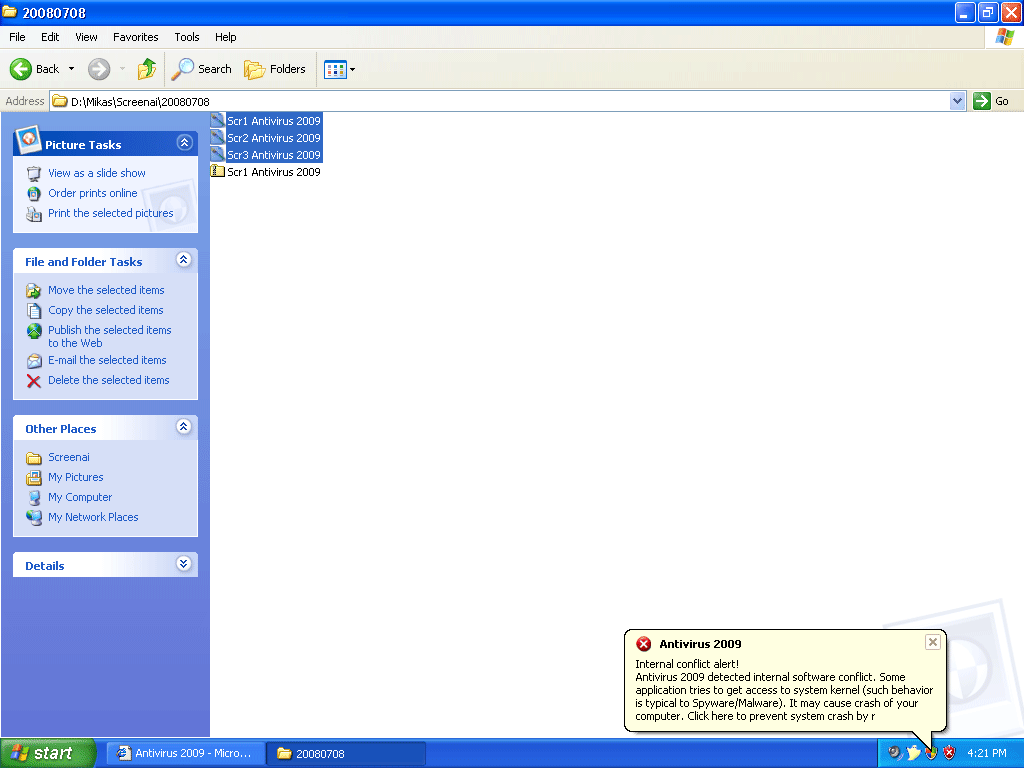
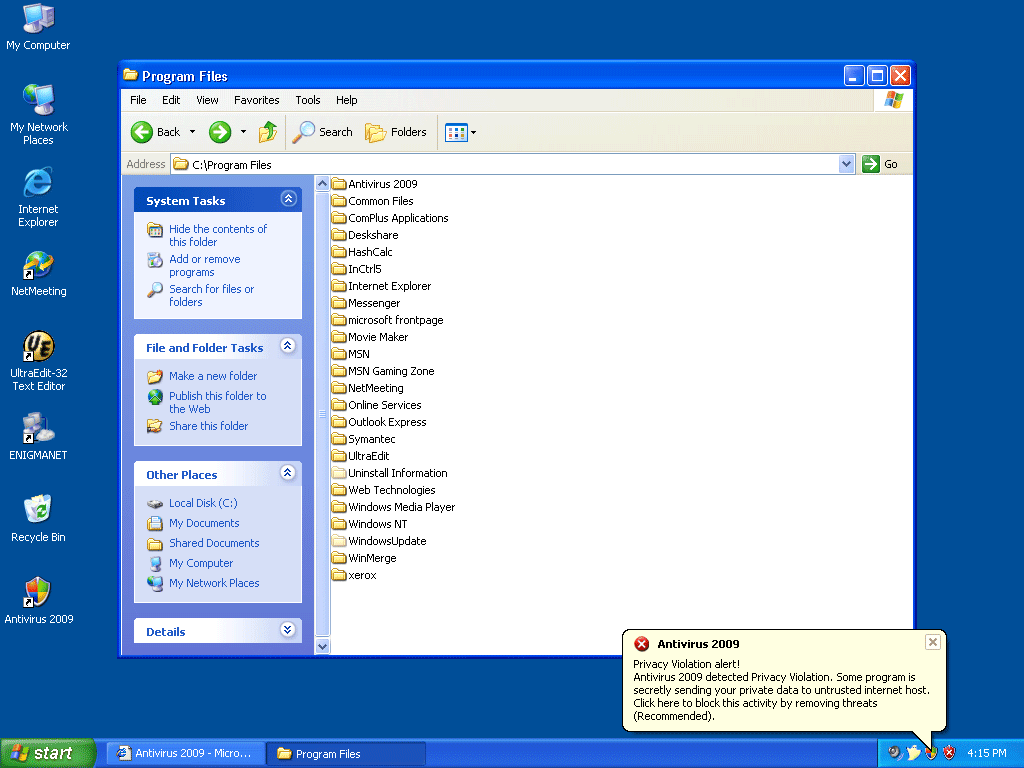
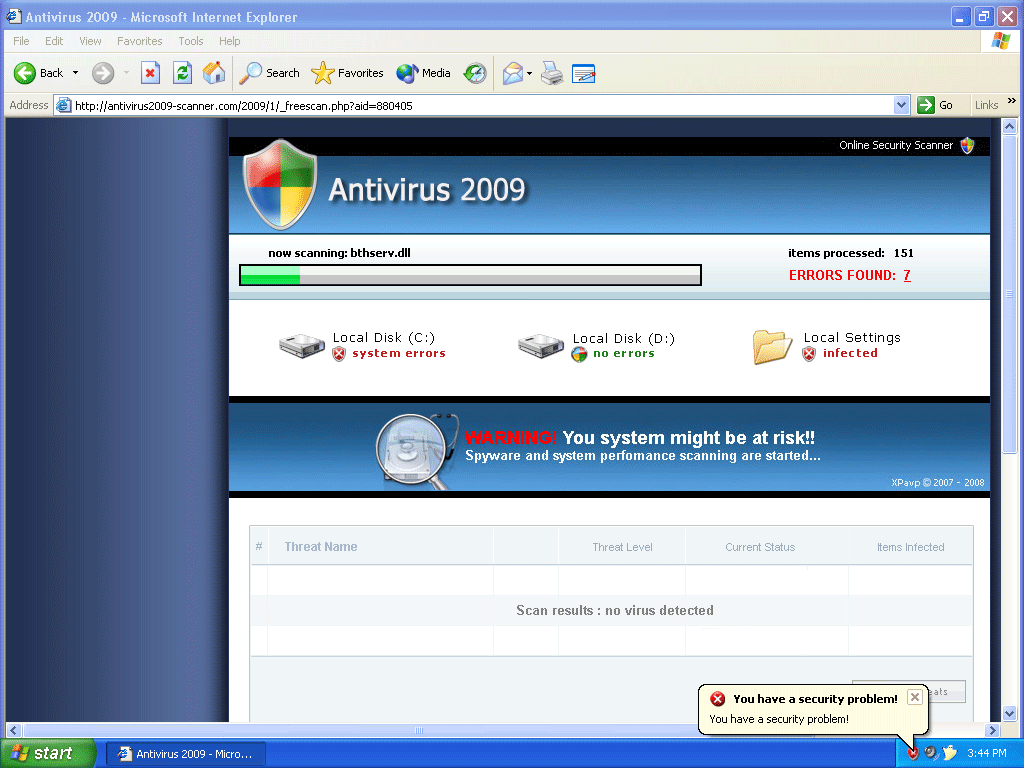
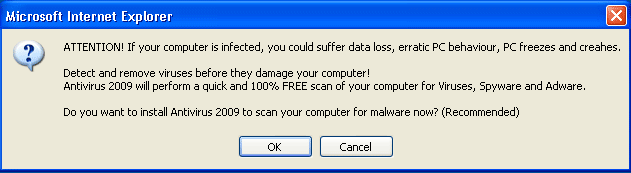
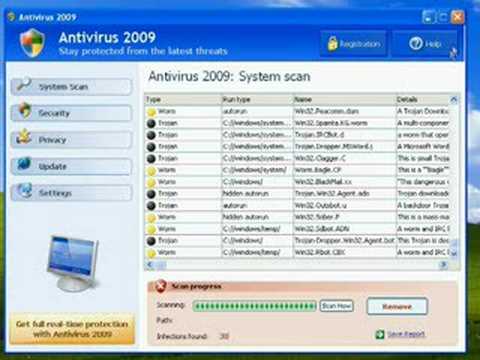
Image Screenshot
[+] Click Image to Enlarge
 
 
Antivirus 2009 (or Antivirus2009) is a rogue anti-spyware program and is a clone of Antivirus 2008. Antivirus 2009 is usually installed by a Trojan called Zlob via a video codec installer found on adult websites. Antivirus 2009 uses bogus spyware scans to trick the user to purchase the full Antivirus 2009 version.

Antivirus 2009 may generate misleading warning alerts and popups in order to scare the user into believing there’s an infection in their computer. Once a user clicks on the fake warning alert, Antivirus 2009 will redirect the user to Antivirus 2009’s website (www.antivirus-2009.com), where the full version of the program is sold. Antivirus 2009 is not a solution to the threats it alleges to remove.

Antivirus 2009 is part of the clan of rogue anti-spyware programs that have the term “antivirus” included in their names. Vista Antivirus 2008, Ultimate Antivirus 2008, System Antivirus 2008 and Windows Antivirus 2008 are among the collection of “antivirus” named programs. Although their names and interface are slighlty different, they all follow the same methods of intection. Antivirus 2009 may also generate system slowdown, instability and may be difficult to remove manually.
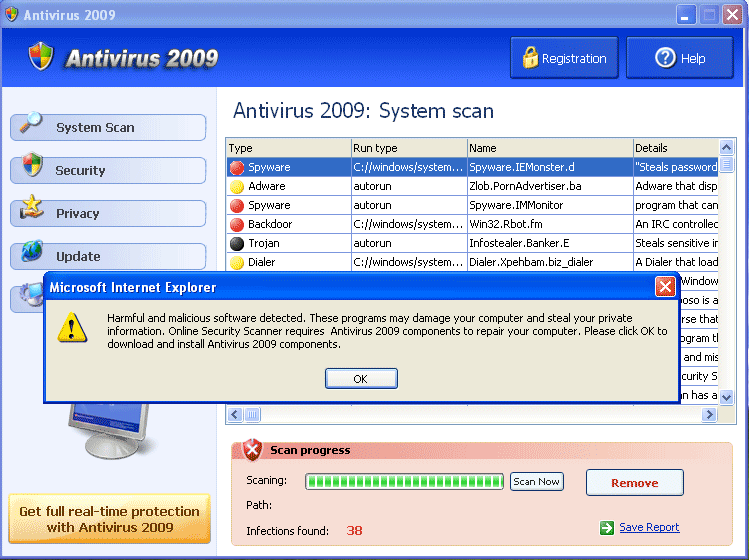
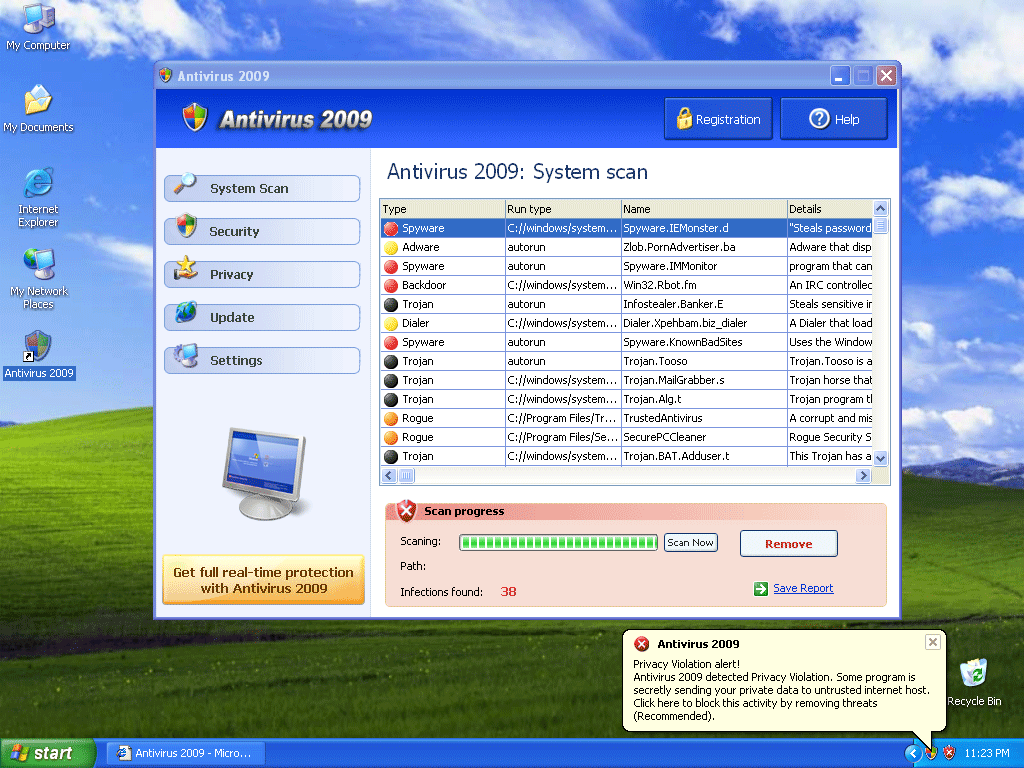
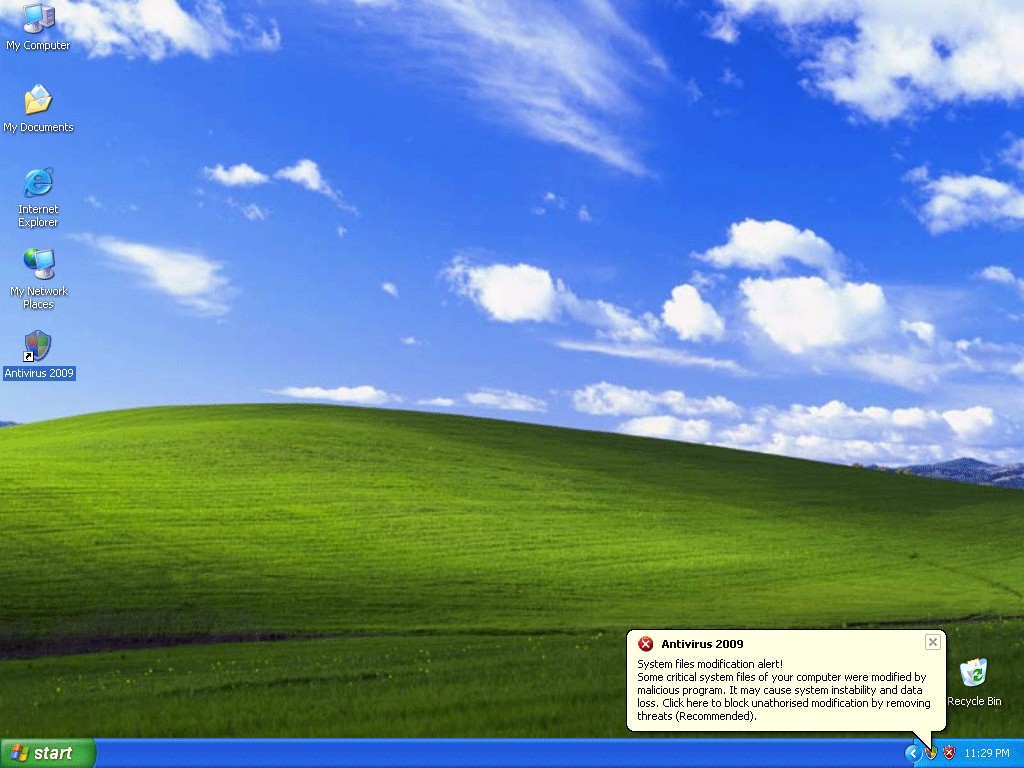
Type: Rogue AntiSpyware Programs

Aliases: AntiVirus2009 (Symantec), Win32/FakeAV.ARS (CA AV).


Important Antivirus 2009 Notice: important disclaimerDisclaimer


Start of page


Detect Antivirus 2009 Using SpyHunter

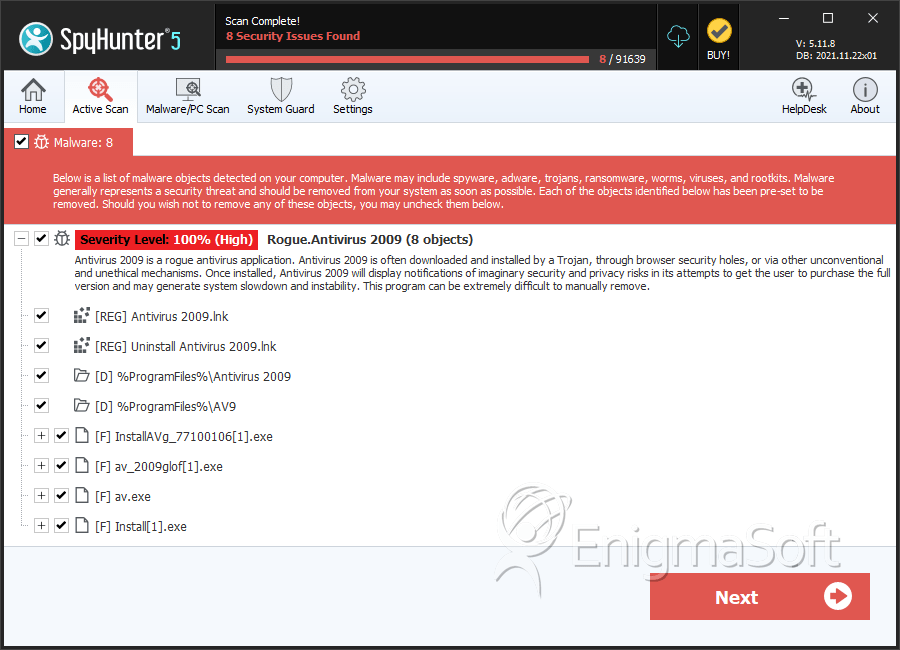
The detection of Antivirus 2009 may be a difficult process and its removal may prove to be even more problematic, especially if it’s done without the assisstance of a removal tool. If you use a spyware removal tool such as SpyHunter, you can have SpyHunter automatically detect the files of Antivirus 2009 and any other type of malware, spyware, adware, computer worm, rootkit, trojan, browser helper object infection that may be hidden on your PC. Why you should try SpyHunter’s Detection Scanner.

To safely detect Antivirus 2009, follow the instructions below:

Download SpyHunter’s Detection Scanner *
to Detect Antivirus 2009.

  1. Once you download SpyHunter’s Detection Scanner, select “Start Scan” to run a full system scan to search for Antivirus 2009 and any other security threat that may be on your PC.

  2. Once SpyHunter has detected Antivirus 2009, you will need to purchase SpyHunter to continue on to the removal process.

  3. To complete the cleaning process, reboot your computer and run SpyHunter again to check for any remaining Antivirus 2009 infections.

* SpyHunter’s Detection Scanner only allows you to detect Antivirus 2009 and other malware threats found on your PC. In order to remove Antivirus 2009, you need to purchase the full version of SpyHunter. If SpyHunter is not able to remove Antivirus 2009 or any other malware threats, SpyHunter’s Spyware HelpDesk can generate free custom malware fixes tailored for your PC. The full version of SpyHunter also provides real-time protection with daily definition updates to keep your PC on top of the latest security trends.

Start of page

Still Can’t Remove Antivirus 2009?

Exclusive Offer for SpyHunter Customers: FREE Custom Malware Fixes!
Have SpyHunter’s Spyware HelpDesk create FREE custom malware fixes tailored to your PC!

If SpyHunter’s scanning process is unable to detect Antivirus 2009 threat, SpyHunter customers have the option to generate a free diagnostic report to receive a custom fix for their problem using SpyHunter’s built in Spyware HelpDesk tool.

Spyware HelpDesk is both a service and a tool which allows our technicians to generate custom fixes specific to your PC. These custom fixes are transmitted to your SpyHunter utility which will disable and eradicate your malware threat completely off your PC. In order to better understand the process involved in generating custom fixes with SpyHunter’s Spyware HelpDesk, read how to use SpyHunter’s Spyware HelpDesk to create a custom malware fix for Antivirus 2009.

Some types of threats hide pieces of code from Windows, install additional components, and others have polymorphic capabilities to make removal harder. You can read the various scenarios as to why you can’t remove Antivirus 2009 with SpyHunter or manually. With SpyHunter’s Spyware Helpdesk, you’ll be able have a custom fix that is specific to your spyware infection on your PC.

Start of page

Antivirus 2009 Anatomy

As new Antivirus 2009 details are reported by our customers and findings from our Threat Research Center, we will update this section.

Antivirus 2009 Solution: With SpyHunter you can remedy Antivirus 2009 in one simple press of a button. We recommend you download SpyHunter’s Spyware Detection Tool to safely detect Antivirus 2009.

Domains related to Antivirus 2009:

Antivirus 2009 may be found on the following location(s):

Note: It is not wise to visit such locations. Be aware that such locations are home to fraudulent websites that may place malicious code on your system or are intended to steal confidential information.
  • Domain Name: antivirus-database.com
    Country: London
  • Domain Name: antivirus2009professional.com
    Country: London
  • Domain Name: antivirus2009-scanner.com
    Country: London

Author url of Antivirus 2009:

  • antivirus-2009.com

Fake message for Antivirus 2009:

The following fake error message(s) appears for Antivirus 2009:

Antivirus 2009 web scanner detected dangerous spyware on your system!

DANGER! Your private life and private details are threatened by potentially severe privacy violations!

Your PC keeps track of all the sites you visit, including the adult sites. As a rule, you don’t even realize that there may be files on your PC that may infringe your privacy or compromise you.

A hi-tech criminal can easily get your credit card credentials! Without protection, you take risk of becoming a fraud victim every second you spend online.


MD5 Details of Antivirus 2009 Files

The following Antivirus 2009 files with its MD5s were created in the system:

File NameFile SizeMD5
av2009.exe956928347abfa7a141567579484ea5168513cc
av2009.exe956416875c7779daccac6492ada0ed1afdc5c3
av2009.exe954368cc9f08f82e46f3a5bf8a6d51bd7325c5
AV2009Install.exe896005fe9c9b0993c9cf9dd3c6b40fda5290e
av2009[1].exe900608832830d6228ed32e3172b989a98e36b9
av2009.exe9538568d979d07446eea90244cfe92f34db638
av2009.exe957952aba42fa0ca04be7222114936347c81df
av2009.exe954880b5718af5ce37e0ae5ca69b1f6167b5fb
av2009.exe9569281d536d5613b8a7fc8be337c8e059e29f
av2009.exe9553922f932bd62cfa682e813d2b9adc51af1e
av2009.exe9569286814927d405e0924daf0550917b9726a
av2009.exe9569282b89e1cdec733a64482623d86e53cffe
av2009.exe958464c9ea3cc606c4bea1748c6f1e1fe14801
av2009[1].exe850432b725c77a908560e5afa13b72b55afeff
av2009.exe997376a6e5d8093b191a11b4c66a7c4ea22f80
av2009.exe99788892547740d5e6c0a3e3a588a1dbc8d094
av2009.exe998912a8ee5a0b153224000979c82cafa10b23
av2009.exe9978880f060c645d1c0b3d82d3a4cf2a1df75c
av2009.exe997376ddebf53d661020ef5083f8fccdd26fad
av2009.exe99788844250a554e7ce878a72c52f2894ead07
av2009.exe9978883f689d14f7dc32dcda7c3c45bdfea68f
av2009.exe996352864cccef6ea9eb1d7c5ae801dd76fa1d
av2009.exe998912567a531fc83f5948a1a595aad21b284f
av2009.exe998912faa772f79c6358e17b71037aefbbb81b
av2009.exe997376065a0d5eaa9717c431553de149d83521
av2009.exe9989124283105346e78d60c99c9b98b9bf454d
AV2009Install_880405[1].exe409686c103b629ac99baba5921529008890d
AV2009Install_880042[1].exe81921f82b3f9e418becefb49194cb19653b7
AV2009Install_77052203[2].exe29208c62ec72c942a57d56dfa3a727bdcc14
av2009.exe9963529465a8d09acc8dba64e2bffccbcaf65e
av2009.exe999424d96ed0978df751b6df574b53f16ab784
av2009.exe997376ba9b78081703130e1ade43a82a49d8c2
winsrc.dll285184d72ef24a22ce0d1370d142d2fa0b6c43
winsrc.dll286208b91943e7c003ed55ccb417899eb3cab0
winsrc.dll287744e5e7498b7e937c4e86ea10494b1675bd
av2009.exe999936a33532137b4d674a6d01e98663cf4a92
av2009.exe997888c67095aa0748037e745cdcf457ee559d
av2009.exe9994242737957aff989788943e64fbbe00e8be
winsrc.dll287232cf353d1b7ffaaee468626363a8ef552c
winsrc.dll28672031b945ce0d83594a6e3c565f910cf2db
winsrc.dll286208dd3fc84c14deb887ecf9c1627f49f1cf
winsrc.dll2841609761a628c50649d196d16baffb74e186
winsrc.dll2872324aac8a5846412f43e1cf123924603d8e
winsrc.dll284672c7b0b5dde487a6bf4a11162ce189431e
winsrc.dll28620886c5371e0413ce6fb9d80374e33f754a
winsrc.dll287744208fbfe44771b6e8011003f9ce859705
winsrc.dll2846727d4315b5946687dbbe4d04276ad9b197
winsrc.dll286720bf529602ecbf8fe63af9d5d9315de403
winsrc.dll28569611b974e831cbf1c22241327dcf9a8ed1
Power-Antivirus-2009.exe15334408d09a129772e414ef46553466d6bb715
av2009.exe997376f29bb7248496808b1986db28f953da50
av2009.exe9717761d29e2222fa186930a8cec5ec3d0c4db
av2009.exe971264e87d4b5b423f9126fe5ed47628417cf1
winsrc.dll287232229b4902c07d412da1746807af90340f
winsrc.dll2872324598803331be81b3d4db338349062872
winsrc.dll285696334e2ef34c9e8d8191bf11c8e1b7b6d8
winsrc.dll286720f9b36ba49b58d5d148786e977d26d84e
av2009.exe974336c1fdf3840049fc9ef129d9f830e55ac6
av2009.exe9733125da2578b7003ebde10c44d6b0150e89b
av2009.exe9733120fccaacb8c7e22e07334e86e5bbb4367
av2009.exe971776aa316adc0e41dcaea4c3e62f7715be40
Power-Antivirus-2009.exe153344034c3fcf4305f634d47226a81f317dcc8
av2009.exe9748482737b0d8b88f466633c091a673dcd2a6
av2009.exe971776a1ae6ec4d95f68397d7435adfe88e08e
av2009.exe974848e795abb1fc25b27b1f8a650bcc12bd69
av2009.exe974336c88576a849eb649959f2b820c013487a
av2009.exe9753607c242b1e1e292d33259463cbf33ffdc4
av2009.exe975360460cb9ca43e072f137d053c15d73b667
winsrc.dll28569622217c224f68e7712ff666d2170bbeed
winsrc.dll28569692718d0d3c1f23dce92bfdb8affc861c
winsrc.dll285696483bce2b41d36d5fea6b93946739df53
AV2009Install[1].exe135680cd5a66dea5c13954fbf5fdc5950bf1a8
av2009.exe970240280b0c36ede128102e0b5778d430495e
av2009.exe97228844a2a1fe3250a4284a08bf851aeca9cd
av2009.exe971264b119b31e134187a426de6586b7c290e2
av2009.exe970752bfd95628796561b008b04c5b87b16b5d
winsrc.dll2867209516d717a194e7f14d7f1b5f91c988d3
winsrc.dll2903047bb9eab7fc6e9307e429e12dfa0296d9
av2009.exe998912321904b86dd606ad7a2a9bb4a550087e
av2009.exe974336581c0b4f3249bf33c392500c822abaa0
av2009.exe97331273cc96d3e0f175b1f5aadf81e958787b
av2009.exe972288135cd9e2ed5b78e0f7d236f3a99d50df
av2009.exe9748482ade9055a2f787139943f6da7cd4359c
av2009.exe997888dfc1194901509e0e734e1a4e72a4c49a
av2009.exe97228833c97254d7297f203008b37773b9a183
av2009.exe97382455981eaed8cf6d8fc01a43e2ab2227bc
av2009.exe975360bf7d2abe0d0623f45dba801cace94d0a
av2009.exe9707528295236e16d8708a97dd39be33a8f6c5
av2009.exe986112599aa45c6a4048fe967258914bef5695
av2009.exe988672155fbebcea112c0d7d6bbbb0e70f93bc
av2009.exe987648d04e41a087af82645144e4bf609105ee
av2009.exe971264dab08486dae10896b3d6925f8778acfe
av2009.exe988672ec53414252d8e7b6b38c367a631e7f39
av2009.exe969728b5a2d8fe7d6c0693e6264bbeb69e81bf
av2009.exe10137603be44133915310edeb167cac1549e3d7
av2009.exe986112efb05ab7aae0249392fab8ad8094592d
av2009.exe990208953cccc666bd094f2a65e937948f1f2b
winsrc.dll306688b627e06c60a82db86ff4eca2d77ee897
winsrc.dll284672ce8b189778d718e98683e00be4e7a362
winsrc.dll288768ae6f23758d60c4f7d2d88aa19ca31168
winsrc.dll2877447b4ced52e773bbf53c775eb4202d72fd
av2009.exe101632017c9beff0fe2e5cc9ca12ebb89ea1cc9
av2009.exe104294400377fc2d52ed4b667f1c667111a0d27
av2009.exe1091072c61937d6cbce179088cb993fffd643d8
_A00F10A209.exe3481613c2f90776b175470c1cf48e35246473
av2009.exe10158086216f7b192ed00a54f046158318e94c0
_A00F10A209.exe440321456664985d5a8667d4c600a76c148e1
av2009.exe983040f58f15a81c7266fbd8d4f7a4078f837a
av2009.exe983040db6f045c497542dd51cd4162f1adc07e
av2009.exe9820161927871bacec854f96ff6cb567c05028
av2009.exe1016832e4c08aa9caa6357ed7b20876c9cca3c9
av2009.exe97433666d71be28e57187cfbd70f41e1f162c4
av2009.exe1041920db10d428c4c043f2e7cb4b832e9f8933
av2009.exe1013760bb347296398c9e76971c91fd10176e23
av2009.exe1007104779bab734937d22ca301d8d30d6e67d6
av2009.exe9820167dcb7f1627aa87b91bc08986b48074c9
av2009.exe1012224822f5f267f48fa64e5d8e0983eafc962
av2009.exe988160bf5c0b0be02fcb18ac3430d9784b7e00
av2009.exe1007616ad9be97ce7f17f821583f06977fd8e04
winsrc.dll306688c951b5c56b5831e638fba1dd27a347e9
AV2009Install_77027901[1].exe819200629b0328b6c303a2dbb73d3b220cb3
av2009.exe101324881714321463380738668343289276731
av2009.exe101478487942351198376918111407736784386
av2009.exe101785646040167640505166496526311060870
av2009.exe101939244255838148439020563538360843127
av2009.exe85043295653364965232876461404082838489
av2009.exe104652829467630492248162739671107524542
av2009.exe98099235e7eb1cc80ed56072d266bb74c83f81
av2009.exe9881602545cccc3129a5c72e32ca26a4073c43
av2009.exe10045441b9d2a22a17d98bc5e06e767af0bd44e
av2009.exe1047040007893eadf37a8c50eb34851fc2333a8
av2009.exe1014272afb07e805ae4101fe05a211679533759
av2009.exe1027584dad7bed901fc8ceecc7048669819786d
av2009.exe1014784091e3faf21bbdfaf1324e7367dbc958a
winsrc.dll306688e2506c236258b5da74e1b1ac5dae1815
winsrc.dll3179528c01e2b6c8294a5e5ee6aed67467f401
winsrc.dll3200009442c64ee429749c87035dd767461579
winsrc.dll306688ec72355d7bf472d0ff5dccfb8ae041e4
av2009.exe101888003b9a0fa3638b897b34b5cbe6f6d4375
av2009.exe1014784196f63e755fa5c84ddf2a2647264e228
av2009.exe10158084335c8000c1fda4d138c8565fb7e9c4f
av2009.exe1015808d0f59ddf790ac3a8a3ede8ab80881386
av2009.exe102246444b65345ac7f814daa1c273d56c13afe
install__MHwzNHwwfHx8fHx8fHw_[1].exe1067123477265f492378c5b2a03db260749299c
AV2009Install_880135[1].exe40845533908b9674ba33e90f7bcc4a08c1a9
av2009.exe100147284dea60952cae4377eb0ebca4e113ccd
av2009.exe10204169a3e894535f0db61f342cb4535833d81
av2009.exe1024512a18e9557aa0a9f2e2661e380889d928b
av2009.exe972800d1c7b908d5a38cbe6f300d742860f8b7
av2009.exe1020416bff1da0a19cac70800296af501f0b523
av2009.exe101939261d4865cb116f5170f7acc26ed9863f5
av2009.exe1022976047df06a3c1d06254bf3bd3f7f1df52f
av2009.exe10214400f0c5fd80980100db6fd9316ffad9fd6
av2009.exe1019392c0859863a94b2b2232671a8c8d342992
av2009.exe1026048a067423362164d715d3d49624b29905a
av2009.exe10270720a688832227113726c8df4e5813d39f6
av2009.exe102451211c111eb3e7b9e1059afa379a67be6e1
av2009.exe1011200643a7a473823ee9c5a72353a7064f412
av2009.exe1003520ee52948a695dbe271ed4ba0f3cbc9888
av2009.exe10035203d96a961cc1f16ce203e6b2c71a0fd93
winsrc.dll3287043c32ea36d144f4655966c8d4f49a852a
av2009.exe10306561a67492a983611736a38b05a61dddcfc
av2009.exe10332163bf02d92d16272afe44ed1d2f02c85bd
av2009.exe1020928f6e291a08e8379c776c393b66e85eb80
av2009.exe1270272be91e944e5ecd41a3b0595730cb700b8
av2009.exe1040384efe437c4dbbfd8a1d246acb33129ae98
av2009.exe103116895e46eecf9e725a6313548859e59959c
av2009.exe10306564d232ba80ad9a8eb75d008c185be791c
av2009.exe1034752cc491f0998d5a9dc8c75ac1912ac7637
ieexplorer32.exe1064965ae0604cc4b44c052b0ccacb8324b971
ieexplorer32.exe109568ce12fa0629a2c7b6950396b06bc21a32
ieexplorer32.exe1105929df36556244e6e78ff45b7221a715211
ieexplorer32.exe116224fdce4d51098017203e2cef22b899cab0
ieexplorer32.exe106496a49f90c9f054ef2a3574902e13e87dd5
av2009.exe12620808539081b9451ddf216ec52c1b05beefe
av2009.exe12687368d972de02036ccc3ae93b24aeedcc999
A9installer_77040506[1].exe4084b673296194136b9e463f7fcf8c550a2c
A9installer_77040506[2].exe2624252629dfee0db9e606fa699b015f6edf
A9installer_77040506[1].exe81925c2a6a10caea5763370f20b8e3970b61
av2009.exe1269760b3fa77c1772b02347b7e93386c9fd65a
av2009.exe1273344f97d3140c398463bbf3febe65f690b00
avsecurity.exe126822486d5fbc16e954b1d4b3ec87197987139
av2009.exe12610568570ae48f9d5db06dc0fd850e4fbcb97
ieupdates.exe11622471b61c8d31ac45a41518c57414cfc249
winsystems[2].dll365056c8a5b34cd0a42dbb9f284f5350bb03cd
winsrc.dll365056c8a5b34cd0a42dbb9f284f5350bb03cd
ieexplorer32.exe1105922962ac03eec3522f524833529dfed127
ieexplorer32.exe11827222266984483109e31746d647318e4175
ieexplorer32.exe114176634dae0dfd5fbf040e8d0be56f9994de
av2009.exe1272320cd9c0c7faf436a659dfc6cdc8db96951
av2009.exe1265152f1e291e2ac0f4f0f99ef447ff7889479
av2009.exe1264640b3dcbdb587623643bc964e8f0a366222
A9installer_77081456.exe1372163263a995b6bf81954eac3e74bdb23753
A9installer_77025304[1].exe1500162ed0686e873e563145e866e427e79593
av2009.exe1467392860ecf1aca62cc9aabab8838a862912f
ieexplorer32.exe1192967ecf62c99d4c1d219779ca9503156302
av2009.exe126515228ac8d48c87e076fac13bd5e822c2823
av2009.exe1482752fa2d9ba148dd52ff2c1841b0c8601996
av2009.exe1465856c781af81c8996e3c7acd79c5c074cf40
A9installer_77038109[1].exe155648fe8833b244489f67785b4d375acbc7c3
av2009.exe147456014d21a01d87497e7fac599576ab78b2e
av2009.exe147456052d8d6dfaf84164144ac19234473098b
av2009.exe1478656297fa604414020bd9e7dece2e759b2f3
av2009.exe14745606fae6811ca8bd20cea583a20446e4864
av2009.exe1474560e7a7371fd0fb516f9aa27ab30cdeb085
av2009.exe147865634e84e321357efec9ed556287237bfc5
av2009.exe147456033f91ee8876989bc65c9ae7b65582eed
av2009.exe14786564c68e58e317f7111ac147d5279ef23e0
av2009.exe1474560d4ea0c5d75d9c66f3f6f72227caebf8c
av2009.exe1260544257193c2bbf278a78cbb7f4b53ee262e
av2009.exe147456096e97cdb0c31bff55cbdf6d5b871ff41
av2009.exe1478656ac2d232ccf48f6564dee03c075bbf957
av2009.exe148275272cd16df625da31993064f98143e3c39
av2009.exe14704642484d4ed4171c10a02e649b28d7da2a1
av2009.exe1478656c52f82d2ff9ef1aa25f1c633575b7caa
av2009.exe1088512769b3ae3ce6b09f6f7e28eca1ad5b217
av2009.exe1478656b5e83d82e69f6684c78124a9e7826c1d
av2009.exe1482752d4fb8dc784fa5184277dd6e8b6ecc1ec
av2009.exe147865678c10a06011fb66937db043ce3c74570
av2009.exe10045446f1f00a51b951c7aa9968c2e68583e9f
av2009.exe1478656c712b5f030eeea73a5238fb6b66ad3c5
av2009.exe147865624eb44ca4885323fdec0904c537c4094
av2009.exe14786567e614ac0b22993c8647a5f00b794f6d6
av2009.exe1482752034f0f7c9b290b45e56e64e28c5a4c26
av2009.exe147456040bc89b4ec4fd173bc8de1afd7b5b035
av2009.exe1474560de11a046cb65bfa98f3ef828ce6035dd
av2009.exe147865633c028f20007f39db0b57f4c3f8de05b
av2009.exe1478656eb26bac2a243b6496ddd4ced8e6eb12d
Install[1].exe23603240256303ebfbc8bbacb1ea7ff342075d
av2009.exe16056321497dd24e211060232c0ff619e9320b3
av2009.exe160972897176d8320883bb080adc89a5bdb6d91
av2009.exe1478656ca560e2657bbc39e4a27358008148f12
av2009.exe10885128feb3435f51c3a4c58c2901aaa846cae
av2009.exe1482752d4e9169717c31d637efe563ee2707225
av2009.exe10890240f8a2630acfe695aaf3d91abaa76f3f1
av2009.exe1609728eed628616c9bbd54c93e4451d4d4c52b
av2009.exe1089536c1ad36f08414ce01caf98a46cad1c421
av2009.exe1478656f89ed7f7339c8e2e5f4917a63afdddbb
av2009.exe108953617527ee62c60e78f32270f518b73f851
av2009.exe148275285c29184017937f94b1b2da214bb1d8b
av2009.exe16056326167b045004c29aa9d24aa06787bba25
av.exe979034d2a64369e37eeae8f6118f474dd8ce0e
av2009.exe110592002a41474c7adc33b1ab219ec8d6b785a
av2009.exe1105408eaefbfeaf7673794f02342cc1ba3e986
av2009.exe16097283ed28a2c91d971ba273671690e875719
av2009.exe110745660f9277a63f5b2f963cd6cf6e8dad015
av2009.exe16056323b5372653905001aadf510d609373bb9
av2009.exe110592012f6deba24a063f19620856e903c95f5
av2009.exe1105920e88af1e38484a1afdd1a786b4742afd2
av2009.exe108902449aaec9ee9c6f3b5d4b87e7d578463df
av2009.exe160563295cfa87bc4d6289703a2a9c056ca0e08
av2009.exe1609728b6c5a6039cc3d0f669381967d8c63a3a
av2009.exe1089536485a7f877f0c703ce49b0d1c6532b084
av2009.exe16097282dd4aa9e9294ec9c8dffe0a181421e49
av2009.exe14745600dbd10093b6b6ec095f2d664d95458a6
av2009.exe1609728675bf184d5aab8197ddc7fc922831a21
av2009.exe16097288c23a9695a894bc8f60a6b4685bd7212
av2009.exe1089536920d5cc190065c6db5e437fe02ca119b
av2009.exe10890249a034cb6b9480b7ddb3a3d811e97d8b3
av2009.exe1613824791650fd2718604790c764162116657c
av2009.exe1613824cbd7734b491af2907f6f44b0ab0ce679
av2009.exe12871686b25c5abfd34ff0fbb034c8101c2d10c
av2009.exe1105408ff297cbf92a3d5e6dac9b41bbde90c50
av2009.exe161382487dac188c67818f33ef49b8f1128300a
ieexplorer32.exe112640248b17df395ce1c861ecb2ad32dedabc
av2009.exe1601536b024581ec0e48da83ab8538c441f020f
av2009.exe224870496d197184c65697739a4112fffed047b
av2009.exe224460840ff6cb228fe8eb9993b3124394aab7f
av2009.exe22528009b1138307aff6e0408a9369717a05cea
av2009.exe111155282a1e993980ea2fb52ecbea4af0deb79
av2009.exe225280085ce732ce349dae896ba9c3d14b8a689
av2009.exe310272c16c12d4335675f5f18db88d8b65d8d0
av2009.exe22487044f59d6f443de5f47f0199622c51b1724
av2009.exe1617920db83c0525c9fed31c29703c4e7ace4d4
av2009.exe224870448ad669ecb070cf170c6b96db76ded6f
av2009.exe16220166d8a18a0a63cf0c2cf43bb1a2dd8f848
av2009.exe22487040ba5e7e62b559a68313cd8e7786c2aa0
av2009.exe1617920b668761d96a5bd038c230e6e676b1aa8
av2009.exe2252800f33e779775d7d49d8958c2d5a268f67a
av2009.exe2244608c4afeb7798fc86a46ac97ac8eff8ae6e
av2009.exe2256896e500d4443830c1073437a5a279322a8e
av2009.exe2248704481fdeaf9f19d8a1b02825c7c3fa3571
av2009.exe1112064e8e61002cb56e0cf95ee8516a798ddc4
av2009.exe225280078c1231ba53d63fede0d53ffdb818cc7
av2009.exe2252800e6df709fe59bb67adee8da6ed5812684
av2009.exe22446083cd17c060f30f2ef9e981aec90801a60
av2009.exe2248704b0867fd4bd7d734dcac4cd0c88e5885f
av2009.exe2252800d28e4203aff0c1335530edffa6d5a3f1
av2009.exe16015360dde076788d2c95f5bf8ea7c0c13e929
av_2009glof[1].exe22814726ba0abd2e57f1aba749dece5911224da
av2009.exe2273280ae9e4b4b5333c347ae33019b799f6224
av2009.exe22732809fac0f1e1936075c5b6460fff9139621
av2009.exe22650888d81afeb679a38f26e0061ba77279f8e
av2009.exe22732806836e8e39a8a6882f99cf562af2de372
av2009.exe22732804f12e154ce8ce5735b678d98320c2563
av2009.exe2269184a2bddd124586ca47a2280a8d2acc73c3
av2009.exe227328046e24cf63961433393e9f5d733096d08
av2009.exe2273280cb1b2b84ca04259c7d3197d1baca2cbb
av2009.exe22814723ab1c0aa2ced150d4e4df0ae1279ec8d
av2009.exe22773765daaa4a58b7aff60cbbf8a5af284bde0
av2009.exe2273280eb39bf0a82ca42694129e6b485cbf424
av2009.exe22773765fb231a4bb79f3f6e0179d480b0f2eff
av2009.exe226508884cf9f89cebe18c2f6c2832adeb5c254
av2009.exe2273280c13b9cfe574df05568a54978cabf7e33
av2009.exe227328085226471978114b1ccd9a57e11d766c1
av2009.exe2273280ab0aeda83cd41aafb2c20424ac2801b7
av2009.exe22773769f7eff7c23a0aaf214ba5fe442d52828
av2009.exe2273280410464178a35f69234caa55fce410aaf
InstallAVg_77100106[1].exe4083675ac25b317f65becaa0490617d25ef4
InstallAVg_77100106[1].exe8192eb4fa01c86d6ff60056718582afa32d5
av2009.exe2269184a25683ffc03820f59d090250a6c5c95f
av2009.exe271564825402441cfd98d68e73443be84d57a5a
av2009.exe2277376b37672aaf3dc1f58fa58e34f5cd3ba0f
av2009.exe2711552b000d60ed664354e0cd50ebff499d270
av2009.exe27115520a8a16ca49a707b749fe63ee06d4fb09
av2009.exe22814726ef9a9cbc0698282da7389625e8453b0
av2009.exe2711552777465e6d338e32f068a787c4436413a
av2009.exe270336094d980710dea9c00b6388504b4ae2b39
av2009.exe2711552a908cbfdbedd552e34b341a04bb67719
av2009.exe2277376f10839e7465d166ef460a27e3d59edce
av2009.exe22691847e2530c0dbde21bfc5b4da25723d26b7
av2009.exe1105408ce5632a2511332a058c2589f00d0cb0d
av2009.exe2715648ae99f5b132bb853b77e8cec5f26919df
av2009.exe2273280768bda5e3184cebc5b8d47031efdd20f
av2009.exe27115520d7b05554c791a74a6a75beff8ed8b2f
av2009.exe1482752a17cfc6443c337032620f6f40d596d64
av2009.exe22650884cf626b9d176dc2b3d15d95418ebc55f
av2009.exe17858562350a7d23c9211e3f946ddc50b176998

Start of page

Antivirus 2009 Video Demo

Click on the “How Antivirus 2009 Infects Your Computer” video to see a Antivirus 2009 infection in action! See through the eyes of an unsuspecting Internet user while him/her is being victimized by Antivirus 2009.

At the end of this video, there’s a link to download SpyHunter’s Free Spyware Scanner. SpyHunter’s Free Spyware Scanner is for detection purposes only. To remove Antivirus 2009, you must purchase SpyHunter’s full version.

Tip: Turn your sound ON and watch the video in Full Screen mode to fully experience how Antivirus 2009 infects a computer. The video contains clickable buttons.


Start of page

Antivirus 2009 Installation Process

Listed below are files needed for the installation of Antivirus 2009. You can use this information to manually search and remove Antivirus 2009 from your PC.

Use Caution! Some technical expertise is needed. Manual removal of Antivirus 2009 is a delicate procedure and does not guarantee complete removal of the malware, since some malicious files tend to hide or may have the ability to recreate themselves. It is strongly advised that you backup your PC before you attempt to manually remove Antivirus 2009. ESG is not responsible for any damage to your computer resulting in any way from your use of this Antivirus 2009 installation process.

If you are still having problems with Antivirus 2009, we recommend you download SpyHunter’s Spyware Detection Tool to safely detect Antivirus 2009. SpyHunter can facilitate the process of detecting and ultimately removing the unwanted files without having to deal with sensitive areas within your system.

If SpyHunter does not fully fix your problem, there may be many reasons as to its inability to remove the unwanted files. With SpyHunter’s Spyware HelpDesk, as a custom-automated-fix tool, you can achieve complete removal.

On the Antivirus 2009 files listed below, you will find that some files may have environment variables (ex. “%Program Files%”). Read more on “Environment Variables List” for information on what each environment variable means.

Block websites associated with Antivirus 2009
Antivirus 2009 uses the following websites to distribute its program:
Find out how to block malicious websites that promote Antivirus 2009
  • antivirus-database.com
  • antivirus2009professional.com
  • antivirus2009-scanner.com

Remove Antivirus 2009 directories, paths or folders
When Antivirus 2009 is executed, it creates the following directories, paths or folders:
Find out how to remove Antivirus 2009 directories, paths or folders
  • %ProgramFiles%\Power-Antivirus-2009
  • %UserProfile%\Start Menu\Antivirus 2009
  • %ProgramFiles%\AntivirusPro2009
  • %ProgramFiles%\Antivirus 2009
  • %ProgramFiles%\AV9

Stop Antivirus 2009 processes
Antivirus 2009 creates the following cookies:
Find out how to remove Antivirus 2009 processes
  • AV2009Install.exe
  • AV2009Install_880405[2].exe
  • c:\WINDOWS\system32\winsrc.dll
  • AV2009Install[1].exe
  • AntivirusPro2009.exe
  • Antivirus2009.exe
  • AV2009Install_880405[1].exe
  • c:\WINDOWS\system32\ieupdates.exe
  • Power-Antivirus-2009.exe
  • %PROGRAMFILES%\Antivirus 2009\av2009.exe
  • av2009.exe
  • av2009[1].exe
  • c:\Program Files\Antivirus 2009\av2009.exe
  • %UserProfile%\Local Settings\Temporary Internet Files\Content.IE5\S96PZM7V\winsrc[1].dll
  • ieexplorer32.exe
  • %PROGRAMFILES%\AV9\av2009.exe

Delete Antivirus 2009 Dlls
The following Antivirus 2009 DLL files are created:
Find out how to remove Antivirus 2009 dlls
  • %UserProfile%\Local Settings\Temporary Internet Files\Content.IE5\S96PZM7V\winsrc[1].dll
  • c:\WINDOWS\system32\winsrc.dll

Remove other malicious Antivirus 2009 files
The following Antivirus 2009 files are created:
Find out how to remove Antivirus 2009 malicious files
  • AV2009Install.exe
  • Uninstall Antivirus 2009.lnk
  • c:\Program Files\Antivirus 2009
  • c:\WINDOWS\system32\winsrc.dll
  • %UserProfile%\Local Settings\Temporary Internet Files\Content.IE5\S96PZM7V\winsrc[1].dll
  • %UserProfile%\Start Menu\Antivirus 2009\Uninstall Antivirus 2009.lnk
  • AV2009Install[1].exe
  • AntivirusPro2009.exe
  • Antivirus2009.exe
  • Antivirus 2009.lnk
  • AV2009Install_880405[2].exe
  • c:\WINDOWS\system32\ieupdates.exe
  • %UserProfile%\Desktop\Antivirus 2009.lnk
  • %UserProfile%\Start Menu\Antivirus 2009
  • Power-Antivirus-2009.exe
  • ieexplorer32.exe-removed_skip
  • av2009.exe
  • av2009[1].exe
  • AV2009Install_880405[1].exe
  • c:\Program Files\Antivirus 2009\av2009.exe
  • c:\WINDOWS\system32\scui.cpl
  • %UserProfile%\Application Data\Microsoft\Internet Explorer\Quick Launch\Antivirus 2009.lnk
  • %UserProfile%\Start Menu\Antivirus 2009\Antivirus 2009.lnk
  • ieexplorer32.exe

Antivirus 2009 creates the following registry entry so that it executes whenever Windows starts:
  • HKEY_CURRENT_USER\Software\Microsoft\Windows\CurrentVersion\Run “75319611769193918898704537500611″

The following registry keys and files add on infected machine browser add-ons sections:
Note: Browser add-ons may show popups, redirect searches, add undesirable toolbars, change home page, track your browsing habbits and steal sensitive information like bank accounts.
  • HKEY_LOCAL_MACHINE\SOFTWARE\Microsoft\Windows\CurrentVersion\Explorer\Browser Helper Objects\{037C7B8A-151A-49E6-BAED-CC05FCB50328}

Remove other registry keys created by Antivirus 2009
Antivirus 2009 creates the following registry keys:
Find out how to remove Antivirus 2009 registry keys
  • HKEY_CLASSES_ROOT\CLSID\{037C7B8A-151A-49E6-BAED-CC05FCB50328}
  • HKEY_LOCAL_MACHINE\SOFTWARE\Microsoft\Windows\CurrentVersion\Explorer\Browser Helper Objects\{037C7B8A-151A-49E6-BAED-CC05FCB50328}
  • HKEY_CURRENT_USER\Software\75319611769193918898704537500611
  • HKEY_CURRENT_USER\Software\Microsoft\Windows\CurrentVersion\Run “75319611769193918898704537500611″
  • Microsoft\Windows\CurrentVersion\Explorer\MenuOrder\Start Menu2\Programs\Antivirus 2009
  • HKEY_CURRENT_USER\Software\Microsoft\Windows\CurrentVersion\Run “ieupdate”

Important Article Disclaimer

article disclaimer article disclaimer
Start of page


ESG Support Center
Share and Enjoy: These icons link to social bookmarking sites where readers can share and discover new web pages.
  • Digg
  • del.icio.us
  • Furl
  • StumbleUpon
  • Technorati
  • YahooMyWeb
This entry was posted on Tuesday, June 24th, 2008 at 10:42 am and is filed under Rogue Anti-Spyware Program. You can follow any responses to this entry through the RSS 2.0 feed. You can leave a response, or trackback from your own site.

Leave a Comment

Note: Abusive comments are not allowed. Please do not post comments regarding technical support issues. ESG customers that have issues with SpyHunter should open a customer support ticket.

*
To prove you're a person (not a spam script), type the security word shown in the picture. Click on the picture to hear an audio file of the word.
Click to hear an audio file of the anti-spam word


Archives

Home Sitemap RSS Feed Privacy Policy End User License Agreement Copyright 2003-2009. Enigma Software Group USA, LLC. All Rights Reserved.