XP Internet Security 2010
GoldSparrow By GoldSparrow in Rogue Anti-Spyware Program | 0 views
Rate it:
1 Star2 Stars3 Stars4 Stars5 Stars (10 votes, average: 4.30 out of 5)
Loading ... Loading ...

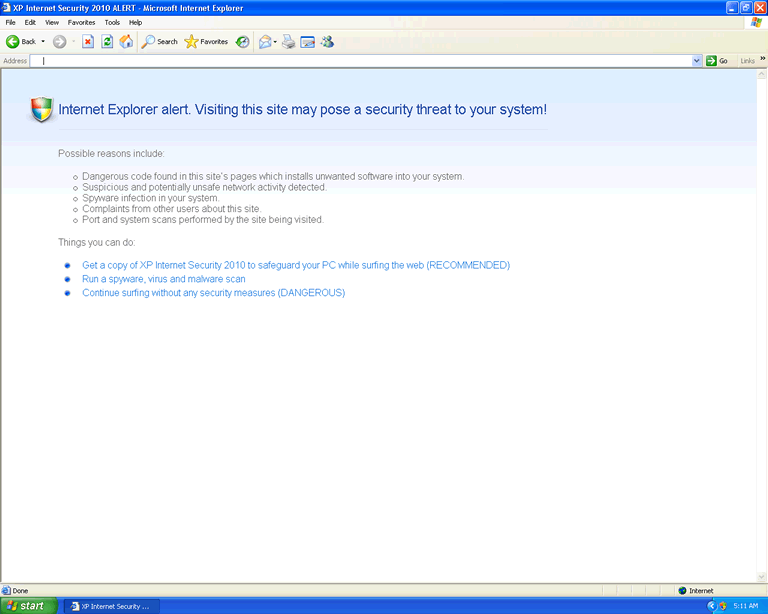
XP Internet Security 2010 Description


Image Screenshot
[+] Click Image to Enlarge


XP Internet Security 2010 is a rogue anti-spyware program from the same family as Internet Security 2010. XP Internet Security 2010 is usually surreptitiously installed onto a user’s computer by a malicious Trojan. On installation, XP Internet Security 2010 will register itself in the Windows registry so that it automatically runs every time the system is started up. XP Internet Security 2010 will also modify system settings, resulting in certain security applications being disabled. XP Internet Security 2010 will then conduct bogus system scans and report false malware infections as well as display fake security alerts and annoying pop-ups. Users should ignore these security alerts as they are fake and only displayed in order to trick users into purchasing the useless XP Internet Security 2010 application.

Type: Rogue AntiSpyware Programs

How Can You Detect XP Internet Security 2010?


Download SpyHunter’s Detection Scanner
to Detect XP Internet Security 2010.


XP Internet Security 2010 has typically the following processes in memory:

  • %Documents and Settings%\[UserName]\Application Data\av.exe

XP Internet Security 2010 creates the following registry entries:

  • HKEY_CLASSES_ROOT\secfile\shell\open\command
  • HKEY_LOCAL_MACHINE\SOFTWARE\Clients\StartMenuInternet\IEXPLORE.EXE\shell\open\command
  • HKEY_CLASSES_ROOT\.exe\shell\open\command
  • HKEY_LOCAL_MACHINE\SOFTWARE\Clients\StartMenuInternet\FIREFOX.EXE\shell\safemode\command
  • HKEY_CURRENT_USER\Software\Classes\secfile\shell\open\command
  • HKEY_LOCAL_MACHINE\SOFTWARE\Clients\StartMenuInternet\FIREFOX.EXE\shell\open\command
  • HKEY_LOCAL_MACHINE\SOFTWARE\Microsoft\Security Center

Important Article Disclaimer

ESG Support Center

Share and Enjoy: These icons link to social bookmarking sites where readers can share and discover new web pages.
  • Digg
  • del.icio.us
  • Furl
  • StumbleUpon
  • Technorati
  • YahooMyWeb
This entry was posted on 01/28/10 and is filed under Rogue Anti-Spyware Program. You can follow any responses to this entry through the RSS 2.0 feed. You can leave a response, or trackback from your own site.

5 Responses to “XP Internet Security 2010”

  1. Julie Julie Says:

    can not get into my computer because of xp internet security

  2. Jeanene Childers Jeanene Childers Says:

    AFTER NUMEROUS ATTEMPTS TO COMMUNICATE WITH THE PERPETRATOR, CANCELLED THE CREDIT CARD I USED AND ADVISED THE CREDIT CARD COMPANY NOT TO HONOR REQUEST FOR PAYMENT.
    IT WAS POSSIBLY EVEN CHARGED TWICE WHEN UNCERTAIN RECEIVED.
    NOW – HOW DO I GET RID OF THE ACTUAL POPPING UP/DEMAND FOR ATTENTION OF THIS
    RASCAL?

  3. Nam Nam Says:

    there is a way to remove this nasty rogue anti virus if you run your system restore to a earlier time it should be removed

  4. doesn doesn't work Says:

    If you do what Nam says, it’ll come back in a few days depending on how far back the restore was. Or at least in my experience.

Leave a Comment

Note: Abusive comments are not allowed. Please do not post comments regarding technical support issues. ESG customers that have issues with SpyHunter should open a customer support ticket.

*
To prove you're a person (not a spam script), type the security word shown in the picture. Click on the picture to hear an audio file of the word.
Click to hear an audio file of the anti-spam word

Poll

How much money have you spent trying to rid your PC of spyware?
View Results
Follow Us on Twitter

Archives

Home Sitemap RSS Feed Privacy Policy End User License Agreement Copyright 2003-2010. Enigma Software Group USA, LLC. All Rights Reserved.

