WiseConvert Toolbar
Threat Scorecard
EnigmaSoft Threat Scorecard
EnigmaSoft Threat Scorecards are assessment reports for different malware threats which have been collected and analyzed by our research team. EnigmaSoft Threat Scorecards evaluate and rank threats using several metrics including real-world and potential risk factors, trends, frequency, prevalence, and persistence. EnigmaSoft Threat Scorecards are updated regularly based on our research data and metrics and are useful for a wide range of computer users, from end users seeking solutions to remove malware from their systems to security experts analyzing threats.
EnigmaSoft Threat Scorecards display a variety of useful information, including:
Ranking: The ranking of a particular threat in EnigmaSoft’s Threat Database.
Severity Level: The determined severity level of an object, represented numerically, based on our risk modeling process and research, as explained in our Threat Assessment Criteria.
Infected Computers: The number of confirmed and suspected cases of a particular threat detected on infected computers as reported by SpyHunter.
See also Threat Assessment Criteria.
| Ranking: | 6,792 |
| Threat Level: | 10 % (Normal) |
| Infected Computers: | 1,913 |
| First Seen: | November 16, 2012 |
| Last Seen: | September 18, 2023 |
| OS(es) Affected: | Windows |
WiseConvert Community Toolbar allows computer users to carry out online searches using Search.conduit.com and is often distributed as a bundle with popular freeware applications hosted on third party websites. However, ESG security researchers have received reports that components in WiseConvert Community Toolbar will take over your Web browser, replace your default search engine, spam you with advertisements, include sponsored links in your online searches and direct you to akaQA.com and other websites repeatedly. Because of this, WiseConvert Community Toolbar is usually considered a Potentially Unwanted Program or even as a form of threat known as a browser hijacker. WiseConvert Community Toolbar basically allows a third party to profit by gathering data on your browsing habits and pestering you with advertisements.
Table of Contents
How Does the WiseConvert Community Toolbar Enter a Computer?
WiseConvert Community Toolbar will usually be introduced after installing freeware that includes WiseConvert Community Toolbar in its default installer. One of the downsides of removing WiseConvert Community Toolbar is that this toolbar makes changes to your Web browser settings that will not be restored once you remove the WiseConvert Community Toolbar or the freeware program that was responsible for bringing WiseConvert Community Toolbar into your computer. Because of this, removing WiseConvert Community Toolbar is usually a two step process that involves both removing the actual WiseConvert Community Toolbar from your computer and then restoring your Web browser settings manually by going into your preferences and restoring them to their defaults.
To avoid becoming infected with the WiseConvert Community Toolbar it is best to pay attention when installing freeware on your computer and opting out of WiseConvert Community Toolbar and other optional installations. Rather than using a default installation, always choose custom installation to make sure you are familiar with everything being installed on your computer. ESG security researchers strongly advise against installing software from dubious sources. Even if the software is a trustworthy application (such as the VLC video player), a third party may create an installer that also installs Potentially Unwanted Programs like the WiseConvert Community Toolbar on your computer. Usually, it is best to go straight to your program's manufacturer's website in order to download your software, rather than downloading it from third parties. Even then, it is recommended to double check your installer since many freeware developers will finance their work by including toolbars like the WiseConvert Community Toolbar in their software's installer.
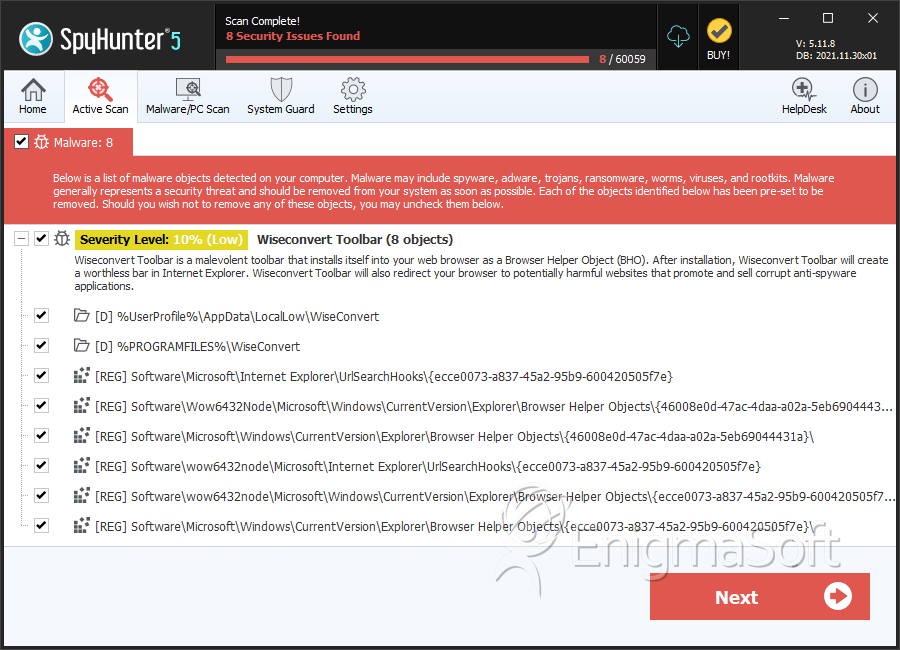
SpyHunter Detects & Remove WiseConvert Toolbar
Registry Details
Directories
WiseConvert Toolbar may create the following directory or directories:
| %PROGRAMFILES%\WiseConvert |
| %UserProfile%\AppData\LocalLow\WiseConvert |



