Windows XP System Repair
Threat Scorecard
EnigmaSoft Threat Scorecard
EnigmaSoft Threat Scorecards are assessment reports for different malware threats which have been collected and analyzed by our research team. EnigmaSoft Threat Scorecards evaluate and rank threats using several metrics including real-world and potential risk factors, trends, frequency, prevalence, and persistence. EnigmaSoft Threat Scorecards are updated regularly based on our research data and metrics and are useful for a wide range of computer users, from end users seeking solutions to remove malware from their systems to security experts analyzing threats.
EnigmaSoft Threat Scorecards display a variety of useful information, including:
Ranking: The ranking of a particular threat in EnigmaSoft’s Threat Database.
Severity Level: The determined severity level of an object, represented numerically, based on our risk modeling process and research, as explained in our Threat Assessment Criteria.
Infected Computers: The number of confirmed and suspected cases of a particular threat detected on infected computers as reported by SpyHunter.
See also Threat Assessment Criteria.
| Ranking: | 385 |
| Threat Level: | 20 % (Normal) |
| Infected Computers: | 55,093 |
| First Seen: | August 9, 2011 |
| Last Seen: | September 20, 2023 |
| OS(es) Affected: | Windows |
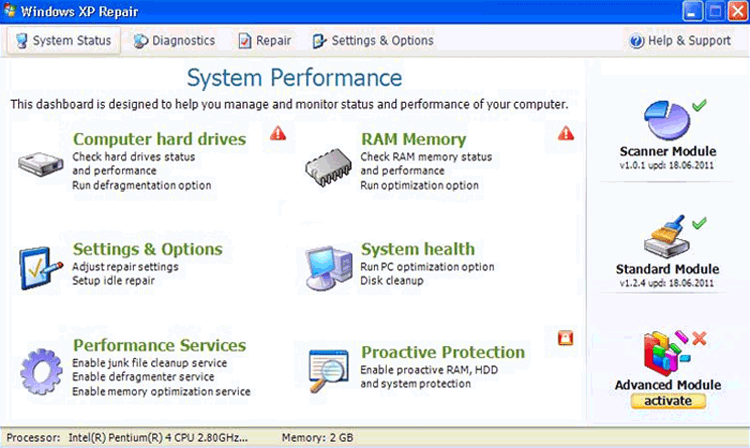
Windows XP System Repair Image
Windows XP System Repair is a counterfeit security program. Windows XP System Repair was designed by Internet fraudsters to mislead credulous PC users into believing their computers have been infected with several viruses and then persuade them into buying its commercial registered version to remove the detected infections.
Windows XP System Repair comes from the FakeSysDef family, the same family of bogus anti-spyware applications as System Defragmenter, Ultra Defragger, HDD Control, Win HDD, Win Defrag, Win Defragmenter, Disk Doctor, Hard Drive Diagnostic, HDD Diagnostic, HDD Plus, HDD Repair, HDD Rescue, Smart HDD, Defragmenter, HDD Tools, Disk Repair, Windows Optimization Center, Scanner, HDD Low, Hdd Fix.
When Windows XP System Repair is successfully installed on an infected PC, Windows XP System Repair runs a fraudulent system scan and shows falsified results to scare its victims that their machines are corrupted by several malware items. Windows XP System Repair also displays phony pop-up security messages to inform targeted PC users about their compromised computer security. Do not trust the false scan results and warning messages shown by Windows XP System Repair because they are generated with the only purpose to confuse you that your computer is at risk and rip you off by convincing you to purchase its nonexistent licensed version. PC threat researchers at ESG highly recommend you to remove Windows XP System Repair instantly after detection by using a trustworthy security tool.
Table of Contents
File System Details
| # | File Name |
Detections
Detections: The number of confirmed and suspected cases of a particular threat detected on
infected computers as reported by SpyHunter.
|
|---|---|---|
| 1. | %TempDir%\[RANDOM CHARACTERS].exe | |
| 2. | %Desktop%\Windows XP System Repair.lnk | |
| 3. | %TempDir%\dfrgr | |
| 4. | %Programs%\Windows XP System Repair\Windows XP System Repair.lnk | |
| 5. | %TempDir%\dfrg | |
| 6. | %Programs%\Windows XP System Repair | |
| 7. | %TempDir%\[RANDOM CHARACTERS] |
Registry Details
URLs
Windows XP System Repair may call the following URLs:
| popcash.net |




