Windows Security Renewal
Threat Scorecard
EnigmaSoft Threat Scorecard
EnigmaSoft Threat Scorecards are assessment reports for different malware threats which have been collected and analyzed by our research team. EnigmaSoft Threat Scorecards evaluate and rank threats using several metrics including real-world and potential risk factors, trends, frequency, prevalence, and persistence. EnigmaSoft Threat Scorecards are updated regularly based on our research data and metrics and are useful for a wide range of computer users, from end users seeking solutions to remove malware from their systems to security experts analyzing threats.
EnigmaSoft Threat Scorecards display a variety of useful information, including:
Ranking: The ranking of a particular threat in EnigmaSoft’s Threat Database.
Severity Level: The determined severity level of an object, represented numerically, based on our risk modeling process and research, as explained in our Threat Assessment Criteria.
Infected Computers: The number of confirmed and suspected cases of a particular threat detected on infected computers as reported by SpyHunter.
See also Threat Assessment Criteria.
| Threat Level: | 100 % (High) |
| Infected Computers: | 6 |
| First Seen: | July 19, 2012 |
| Last Seen: | January 8, 2020 |
| OS(es) Affected: | Windows |
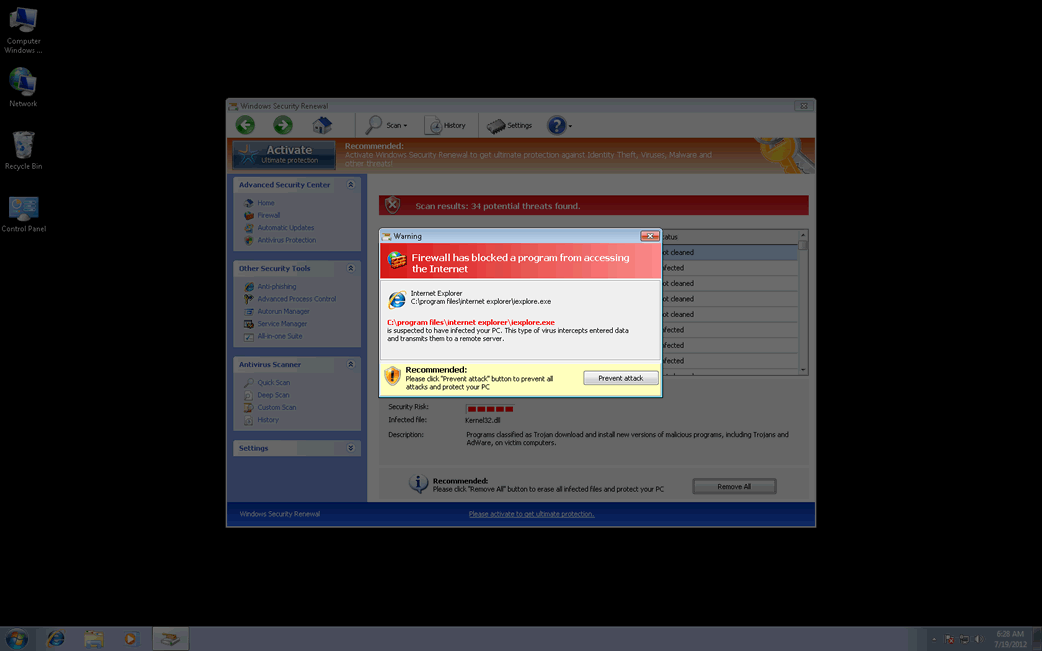
Windows Security Renewal Image
Windows Security Renewal is one of the dozens of variants of the infamous FakeVimes family of malware. These fake security programs have been active since 2009. However, since early 2012, there have been numerous reports of FakeVimes-related outbreaks all around the world. This comeback of the FakeVimes family of malware may be due to its associated malware. Although the FakeVimes rogue security programs themselves have not changed much since 2009, in 2012 criminals started bundling these malicious bogus anti-virus programs with a variant in the Sirefef family of rootkits. This makes Windows Security Renewal and its many clones particularly resilient to removal and detection. To remove Windows Security Renewal, ESG security analysts strongly recommend the use of an anti-rootkit tool coupled with an advanced anti-malware application.
Some examples of clones of Windows Security Renewal include programs with names like Virus Melt, Presto TuneUp, Fast Antivirus 2009, Extra Antivirus, Windows Security Suite, Smart Virus Eliminator, Packed.Generic.245, Volcano Security Suite, Windows Enterprise Suite, Enterprise Suite, Additional Guard, PC Live Guard, Live PC Care, Live Enterprise Suite, Security Antivirus, My Security Wall, CleanUp Antivirus, Smart Security, Windows Protection Suite, Windows Work Catalyst.
Windows Security Renewal is designed to carry out a common online scam. Basically, what Windows Security Renewal intends is to persuade its victims that their PCs are infected with all kinds of harmful malware while posing as a legitimate security program. However, any attempt to use Windows Security Renewal to fix these supposed malware infections will result in error messages claiming that an expensive 'upgrade' for Windows Security Renewal is needed in order to handle this nonexistent problem. Since Windows Security Renewal has no actual way of detecting or removing malware and is actually a kind of malware threat itself, ESG security analysts recommend against paying for Windows Security Renewal and recommend its immediate removal. Windows Security Renewal will harass its victims constantly with alarming error messages, browser redirects, and a variety of other symptoms.
Table of Contents
Getting Rid of a Windows Security Renewal Infection
Manual removal of Windows Security Renewal is definitely not recommended, especially because malware in the Sirefef family can reinstall itself if removed incorrectly and can even irrevocably damage your operating system due to the sensitive areas that are infected. Instead, an advanced anti-malware tool should be used to take care of a Windows Security Renewal infection. The registration code 0W000-000B0-00T00-E0020 can help you stop many of Windows Security Renewal's irritating behaviors in order to facilitate removal, although the use of this code should not be considered as an effective or permanent solution to a Windows Security Renewal infection.
SpyHunter Detects & Remove Windows Security Renewal
Windows Security Renewal Video
Tip: Turn your sound ON and watch the video in Full Screen mode.
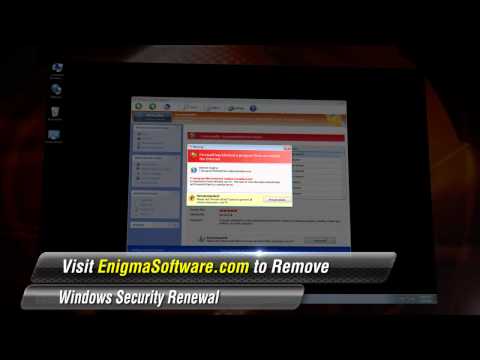
File System Details
| # | File Name | MD5 |
Detections
Detections: The number of confirmed and suspected cases of a particular threat detected on
infected computers as reported by SpyHunter.
|
|---|---|---|---|
| 1. | Protector-weeb.exe | 44ee30424f0bfce281bb5d4c78695831 | 1 |
| 2. | %AppData%/Protector-[rnd].exe |



