Searchya! Toolbar
Threat Scorecard
EnigmaSoft Threat Scorecard
EnigmaSoft Threat Scorecards are assessment reports for different malware threats which have been collected and analyzed by our research team. EnigmaSoft Threat Scorecards evaluate and rank threats using several metrics including real-world and potential risk factors, trends, frequency, prevalence, and persistence. EnigmaSoft Threat Scorecards are updated regularly based on our research data and metrics and are useful for a wide range of computer users, from end users seeking solutions to remove malware from their systems to security experts analyzing threats.
EnigmaSoft Threat Scorecards display a variety of useful information, including:
Popularity Rank: The ranking of a particular threat in EnigmaSoft’s Threat Database.
Severity Level: The determined severity level of an object, represented numerically, based on our risk modeling process and research, as explained in our Threat Assessment Criteria.
Infected Computers: The number of confirmed and suspected cases of a particular threat detected on infected computers as reported by SpyHunter.
See also Threat Assessment Criteria.
| Popularity Rank: | 8,643 |
| Threat Level: | 50 % (Medium) |
| Infected Computers: | 21,425 |
| First Seen: | April 29, 2014 |
| Last Seen: | November 28, 2025 |
| OS(es) Affected: | Windows |
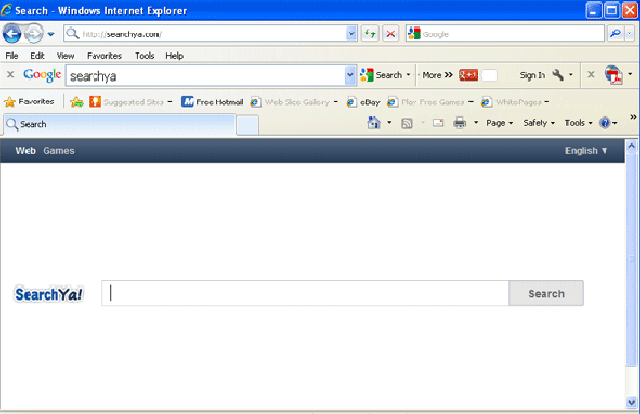
Searchya! Toolbar Image
Classified as adware, the Searchya! Toolbar is used to deliver advertisements to computer users, often in the form of pop-up windows and browser redirects. Carrying out a search on Searchya! Toolbar's associated search engine will usually result in low-quality search results replete with advertisements and links to websites containing unsafe content. Even though Searchya! Toolbar's website supposedly contains uninstall instructions, this adware infection may not be easy to remove and will usually require the help of a reliable anti-malware program.
Although the main symptoms of a browser hijacker infection associated with the Searchya.com website is the presence of the Searchya! Toolbar itself, there are several symptoms that point to the fact that Searchya! Toolbar is not a reliable web browser add-on:
- The presence of the Searchya! Toolbar on your computer may usually result in poor computer performance.
- Attempting to remove Searchya! Toolbar manually may usually result in error messages, crashes, or in the Searchya! Toolbar being reinstalled automatically when the infected web browser starts up again.
- Your web browser's homepage may have been changed to Searchya.com without your authorization. Your default search engine and favorite websites may also have been altered as well.
- The Searchya! Toolbar may usually cause the infected web browser to display fake error messages and pop-up alerts from the Windows Task Bar.
- Unfortunately, the Searchya! Toolbar will rarely attack alone. If the Searchya! Toolbar is installed on your computer, then it is probable that your machine has become infected with other kinds of malware threats.
Removing the Searchya! Toolbar from your computer will usually require an updated anti-malware program. Since Searchya! Toolbar will often be associated with other malware threats, ESG security researchers advise scanning your hard drives to make sure that other malware infections have not entered your computer. The Searchya! Toolbar makes modifications to the Windows Registry and to your computer's settings. Because of this, simply reinstalling you web browser or changing from one web browser to another will do nothing to stop symptoms associated with the Searchya! Toolbar.
Table of Contents
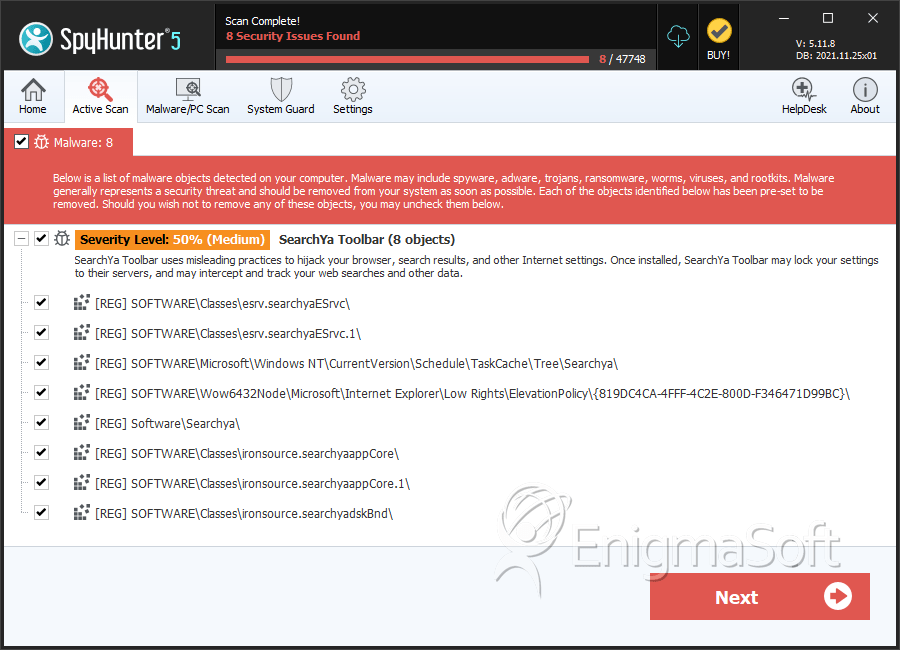
SpyHunter Detects & Remove Searchya! Toolbar
File System Details
| # | File Name | MD5 |
Detections
Detections: The number of confirmed and suspected cases of a particular threat detected on
infected computers as reported by SpyHunter.
|
|---|---|---|---|
| 1. | searchyasrv.exe | 78301801b3ac5cd6cefed6621ebc9509 | 35 |
| 2. | SearchYaSetup_2.2.1.503.1.exe | 2ded70f1dc6a6dae4bbb4443c4a95fbf | 1 |
| 3. | SearchYaLatest.exe | 33f3b03bca3e1e3e0e8ae21b5c002d53 | 1 |
| 4. | searchya.dll | f75e099cd9316054e1ecab04749e076a | 1 |
| 5. | C:\Program Files\SearchYa!\1.5.20.0\searchyaApp.dll | ||
| 6. | C:\Program Files\SearchYa!\1.5.20.0\escortShld.dll | ||
| 7. | C:\Program Files\SearchYa!\1.5.20.0\searchyaTlbr.dll | ||
| 8. | C:\Program Files\SearchYa!\1.5.20.0\bh\searchya.dll | ||
| 9. | C:\Program Files\SearchYa!\1.5.20.0\searchyaEng.dll | ||
| 10. | C:\Program Files\SearchYa!\1.5.20.0\FavIcon | ||
| 11. | C:\Program Files\SearchYa!\1.5.20.0\searchyasrv | ||
| 12. | C:\Program Files\SearchYa!\1.5.20.0\uninstall |
Registry Details
Directories
Searchya! Toolbar may create the following directory or directories:
| %PROGRAMFILES%\Ironsource\searchya |
| %PROGRAMFILES%\SearchYa! |
| %PROGRAMFILES(x86)%\Ironsource\searchya |
| %PROGRAMFILES(x86)%\SearchYa! |


