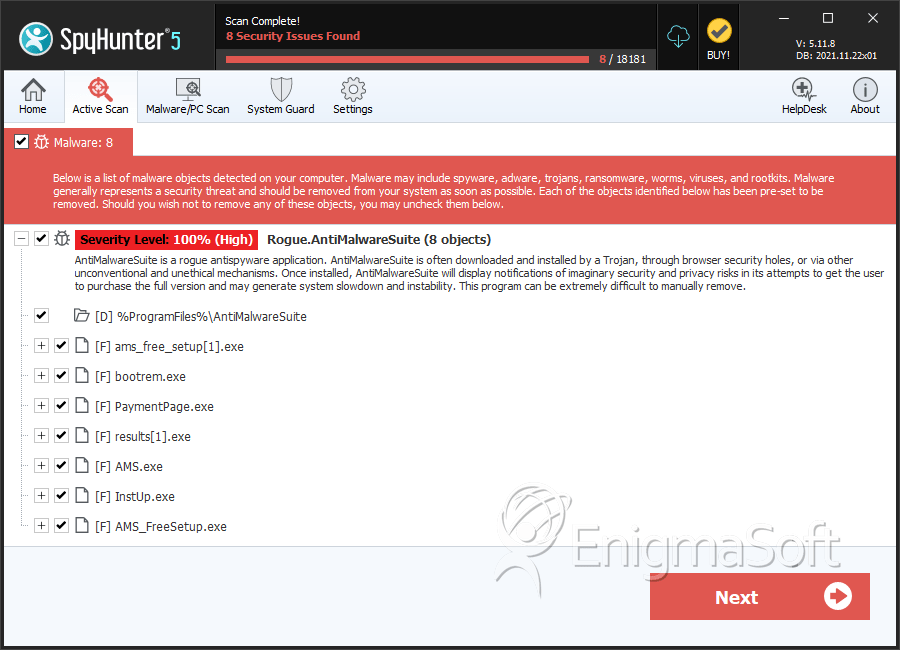
AntiMalwareSuite

Sumo3000 By Sumo3000 in Rogue Anti-Spyware Program | 0 views
Rate it:
1 Star2 Stars3 Stars4 Stars5 Stars (No Ratings Yet)
Loading ... Loading ...

AntiMalwareSuite Description

AntiMalwareSuite or Anti Malware Suite disguises itself as a legitimate security tool by conducting fake system scans and displaying warnings. AntiMalwareSuite comes from the same family as Cleaner 2009 and is often distributed by Trojans such as Zlob or Vundo. In addition to displaying fake security warnings, AntiMalwareSuite will also cause a system to operate slower and possibly put a victim’s private information at risk. AntiMalwareSuite cannot detect or remove any type of computer threat; therefore it should be removed immediately after detection.

Type: Rogue AntiSpyware Programs

How Can You Detect AntiMalwareSuite?


Download SpyHunter’s Detection Scanner
to Detect AntiMalwareSuite.


AntiMalwareSuite Technical Report

As new AntiMalwareSuite details are reported by our customers and findings from our Threat Research Center, we will update this section.

The following AntiMalwareSuite files with its MD5s were created in the system:

File Name File Size MD5
InstUp.exe 558799 e7d56e2635338b7e690075010419ce4b
bootrem.exe 4096 6abfb7cc63f33001a4d930ef315ea685
AMS.exe 2588672 86b210eb95ff9aa3f28077d3df88d82a
results[1].exe 18651 e866ee2af73b5d27cf4ba5b3bdcb1c05
AMS_FreeSetup.exe 8420775 90ac68e3e5e357082461c867e1025541
PaymentPage.exe 303104 00f10b83e305c58f115973a5101de979
QuickInstallPack.exe 486912 1b3547dd446cbd757210d08d82cbf1a9
AMS_FreeInstaller[1].exe 486912 1b3547dd446cbd757210d08d82cbf1a9
ams_free_setup[1].exe 3325960 a02eb61321bb65778d32b8fb0382a8f3

AntiMalwareSuite has typically the following processes in memory:

  • c:\Program Files\AntiMalwareSuite\AsAgents.dll
  • c:\Program Files\AntiMalwareSuite\InstUp.exe
  • c:\Program Files\AntiMalwareSuite\shellext.dll
  • c:\WINDOWS\system32\bootrem.exe
  • %UserProfile%\Local Settings\Application Data\qip\iercpt.dll
  • AMS_FreeInstaller[1].exe
  • c:\Program Files\AntiMalwareSuite\AMS.exe
  • c:\Program Files\AntiMalwareSuite\mfc71.dll
  • c:\Program Files\AntiMalwareSuite\msvcr71.dll
  • c:\Program Files\AntiMalwareSuite\UserAgent.dll
  • %UserProfile%\Local Settings\Application Data\qip\QuickInstallPack.exe
  • AMS_FreeSetup.exe
  • ams_free_setup[1].exe
  • c:\Program Files\AntiMalwareSuite\PaymentPage.exe
  • c:\Program Files\AntiMalwareSuite\atl71.dll
  • c:\Program Files\AntiMalwareSuite\msvcp71.dll
  • c:\Program Files\AntiMalwareSuite\unins000.exe
  • c:\Program Files\Mozilla Firefox\plugins\nprcpt.dll
  • %UserProfile%\Local Settings\Temp\AMS_FreeSetup.exe
  • QuickInstallPack.exe

AntiMalwareSuite created the following directories, files, paths:

  • %ProgramFiles%\AntiMalwareSuite
  • %AllUsersProfile%\Start Menu\Programs\AntiMalwareSuite
  • %AllUsersProfile%\Application Data\AntiMalwareSuite

AntiMalwareSuite creates the following registry entries:

  • HKEY_CLASSES_ROOT\iercpt.iercptbho.1
  • HKEY_CLASSES_ROOT\AppID\iercpt.DLL
  • HKEY_CLASSES_ROOT\AppID\{3A9377A6-BE7F-485D-908C-D44114691389}
  • HKEY_CLASSES_ROOT\CLSID\{4567AB12-EDED-4675-AF10-BA15EDDB4D7A}
  • HKEY_CLASSES_ROOT\TypeLib\{4567AB12-AE24-4FD6-B479-E2B464F32DA6}
  • HKEY_LOCAL_MACHINE\SOFTWARE\Microsoft\Windows\CurrentVersion\Uninstall\AMS_is1
  • HKEY_CURRENT_USER\Software\Microsoft\Windows\CurrentVersion\Run “QuickInstallPack”
  • HKEY_LOCAL_MACHINE\SOFTWARE\Microsoft\Windows\CurrentVersion\Internet Settings\5.0\User Agent\Post Platform “UAMS 4.1.221.0″
  • HKEY_CLASSES_ROOT\iercpt.iercptbho
  • HKEY_CLASSES_ROOT\amshellext.ShellHook.1
  • HKEY_CLASSES_ROOT\Interface\{4567AB12-A884-4CA6-B739-CEDB12FEF096}
  • HKEY_CLASSES_ROOT\CLSID\{D4CDC21D-43BE-4101-A1EF-E379F134771E}
  • HKEY_CLASSES_ROOT\TypeLib\{A6FBD2E4-1C7E-4EAB-80DD-01DE2645566A}
  • HKEY_CLASSES_ROOT\washellext.WASContextMenu.1
  • HKEY_LOCAL_MACHINE\SOFTWARE\Microsoft\Windows\CurrentVersion\Explorer\Browser Helper Objects\{D4CDC21D-43BE-4101-A1EF-E379F134771E}
  • HKEY_LOCAL_MACHINE\SOFTWARE\Microsoft\Windows\CurrentVersion\Explorer\ShellExecuteHooks “{4ADD95DA-B25D-4D21-9C5C-05FC6DE05860}”
  • 4ADD95DA-B25D-4d21-9C5C-05FC6DE05860
  • HKEY_CURRENT_USER\Software\AntiMalwareSuite
  • HKEY_CLASSES_ROOT\amshellext.ShellHook
  • HKEY_CLASSES_ROOT\Interface\{59C345BA-3D5E-44E3-9D10-D3848AF15D73}
  • HKEY_CLASSES_ROOT\CLSID\{4ADD95DA-B25D-4d21-9C5C-05FC6DE05860}
  • HKEY_CLASSES_ROOT\TypeLib\{4567AB12-7DFC-4C46-BD8F-41259D169A0D}
  • HKEY_CLASSES_ROOT\washellext.WASContextMenu
  • HKEY_LOCAL_MACHINE\SOFTWARE\Microsoft\Windows\CurrentVersion\Uninstall\QuickInstallPack
  • HKEY_LOCAL_MACHINE\SOFTWARE\Microsoft\Windows\CurrentVersion\Run “AntiMalwareSuite”
  • SOFTWARE\Microsoft\Windows\CurrentVersion\Explorer\ShellExecuteHooks\4ADD95DA-B25D-4D21-9C5C-05FC6DE05860

Important Article Disclaimer

ESG Support Center

Share and Enjoy: These icons link to social bookmarking sites where readers can share and discover new web pages.
  • Digg
  • del.icio.us
  • Furl
  • StumbleUpon
  • Technorati
  • YahooMyWeb
This entry was posted on 12/31/09 and is filed under Rogue Anti-Spyware Program. You can follow any responses to this entry through the RSS 2.0 feed. You can leave a response, or trackback from your own site.

Leave a Comment

Note: Abusive comments are not allowed. Please do not post comments regarding technical support issues. ESG customers that have issues with SpyHunter should open a customer support ticket.

*
To prove you're a person (not a spam script), type the security word shown in the picture. Click on the picture to hear an audio file of the word.
Click to hear an audio file of the anti-spam word

Poll

How much money have you spent trying to rid your PC of spyware?
View Results
Follow Us on Twitter

Archives

Home Sitemap RSS Feed Privacy Policy End User License Agreement Copyright 2003-2010. Enigma Software Group USA, LLC. All Rights Reserved.