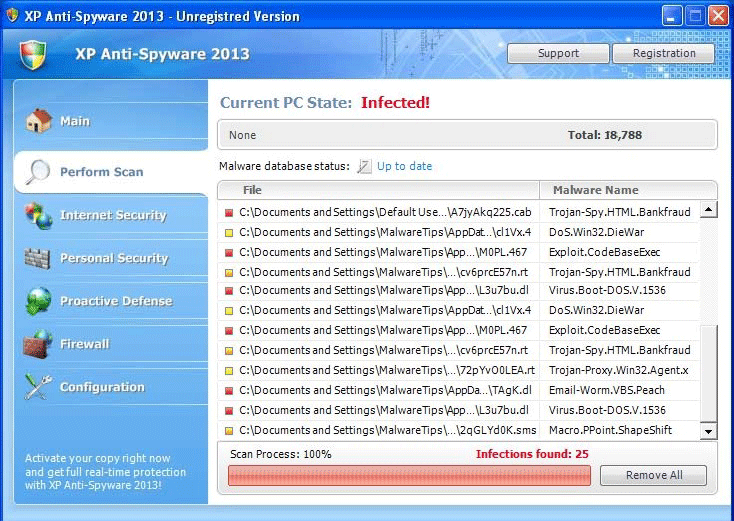
XP Antispyware 2013 is a fake anti-spyware application that is created by cybercriminals to intimidate victims into believing their computers have been infected with numerous security infections. XP Antispyware 2013 attempts to convince PC users to buy the imaginary full version of scareware. The main problem with XP Antispyware 2013 is that its full edition will not protect the computer from real malware threats. Although the name and interface of XP Antispyware 2013 may sound and look trustworthy, XP Antispyware 2013 will not secure the PC and fix computer problems. XP Antispyware 2013 could be bundled with a Trojan that is downloaded from malicious websites. Trojans take advantage of security holes and other system vulnerabilities to enter the targeted computer. XP Antispyware 2013 attempts to persuade victims to purchase scamware and gain credit card details to steal money. After installation, XP Antispyware 2013 will launch fictitious system scans and display pop-up warning messages. XP Antispyware 2013 will create false PC scan results to frighten you into thinking your computer is corrupted by malware. To delete XP Antispyware 2013 and the Trojan associated with it, ESG's malware research team advises you to use a legitimate malware removal tool that deals with rogue anti-spyware programs.
Table of Contents
File System Details
XP Antispyware 2013 may create the following file(s):
HKEY_CURRENT_USER\Software\Classes\\shell\open\command "(Default)" = "%LocalAppData%\.exe" -a "%1" %*
HKEY_CLASSES_ROOT\.exe\shell\open\command "(Default)" = "%LocalAppData%\.exe" -a "%1" %*
HKEY_LOCAL_MACHINE\SOFTWARE\Clients\StartMenuInternet\FIREFOX.EXE\shell\safemode\command "(Default)" = ""%LocalAppData%\.exe" -a "C:\Program Files\Mozilla Firefox\firefox.exe" -safe-mode"
HKEY_CURRENT_USER\Software\Classes\.exe\shell\open\command "(Default)" = "%LocalAppData%\.exe" -a "%1" %*
HKEY_CLASSES_ROOT\
HKEY_CLASSES_ROOT\ah\shell\open\command "(Default)" = "%LocalAppData%\.exe" -a "%1" %*
HKEY_LOCAL_MACHINE\SOFTWARE\Clients\StartMenuInternet\IEXPLORE.EXE\shell\open\command "(Default)" = ""%LocalAppData%\.exe" -a "C:\Program Files\Internet Explorer\iexplore.exe""
Messages
The following messages associated with XP Antispyware 2013 were found:
Security Breach!
Beware! Spyware infection was found. Your system security is at risk. Private information may get stolen, and your PC activity may get monitored. Click for and anti-spyware scan.
Severe system damage!
Your system security is in danger. Privacy threats detected. Spyware, keyloggers or Trojans may be working in the background right now. Perform an in-depth scan and removal now, click here.
Stealth intrusion!
Infection detected in the background. Your computer is now attacked by spyware and rogue software. Eliminate the infection safely, perform a security scan and deletion now.
System danger!
Your system security is in danger. Privacy threats detected. Spyware, keyloggers or Trojans may be working in the background right now. Perform an in-depth scan and removal now, click here.
System hacked!
Unknown program is scanning your system registry right now! Identity theft detected!
System hijack!
System security threat was detected. Viruses and/or spyware may be damaging your system now. Prevent infection and data loss or stealing by running a free security scan.
Threat detected!
Security alert! Your computer was found to be infected with Trojan-BNK.Win32.Keylogger.gen! Private data may get stolen and system may be severe. Recover your PC from the infection right now, perform a security scan.
Virus infection!
System security was found to be compromised. Your computer is now infected. Attention, irreversible system changes may occur. Private data may get stolen. Click here now for an instant anti-virus scan.
You made some really good points there. I looked on the internet for more info about the issue and found most individuals will go along with your views on this site.
Great post. I was checking constantly this weblog and I am impressed! Extremely useful info specifically the ultimate part 🙂 I care for such information a lot. I was looking for this particular info for a very lengthy time. Thanks and best of luck.
You would think these cyber criminals would come up with a less generic name than XP antispyware 2013. They found a money pit by exploiting computer users. Is there any type of justice system to punish these cyber criminals?
Your comment is awaiting moderation.
Please verify that you are not a robot.
Submit Comment
Please DO NOT use this comment system for support or billing questions.
For SpyHunter technical support requests, please contact our technical support team
directly by opening a customer support ticket via
your SpyHunter. For billing issues, please refer to our "Billing
Questions or Problems?" page. For general inquiries (complaints, legal, press, marketing, copyright), visit our
"Inquiries and Feedback" page.
Enigmasoftware.com uses cookies to provide you with a better browsing experience and analyze how users navigate and utilize the Site. By using this Site or clicking on "OK", you consent to the use of cookies. Learn more.