WinWebSec
Threat Scorecard
EnigmaSoft Threat Scorecard
EnigmaSoft Threat Scorecards are assessment reports for different malware threats which have been collected and analyzed by our research team. EnigmaSoft Threat Scorecards evaluate and rank threats using several metrics including real-world and potential risk factors, trends, frequency, prevalence, and persistence. EnigmaSoft Threat Scorecards are updated regularly based on our research data and metrics and are useful for a wide range of computer users, from end users seeking solutions to remove malware from their systems to security experts analyzing threats.
EnigmaSoft Threat Scorecards display a variety of useful information, including:
Popularity Rank: The ranking of a particular threat in EnigmaSoft’s Threat Database.
Severity Level: The determined severity level of an object, represented numerically, based on our risk modeling process and research, as explained in our Threat Assessment Criteria.
Infected Computers: The number of confirmed and suspected cases of a particular threat detected on infected computers as reported by SpyHunter.
See also Threat Assessment Criteria.
| Threat Level: | 100 % (High) |
| Infected Computers: | 2,830 |
| First Seen: | July 24, 2009 |
| Last Seen: | May 6, 2024 |
| OS(es) Affected: | Windows |
WinWebSec is a well-known group of rogue security applications. Like most rogue security programs, WinWebSec programs are designed to scam computer users by convincing them to purchase fake anti-virus applications. WinWebSec applications are disguised as anti-virus software but are actually designed to display fake error messages and to mislead the victim into thinking that their PCs are severely infected. ESG malware analysts strongly advise against paying for any anti-virus program in the WinWebSec family of malware. WinWebSec programs have no way of protecting your computer system from malware and actually wreak havoc on the victim's computer system.
Malware in the WinWebSec family has been around for a long time, since at least 2009. Typically, these fake applications are delivered by a Trojan infection and are often one component of a multi-component malware attack. Trojans associated with the WinWebSec family will often be distributed through spam email, malicious advertisements for online malware scanners, or attack websites designed to infect your computer system with malware with the help of exploits. Examples of fake anti-virus products in the WinWebSec family of malware include Security Sphere 2012, Security Shield, Smart Fortress 2012, Essential Cleaner, Antispyware Pro 2009 and Winweb Security.
Table of Contents
Identifying and Dealing with a WinWebSec-Related Malware Infection
Fake security products in the WinWebSec family tend to include interfaces with a pink hue, layouts that are identical from one program to another, and phrases that are repeated from one WinWebSec clone to another (for example: Get full real-time protection with [NAME]). Malware programs in the WinWebSec family also share their attack pattern, displaying similar bogus error messages, pop-up notifications from the Taskbar and similar fake computer scans from one clone to another. Since all of these are created to frighten you into thinking that you need to purchase a 'full version' of the WinWebSec program, ESG malware analysts strongly recommend against taking action based on the rogue security application's claims. Instead, remove WinWebSec application with a strong anti-malware program immediately.
Malware infections in the WinWebSec family often have the capacity to render inoperative legitimate security tools in order to protect themselves. WinWebSec malware programs can also block access to certain files and cause browser redirects. Because of this, to remove a WinWebSec program, it is often necessary to start up the infected computer system from a removable memory device, from a shared drive or in Safe Mode (often by hitting the F8 key while Windows starts up).
Aliases
15 security vendors flagged this file as malicious.
| Antivirus Vendor | Detection |
|---|---|
| AVG | Agent_s.N |
| Fortinet | W32/ZAccess.GVH!tr.bdr |
| Ikarus | Backdoor.Win32.ZAccess |
| Microsoft | TrojanDropper:Win32/Sirefef.B |
| AntiVir | TR/Drop.Sirefef.B.589 |
| BitDefender | Gen:Variant.Kazy.66870 |
| Kaspersky | Backdoor.Win32.ZAccess.gvh |
| Avast | Win32:Sirefefs-A [Drp] |
| NOD32 | a variant of Win32/Kryptik.AEND |
| McAfee | Generic BackDoor!1o3 |
| AVG | Dropper.Generic5.BMYQ |
| Fortinet | W32/VBKrypt.HYZX!tr |
| AhnLab-V3 | Trojan/Win32.Buzus |
| Microsoft | Backdoor:Win32/Xtrat.A |
| AntiVir | TR/Kazy.56364.1 |
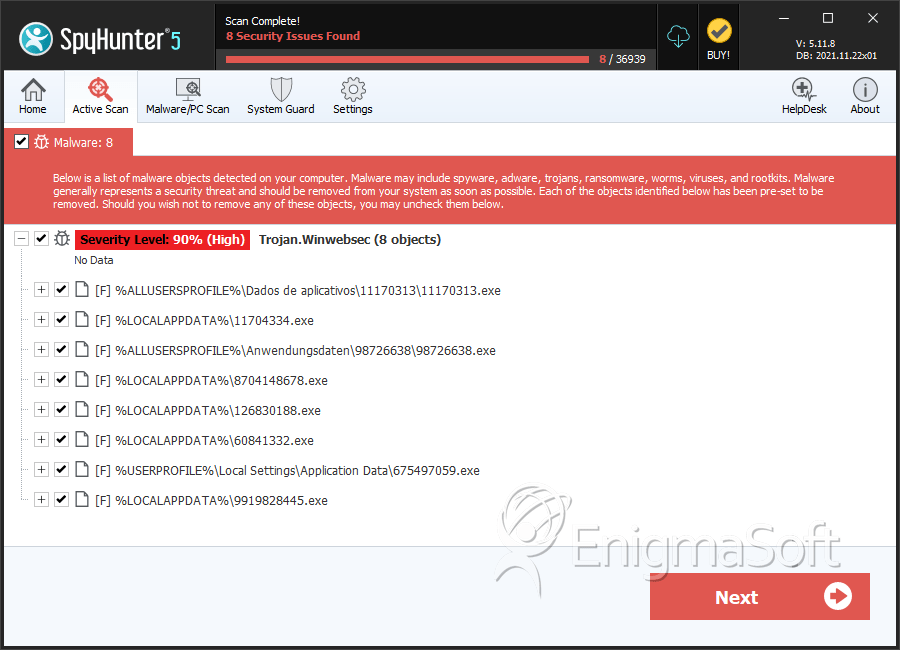
SpyHunter Detects & Remove WinWebSec
File System Details
| # | File Name | MD5 |
Detections
Detections: The number of confirmed and suspected cases of a particular threat detected on
infected computers as reported by SpyHunter.
|
|---|---|---|---|
| 1. | C084297E69DD51850000C083690157DC.exe | df316d4f1d8313785f7de0aff89a6546 | 5 |
| 2. | E886D5C4DBA574CD0000E885ED487E5D.exe | 7b705777bc59738c15db129904a39f18 | 4 |
| 3. | 6CDA4F2809F84C7D00006CD9E25250A6.exe | 6bdd9f02ce89008fc6a127e68e992e80 | 3 |
| 4. | 0CCB2B51F070EFC400000CCB1E8AF3E6.exe | 068e9d3fe03841b7aa2eca8516f78a0a | 3 |
| 5. | E87EDBA94E40B0B70000E87DF32FB511.exe | 4b6ba79dfcbbd8a7cda8e276793c7179 | 2 |
| 6. | D429B1DCC0ED729B0000D428DDBB7A32.exe | dc12e5fffa010555d2867d8912d2cd4e | 2 |
| 7. | ajwgcglm.exe | b422ece42f844728ea808680f6a19d41 | 2 |
| 8. | lsjqxwra.exe | 28fdc29b2083b01d9d9faefab350c40f | 2 |
| 9. | rrexqmmh.exe | f80286d81ea5330b6277d072406c8edd | 2 |
| 10. | 7638FE76B04E1A12000076388844200A.exe | cc4d5b5aed3e5a3eb96cb79413c0dafb | 2 |
| 11. | C0C1D9F64CCE437F0000C0C1193A4894.exe | dc976e361d5ae8cbda93bb2a418a3152 | 2 |
| 12. | Win8Security_scanner[1].exe | 5678bb4b106a4d292d08fd0d359742cc | 2 |
| 13. | 34C60DFAA7B1B483000034C5D93EBE73.exe | 30697b763ffa6ca491d8249464d1b2c1 | 1 |
| 14. | wlplxbokp.exe | 68c4a15b5885044fa971424f77dc7e9e | 1 |
| 15. | 6458EC6D570DF6C7000064588819FBF4.exe | 2f3b14b2154e531009a5454b26a1707b | 1 |
| 16. | 791640.exe | 1f7d54dc6c9839fec677a31a4002aa19 | 1 |
| 17. | 60F2A687DCF73AB1000060F2459C415B.exe | 9d5583f271bde36afdb76d2088184f36 | 1 |
| 18. | 968EC5D5A92286C40000968E2F4C8BD6.exe | aa0b15e21531946dd9583b15a7aba422 | 1 |
| 19. | 5489386A0CF9DA6000005488E3E4DE15.exe | fb2aaf1230c6fdaadfc8e63523244f03 | 1 |
| 20. | 02530A2159B9A8880000025307D4AEE5.exe | 2b4af3569b14c09df5c0bb75978b2bb4 | 1 |
| 21. | B85F0219B93F7D6A0000B85E49C1837E.exe | 22104bd74a887c406e1c98f174283bf5 | 1 |
| 22. | raknwrnl.exe | e541a8c10fdd06fd90048adcdd35f21b | 1 |
| 23. | 82A03F5D6334EE270000829FBCC1F273.exe | 4b6e5e03e4468e20e9b49f71c8cd7030 | 1 |
| 24. | 2678437.exe | 064b73dfc8957ffc4c9171b2854ac6cb | 1 |
| 25. | 2204.tmp | 064984de6c802644c6aba8ccfa7f29de | 1 |