VirusSecurity
Threat Scorecard
EnigmaSoft Threat Scorecard
EnigmaSoft Threat Scorecards are assessment reports for different malware threats which have been collected and analyzed by our research team. EnigmaSoft Threat Scorecards evaluate and rank threats using several metrics including real-world and potential risk factors, trends, frequency, prevalence, and persistence. EnigmaSoft Threat Scorecards are updated regularly based on our research data and metrics and are useful for a wide range of computer users, from end users seeking solutions to remove malware from their systems to security experts analyzing threats.
EnigmaSoft Threat Scorecards display a variety of useful information, including:
Ranking: The ranking of a particular threat in EnigmaSoft’s Threat Database.
Severity Level: The determined severity level of an object, represented numerically, based on our risk modeling process and research, as explained in our Threat Assessment Criteria.
Infected Computers: The number of confirmed and suspected cases of a particular threat detected on infected computers as reported by SpyHunter.
See also Threat Assessment Criteria.
| Ranking: | 16,349 |
| Threat Level: | 80 % (High) |
| Infected Computers: | 283 |
| First Seen: | November 28, 2011 |
| Last Seen: | September 2, 2023 |
| OS(es) Affected: | Windows |
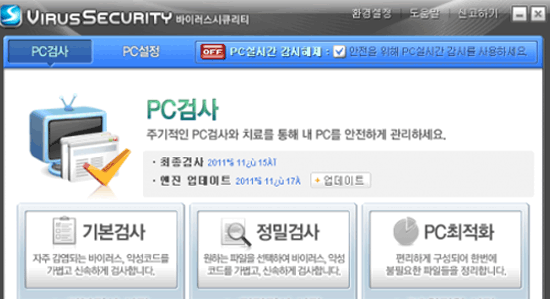
VirusSecurity Image
VirusSecurity is a fake security program that is a fairly typical example of a classic infection. Rogue security programs are false anti-virus or defragmenter programs that are designed to scam their victims rather than to repair a computer system. VirusSecurity, a member of the FakeVimes family operates in exactly the same way as the most popular rogue security programs and should be removed from your computer system immediately. According to ESG security researchers, VirusSecurity is of Korean origin, and its interface and array of fake system alerts are also in Korean. This may make it especially frustrating for its victims with no knowledge of the Korean language, as they may find a new presence on their computer, displaying messages that are incomprehensible to a person not familiar with Korean.
However, if you have handled files of Korean origin, visited servers located in Korea or received suspicious emails in Korean only to find that a new program has been installed onto your computer system (displaying an interface entirely in Korean), you can be sure that your computer has become infected with a dangerous Trojan. VirusSecurity should be treated as one would treat any other malware infection, regardless of its origin. ESG security researchers strongly recommend using a reliable anti-virus application to remove VirusSecurity automatically. While manual removal of VirusSecurity is possible, automatic removal ensures that your computer will not become reinfected with this threat, and will also catch all other malware associated with a VirusSecurity infection.
The VirusSecurity's family has numerous members, all of them clones of VirusSecurity. These members include Virus Melt, Presto TuneUp, Fast Antivirus 2009, Extra Antivirus, Windows Security Suite, Smart Virus Eliminator, Packed.Generic.245, Volcano Security Suite, Windows Enterprise Suite, Enterprise Suite, Additional Guard, PC Live Guard, Live PC Care, Live Enterprise Suite, Security Antivirus, My Security Wall, CleanUp Antivirus, Smart Security, Windows Protection Suite, Windows Work Catalyst.
Table of Contents
Protecting Your Computer System from VirusSecurity
Rogue security programs like VirusSecurity are usually associated with a Trojan infection. These malware infections are known as Trojans because they need the victim to download or install it. Unlike viruses or worms, most Trojans cannot spread by themselves and will usually rely on social engineering or a secondary application (usually known as a dropper), in order to infect a computer system. Because of this, learning safe browsing practices is essential in protecting yourself from malware such as VirusSecurity. While fully-updated security software will protect your computer, Trojans associated with VirusSecurity rely on the user to download and install them, bypassing the installed security software. To do this, they will usually be disguised as something else. Common places where you may find Trojans in disguise, include suspicious email attachments, codecs on pornographic video websites, popular file downloads on file sharing networks and fake system or application updates from a third party.
File System Details
| # | File Name |
Detections
Detections: The number of confirmed and suspected cases of a particular threat detected on
infected computers as reported by SpyHunter.
|
|---|---|---|
| 1. | C:\Program Files\VirusSecurity\VirusSecurityLaunch.exe | |
| 2. | %StartMenu%\VirusSecurity | |
| 3. | %ProgramFiles%\VirusSecurity |




