Virus Doctor
Threat Scorecard
EnigmaSoft Threat Scorecard
EnigmaSoft Threat Scorecards are assessment reports for different malware threats which have been collected and analyzed by our research team. EnigmaSoft Threat Scorecards evaluate and rank threats using several metrics including real-world and potential risk factors, trends, frequency, prevalence, and persistence. EnigmaSoft Threat Scorecards are updated regularly based on our research data and metrics and are useful for a wide range of computer users, from end users seeking solutions to remove malware from their systems to security experts analyzing threats.
EnigmaSoft Threat Scorecards display a variety of useful information, including:
Ranking: The ranking of a particular threat in EnigmaSoft’s Threat Database.
Severity Level: The determined severity level of an object, represented numerically, based on our risk modeling process and research, as explained in our Threat Assessment Criteria.
Infected Computers: The number of confirmed and suspected cases of a particular threat detected on infected computers as reported by SpyHunter.
See also Threat Assessment Criteria.
| Ranking: | 15,658 |
| Threat Level: | 100 % (High) |
| Infected Computers: | 51 |
| First Seen: | July 24, 2009 |
| Last Seen: | May 6, 2024 |
| OS(es) Affected: | Windows |
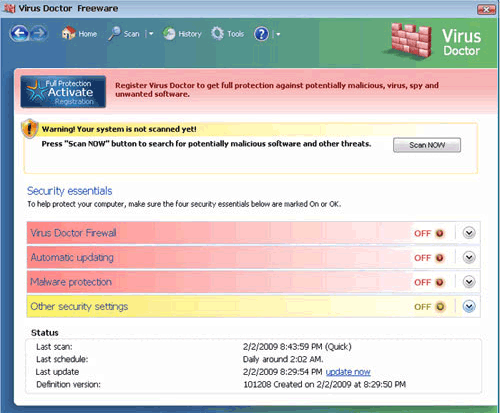
Virus Doctor Image
Virus Doctor is a fake anti-virus application that is a textbook example of how rogue anti-virus programs attacks are able to steal money from their victims. Virus Doctor is linked to the website virus-doctor.com, where victims are instructed to enter their credit card information in exchange for a 'full version' of this useless application. Virus Doctor, first seen in 2009, is one of the first members of a very large family of rogue anti-virus programs. In fact, new members of the Virus Doctor family, the FakeVimes family of rogue anti-virus programs are detected every day. Fortunately, Virus Doctor's age and reputation make it reasonably easy to deal with since most legitimate security programs will have a detailed account of how the Virus Doctor infection works and how to remove it.
Some of the many known clones of Virus Doctor include older fake security programs like Virus Melt, Presto TuneUp, Fast Antivirus 2009, Extra Antivirus, Windows Security Suite, Smart Virus Eliminator, Packed.Generic.245, Volcano Security Suite, Windows Enterprise Suite, Enterprise Suite, Additional Guard, PC Live Guard, Live PC Care, Live Enterprise Suite, Security Antivirus, My Security Wall, CleanUp Antivirus, Smart Security, Windows Protection Suite, Windows Work Catalyst.
Table of Contents
If You Want Your PC to Stay Healthy, Definitely Avoid a Check-Up with Virus Doctor
Like most rogue anti-virus programs, Virus Doctor claims that Virus Doctor can carry out all kinds of advanced security tasks, such as monitoring your firewall, downloads and system security. These are all lies – ESG security analysts have found that Virus Doctor has no way to remove or detect malware. This fake security product has been programmed to do nothing but display multiple misleading error messages until victims are scared enough to believe that they need to purchase Virus Doctor to fix the imaginary threats on their computer. Virus Doctor has been known to be associated with Google redirects in order to lead computer users to malicious websites promoting Virus Doctor and its many clones. Components of Virus Doctor have also been found to shut down legitimate security programs and Windows components that are usually needed to deal with malware (such as the Windows Registry Editor and Task Manager). Sometimes, depending on the case, it may be compulsory to start up Windows in Safe Mode or from a removable drive in order to ensure that Virus Doctor cannot start up automatically and interfere with programs used for its removal.
Aliases
15 security vendors flagged this file as malicious.
| Anti-Virus Software | Detection |
|---|---|
| Sunbelt | VirusDoctor |
| Panda | Adware/VirusDoctor |
| NOD32 | Win32/Adware.VirusDoctor |
| McAfee-GW-Edition | Riskware.Fake.VDoctor.1 |
| McAfee+Artemis | potentially unwanted program Generic!Artemis |
| Kaspersky | not-a-virus:FraudTool.Win32.VirusDoctor.a |
| K7AntiVirus | Non-Virus: |
| Ikarus | not-a-virus:FraudTool.Win32.VirusDoctor |
| Fortinet | Misc/VirusDoctor |
| F-Secure | FraudTool.Win32.VirusDoctor.a |
| eSafe | Suspicious File |
| Comodo | ApplicUnwnt.Win32.FraudTool.VirusDoctor.~A |
| CAT-QuickHeal | FraudTool.VirusDoctor.a (Not a Virus) |
| BitDefender | Spyware.3622 |
| AVG | Fake_AntiSpyware.BHK |
SpyHunter Detects & Remove Virus Doctor
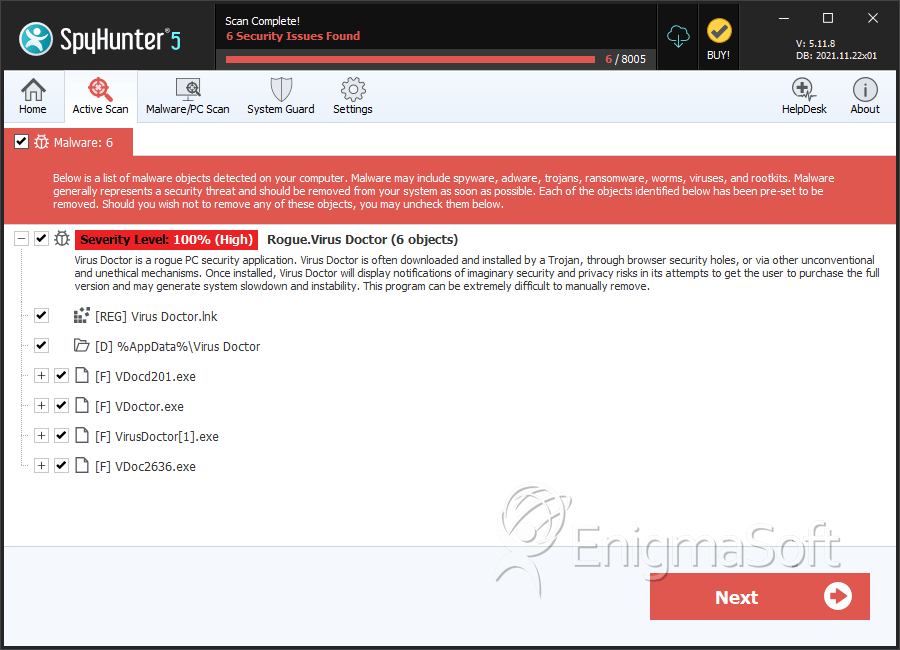
File System Details
| # | File Name | MD5 |
Detections
Detections: The number of confirmed and suspected cases of a particular threat detected on
infected computers as reported by SpyHunter.
|
|---|---|---|---|
| 1. | e0111dea975a25ad762f3ba4ebcc0ed4f4bcafec4ac38095cd782ba6d9e03978 | b4aee27229aced06f4aebca7f1c2ca32 | 3 |
| 2. | 17eb113527b02b26b5d720dc4156d55ffe7bb15280feea1b329188c1c159d8f3.exe | ec62a31eecb1c0bcc9ff3fe54c60f652 | 3 |
| 3. | VDocd201.exe | 635ab761d6e8a486a7cc431271013222 | 0 |
| 4. | VDoctor.exe | d4f8184b0a576e8fae8380b82bc5b129 | 0 |
| 5. | VirusDoctor[1].exe | 92f0b996b7a93751448856931b8d7e68 | 0 |
Registry Details
Directories
Virus Doctor may create the following directory or directories:
| %AppData%\Virus Doctor |