Rogue:Win32/FakePAV
Threat Scorecard
EnigmaSoft Threat Scorecard
EnigmaSoft Threat Scorecards are assessment reports for different malware threats which have been collected and analyzed by our research team. EnigmaSoft Threat Scorecards evaluate and rank threats using several metrics including real-world and potential risk factors, trends, frequency, prevalence, and persistence. EnigmaSoft Threat Scorecards are updated regularly based on our research data and metrics and are useful for a wide range of computer users, from end users seeking solutions to remove malware from their systems to security experts analyzing threats.
EnigmaSoft Threat Scorecards display a variety of useful information, including:
Ranking: The ranking of a particular threat in EnigmaSoft’s Threat Database.
Severity Level: The determined severity level of an object, represented numerically, based on our risk modeling process and research, as explained in our Threat Assessment Criteria.
Infected Computers: The number of confirmed and suspected cases of a particular threat detected on infected computers as reported by SpyHunter.
See also Threat Assessment Criteria.
| Ranking: | 15,726 |
| Threat Level: | 100 % (High) |
| Infected Computers: | 957 |
| First Seen: | November 30, 2010 |
| Last Seen: | May 6, 2024 |
| OS(es) Affected: | Windows |
Win32/FakePAV is a Trojan that has been associated with a very large family of rogue security programs. Some of the dozens of fake security applications associated with Win32/FakePAV include Windows Secure Surfer, Windows Attention Utility, Clean This, Peak Protection 2010 and ThinkPoint. Since Win32/FakePAV poses a severe threat to any PC, Win32/FakePAV shouldn't be allowed to stay in the infected machine, and it is best to remove it right away with a dependable anti-malware application. Most of the time, other components will be involved in a Win32/FakePAV-related infection. This makes manual removal impractical and automated removal with a reliable anti-malware program the preferred course of action. It is also important to note that other malware, such as a rootkit component may also be present on the victim's computer.
Malware associated with the Win32/FakePAV Trojan scams its victims by displaying a large number of misleading error messages. These are designed to mimic those displayed by Microsoft Security Essentials in order to convince the victim to download and pay for a bogus security program. Win32/FakePAV has the ability to terminate various file processes repeatedly, including Windows Registry Editor, Windows Restore, Internet Explorer and a number of known anti-virus programs in order to protect itself from removal and detection. Since Win32/FakePAV makes changes to the Windows Registry that allow Win32/FakePAV to start up automatically when the victim logs into Windows, it is advised to start up the infected computer in Safe Mode in order to prevent Win32/FakePAV from blocking access to your anti-malware software.
Table of Contents
Understanding the Win32/FakePAV Scam
Rogue security programs in the Win32/FakePAV family, such as ThinkPoint and Palladium Pro, harass computer users with alarming error messages. They also cause browser redirects and cause the infected computer to behave erratically and to perform poorly. Inexperienced computer users may believe Win32/FakePAV's claims, paying for an expensive upgrade for a fake anti-virus application. One of the most dangerous aspects of a Win32/FakePAV infection is that these fake security programs will seldom attack alone. A Win32/FakePAV infection will often be accompanied by a Trojan dropper infection and will often occur in the presence of a dangerous rootkit component. Because of this, a Win32/FakePAV infection will usually mean that the victim's computer is exposed to other malware threats, placing the victim's sensitive data at risk.
Aliases
15 security vendors flagged this file as malicious.
| Anti-Virus Software | Detection |
|---|---|
| DrWeb | Trojan.Siggen4.11689 |
| Kaspersky | Trojan.Win32.Jorik.Fraud.qsl |
| Avast | Win32:FakeAV-DQY [Trj] |
| DrWeb | Trojan.Siggen4.6042 |
| F-Secure | Gen:Variant.Kazy.78007 |
| BitDefender | Gen:Variant.Kazy.77998 |
| Avast | Win32:FakeAlert-CSE [Trj] |
| AVG | SHeur4.AISW |
| Fortinet | W32/FakeAV.NGYX!tr |
| DrWeb | Trojan.DownLoader6.25436 |
| Kaspersky | Trojan.Win32.FakeAV.ngyx |
| Avast | Win32:FakeAV-DOR [Trj] |
| DrWeb | Trojan.DownLoader6.31964 |
| Kaspersky | Trojan.Win32.FakeAV.nnlo |
| CAT-QuickHeal | Trojan.FakeAV.nnlo |
SpyHunter Detects & Remove Rogue:Win32/FakePAV
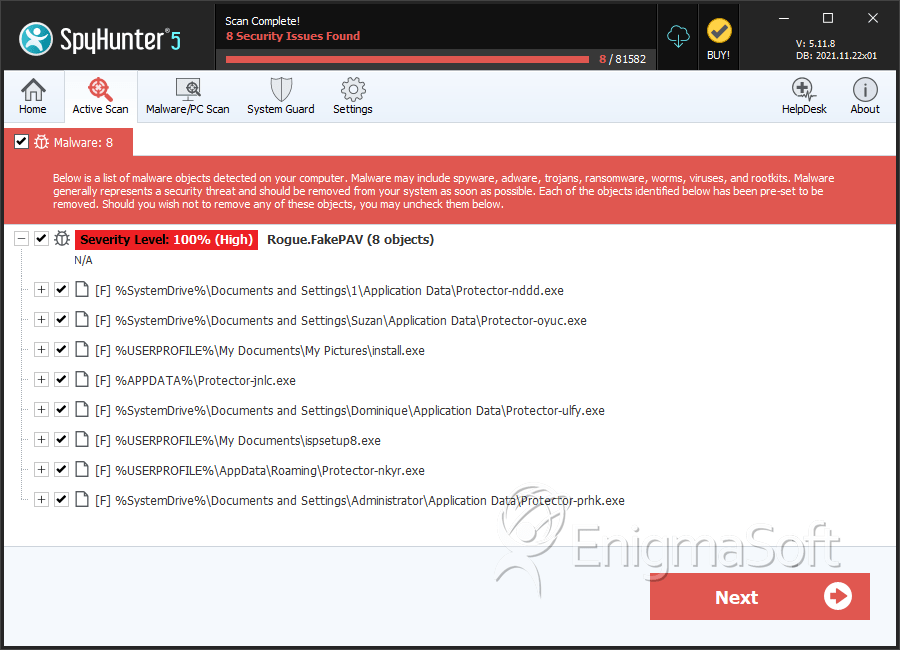
File System Details
| # | File Name | MD5 |
Detections
Detections: The number of confirmed and suspected cases of a particular threat detected on
infected computers as reported by SpyHunter.
|
|---|---|---|---|
| 1. | Protector-nddd.exe | b1f51dd461597758b42773700578184c | 43 |
| 2. | Protector-oyuc.exe | c61fc311cbed13d3073d446b91db4638 | 38 |
| 3. | install.exe | 4c977b7b1d5cb5529bf0b1684e5a1669 | 28 |
| 4. | d7a552d6c3985b00db2daeeb8c2aa3fe432c6fe518b936d6cae4add7f2b0fc89.exe | fedefeb534cecc5b49ea09aceb161939 | 9 |
| 5. | setup.exe | 434286b07ad05fe5c6c86453af00a4b3 | 7 |
| 6. | ispsetup8.exe | 4cc5024d1d8fa3f98b0004ee94297389 | 6 |
| 7. | 542cc211c6fd5648243806bc3942822d988c92bff76a375c368d80779d0efea9.exe | 993c72271656eee6f194906731f28394 | 5 |
| 8. | c1438ceca39d671094e0593fb99fb36ce7eaca3776d3d81fdb194fab51c08a67.exe | 8970016a4829dd9bb63a8fa60d4a1fb9 | 5 |
| 9. | Protector-nkyr.exe | a91470eb263d0a7ca66373303e5b12c5 | 4 |
| 10. | b9815a31c1b948b1e9e9425535435a59a375600c6068af4dd592d80b8c5d1759.exe | 61f48cad37e4172c44f78a9cce5a17b8 | 4 |
| 11. | Protector-prhk.exe | 35a9b2eebd0e185d52d667d6140ef0fb | 3 |
| 12. | Protector-guus.exe | a1c495bbb7bd712ced760152e886b646 | 3 |
| 13. | setup.exe | 8f6e4a862443362314fff5c173f6de1a | 3 |
| 14. | Protector-uaqk.exe | 3ef832d61e65c63fb40091535d56c689 | 2 |
| 15. | Protector-uljb.exe | 3f21b7e7fef42f63ab3701f9e419e12f | 2 |
| 16. | Protector-umxm.exe | 3eea0fae5faca4883cb814b52412e8bb | 2 |
| 17. | Protector-adcv.exe | 35a853496e7a18692277f2ffa2531263 | 2 |
| 18. | Protector-afus.exe | 319a5ee6eea3790bb507ae3640bfba8c | 1 |
| 19. | Protector-dkvr.exe | 961b2b6d8c80e49163e6bb17f1160de2 | 1 |
| 20. | Protector-pdcf.exe | 0e8d851b268645fdc6ea388a14e68b01 | 1 |
| 21. | Protector-wqik.exe | f4545bb7ed608bad6ffc3f6104937d34 | 1 |
| 22. | Protector-ewhv.exe | 81d4d28428c38df1a4663c6a6f5bb0a9 | 1 |
| 23. | Protector-nigk.exe | 3be9d08fe3b42133461f6aacfc6fc45d | 1 |
| 24. | Protector-qhdq.exe | fcb75acdef6444d4c0af3438d3b27d17 | 1 |
| 25. | setup.exe | 782d99b44cb875655165559636ecfe84 | 1 |
| 26. | Protector-jtqb.exe | 0b423001ef4987156773d6c68f75832a | 1 |
| 27. | Protector-nlvw.exe | f1d98045cfd37b8838eecd94eaf79647 | 1 |
| 28. | Protector-xhfg.exe | 4854a280ba2de4243861b3d9fcea81d3 | 1 |
| 29. | Protector-dpad.exe | fc5c53995a76cd7e7c677460393dcdc9 | 1 |
| 30. | Protector-udxv.exe | daae04002e194da99037c4e2a7f96f43 | 1 |



