PC MightyMax
Threat Scorecard
EnigmaSoft Threat Scorecard
EnigmaSoft Threat Scorecards are assessment reports for different malware threats which have been collected and analyzed by our research team. EnigmaSoft Threat Scorecards evaluate and rank threats using several metrics including real-world and potential risk factors, trends, frequency, prevalence, and persistence. EnigmaSoft Threat Scorecards are updated regularly based on our research data and metrics and are useful for a wide range of computer users, from end users seeking solutions to remove malware from their systems to security experts analyzing threats.
EnigmaSoft Threat Scorecards display a variety of useful information, including:
Ranking: The ranking of a particular threat in EnigmaSoft’s Threat Database.
Severity Level: The determined severity level of an object, represented numerically, based on our risk modeling process and research, as explained in our Threat Assessment Criteria.
Infected Computers: The number of confirmed and suspected cases of a particular threat detected on infected computers as reported by SpyHunter.
See also Threat Assessment Criteria.
| Threat Level: | 100 % (High) |
| Infected Computers: | 14,690 |
| First Seen: | July 24, 2009 |
| Last Seen: | June 30, 2023 |
| OS(es) Affected: | Windows |
PC MightyMax is a fake registry cleaner that has been around since 2006. Since then, the criminals behind this bogus registry cleaner have released 'new' versions of PC MightyMax, such as PC MightyMax 2009 and PC MightyMax 2010. Make no mistake about it; PC MightyMax has no way of fixing your computer or cleaning your registry. Rather, PC MightyMax is a rogue security application, a fake security program that pretends to protect your computer from malware in order to steal your money. Promoted at the website PCMightyMax.net, PC MightyMax is a threat to inexperienced computer users. While PC MightyMax is problematic, more advanced rogue security programs have appeared since PC MightyMax's heyday. This means that most security applications are well-equipped to handle this bogus security program. In fact, PC MightyMax can even be removed manually, by removing its registry entries from the Windows Registry and then deleting all files associated with this fake security tool.
Table of Contents
The PC MightyMax Scam
Like most rogue security programs, PC MightyMax pretends to be a real security tool. Some ways in which PC MightyMax tricks its victims into downloading and installing PC MightyMax include a highly-convincing interface, error messages that appear genuine, a widespread online marketing campaign, and the PCMightyMax.net website itself. Malware analysts warn that PC MightyMax has no way of cleaning your registry, removing malware or helping your computer run more smoothly. This is because once PC MightyMax is installed, PC MightyMax will do nothing but display irritating error messages in order to convince the victim that they need to purchase a 'full version' of PC MightyMax, much like more recent rogue security applications. Unlike more dangerous rogue security programs, PC MightyMax will cause few other symptoms apart from its irritating pop-up windows. However, PC MightyMax gives its victims no way of uninstalling the program, meaning that an anti-malware program will be necessary for most computer users.
Why You Should Remove PC MightyMax Immediately
Every once in a while, PC MightyMax will display alarming pop-up Windows containing the string 'CRITICAL ALERT' or 'Alert!!!' which will be accompanied by an irritating, and considerably loud, beeping noise. While this alone can be enough to convince most computer users to remove PC MightyMax, this fake security program will also change your browser settings, run without your permission and connect to the Internet. The worst of all, PC MightyMax will seldom enter your computer alone and may be accompanied by other, more dangerous malware threats.
Aliases
12 security vendors flagged this file as malicious.
| Anti-Virus Software | Detection |
|---|---|
| AhnLab-V3 | Win-Adware/Rogue.PCMightyMax2009.121856 |
| AntiVir | SPR/Tool.PCMightyMax.A.3 |
| BitDefender | Application.PCMightyMax.A |
| AVG | Generic4.BSKB |
| AntiVir | Adware/PCMightyMax.A.2 |
| F-Secure | Rogue:W32/PCMMax.A |
| NOD32 | Win32/Adware.PCMightyMax |
| Prevx1 | Heuristic: Suspicious File With Persistence |
| eSafe | suspicious Trojan/Worm |
| F-Secure | Suspicious:W32/Malware!Gemini |
| eSafe | Suspicious File |
| DrWeb | BACKDOOR.Trojan |
SpyHunter Detects & Remove PC MightyMax
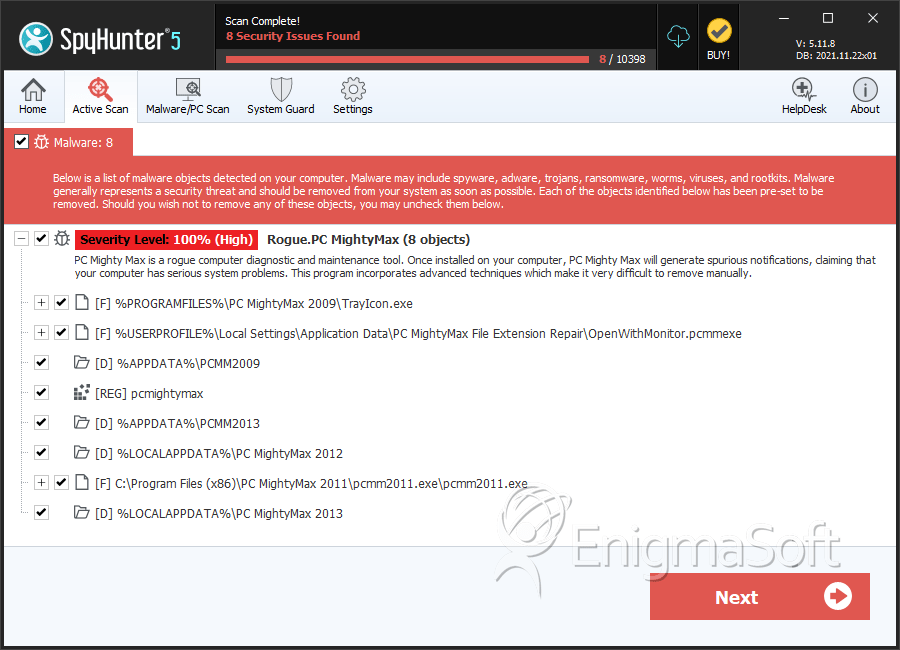
File System Details
| # | File Name | MD5 |
Detections
Detections: The number of confirmed and suspected cases of a particular threat detected on
infected computers as reported by SpyHunter.
|
|---|---|---|---|
| 1. | TrayIcon.exe | 263f3dbd2ca7e42dca3c1b3c5a61a9a3 | 1,253 |
| 2. | TrayIcon.exe | 0b5e197bf0c8a9bc6756774a8158cb9d | 694 |
| 3. | TrayIcon.exe | 4b9d94dea9f86646ee2fb346cafb5f93 | 614 |
| 4. | TrayIcon.exe | 779a5b8869dccd92527f6e92c5899292 | 530 |
| 5. | TrayIcon.exe | e41decca40726b2dc4f8fd4f88bfd17f | 508 |
| 6. | OpenWithMonitor.pcmmexe | f3ee07e632cb3cebbf4f77830c197221 | 415 |
| 7. | OpenWithMonitor.pcmmexe | 1a16e3dd753d8ea04e0b64b48d8fbd31 | 108 |
| 8. | OpenWithMonitor.pcmmexe | 5a34640751296ec0e3e41299722eea31 | 98 |
| 9. | OpenWithMonitor.pcmmexe | e3ba7e55838563919df5f48f8409a0b9 | 91 |
| 10. | DiagnosticReporter.exe | ef5133adb3cff1958cb5b60436429867 | 27 |
| 11. | pcmm2013.exe | f0ff6042fe46959b092b3c09bacd5347 | 27 |
| 12. | TrayIcon.exe | 2f33a6665cc9adfee563bae4f9a21bee | 22 |
| 13. | TrayIcon.exe | 94cb3173362eb1854820bbb5883c25b7 | 22 |
| 14. | OpenWithMonitor.pcmmexe | 8425717caa73b7adf5f4bae98ecba057 | 22 |
| 15. | TrayIcon.exe | 07d781ea863691e18cfcbb71044e3c2e | 21 |
| 16. | PCMightyMax2013_1008.EXE | 3b008cbe517b1c53c3f632e5047d4663 | 18 |
| 17. | FileExtensionFix.pcmmexe | c0013a753b89bd87730f8917a243c2c7 | 16 |
| 18. | pcmm2013.exe | 7407de2164c153de795bb90e55fd8f41 | 13 |
| 19. | pcmm2014.exe | a93e9ecd60fb07bb113a1a5fb43c33b4 | 11 |
| 20. | pcmm2012.exe | b123839f3242eb3b7856d32d351a7d08 | 10 |
| 21. | OpenWithMonitor.pcmmexe | a4d62cb95eaa446b9235a5b6ca1b2906 | 8 |
| 22. | TrayIcon.exe | 3a59295660fa400288aa13e4533ca365 | 7 |
| 23. | pcmm2015.exe | bea483d1307a7ac9c971c0875fe5328b | 7 |
| 24. | TrayIcon.exe | cdd5656ab6e908db77192ac1239df40d | 4 |
| 25. | TrayIcon.exe | f898dccbd0ad25e69e3065d17d571bb6 | 4 |
| 26. | ConfigurationManager.dll | 3c837fc54a451d5fa68e2ad29bc70db5 | 3 |
| 27. | OpenWithMonitor.pcmmexe | 8627d7b878a32ef84d7cb6241dd285ba | 2 |
| 28. | Uninstall.exe | 275a18474b3cd27abc025fbe773c1c67 | 2 |
| 29. | FileExtensionFix.pcmmexe | 2761c69e55d48e6c2bc22d0d600a09dc | 2 |
Registry Details
Directories
PC MightyMax may create the following directory or directories:
| %APPDATA%\PCMM2009 |
| %APPDATA%\PCMM2013 |
| %LOCALAPPDATA%\PC MightyMax 2012 |
| %LOCALAPPDATA%\PC MightyMax 2013 |
| %LOCALAPPDATA%\PC MightyMax File Extension Repair |
| %USERPROFILE%\Local Settings\Application Data\PC MightyMax 2013 |
| %UserProfile%\Local Settings\Application Data\PC MightyMax 2012 |



