MyStart by Incredibar
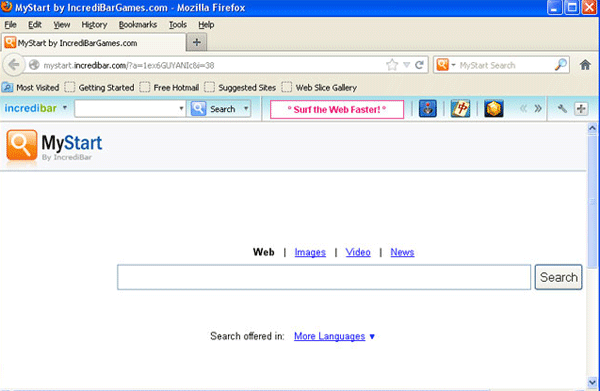
MyStart by Incredibar Image
MyStart is a browser hijacker that uses the MyStart by Incredibar toolbar and a browser hijacking component that forces its victims to visit the MyStart.Incredibar.com website. This website is a low-quality search engine that displays more advertisements than legitimate results. Even worse, several of MyStart's search results may lead computer users to websites containing malicious content. Although MyStart actually provides a supposed tool to remove this component from the victim's web browser, ESG security researchers recommend disregarding this component and instead removing MyStart with the help of a reputable anti-malware utility.
MyStart can refer to both the low-quality search engine and the actual browser toolbar associated with this threat. The MyStart website uses a design and template that is a knock-off of the Google search engine's well-known design. Unfortunately, the similarities between MyStart and Google stop there, since MyStart has been associated with various malware attacks and other problems. Malware researchers have observed that contact with MyStart will often expose computer users to the following malware threats:
- Among the results of a MyStart search, PC security analysts have observed advertisements for websites promoting rogue security products. These fake security applications are designed to scam inexperienced computer users by making it appear that they need to acquire a useless, bogus anti-virus program.
- MyStart search results may also expose computer users to websites that use exploits in order to install ransomware Trojans or backdoor Trojans on visitors' computers. Using exploits in third party platforms such as Java or Flash, criminals can use these kinds of websites to install malware without the victim's consent.
- Advertisements contained in MyStart search results may also lead to phishing websites. These are disguised as legitimate websites that try to fool the victim into entering their personal information, passwords or credit card information. For example, earlier in 2012 malware analysts observed a Twitter phishing site that, disguised as the real Twitter website, attempted to trick computer users into entering their Twitter login information.
ESG malware analysts have observed that the symptoms of browser redirects to the MyStart web page are very similar to symptoms of the so-called Google Redirect Virus. This malware infection, a common component of severe rootkit threats, changes online search results so that the links lead to malicious or unsafe websites. MyStart redirects can also force computer users to visit MyStart's website through pop-up windows or by randomly directing the victim's online activity.
File System Details
| # | File Name |
Detections
Detections: The number of confirmed and suspected cases of a particular threat detected on
infected computers as reported by SpyHunter.
|
|---|---|---|
| 1. | %Temp%\incredibarApp.dll | |
| 2. | %Temp%\incredibarTlbr.dll | |
| 3. | C:\Program Files\Incredibar-Games_EN\Incredibar-Games_ENToolbarHelper.exe | |
| 4. | C:\Program Files\Incredibar-Games_EN\ldrtbIncr.dll | |
| 5. | %Temp%\bh\incredibar.dll | |
| 6. | %Temp%\incredibarsrv.exe | |
| 7. | C:\Program Files\Incredibar-Games_EN\uninstall.exe | |
| 8. | C:\Program Files\Incredibar-Games_EN\prxtbIncr.dll | |
| 9. | %Program Files%\Incredibar\Incredibar.exe | |
| 10. | %Temp%\incredibarEng.dll | |
| 11. | %Temp%\uninstall.exe | |
| 12. | C:\Program Files\Incredibar-Games_EN\tbIncr.dll | |
| 13. | %UserProfile%\Start Menu\Incredibar\Help.lnk | |
| 14. | %Temp%\incredibar.crx | |
| 15. | C:\Program Files\Incredibar-Games_EN\ToolbarContextMenu.xml | |
| 16. | %AppData%\[trojan name]\toolbarstat.log | |
| 17. | %AppData%\[trojan name]\toolbarcouponsmerchants2.xml | |
| 18. | %AppData%\[trojan name]\toolbarlog.txt | |
| 19. | %AppData%\[trojan name]\toolbarstats.dat | |
| 20. | %AppData%\[trojan name]\toolbarguid.dat | |
| 21. | %UserProfile%\Start Menu\Incredibar\Incredibar.lnk | |
| 22. | %UserProfile%\Application Data\Microsoft\Internet Explorer\Quick Launch\Incredibar.lnk | |
| 23. | C:\Program Files\Incredibar-Games_EN\GottenAppsContextMenu.xml | |
| 24. | C:\Program Files\Incredibar-Games_EN\OtherAppsContextMenu.xml | |
| 25. | %AppData%\[trojan name]\toolbarversion.xml | |
| 26. | %AppData%\[trojan name]\toolbarcouponscategories.xml | |
| 27. | %AppData%\[trojan name]\toolbaruninstallIE.dat | |
| 28. | %AppData%\[trojan name]\toolbarpreferences.dat | |
| 29. | %UserProfile%\Desktop\Incredibar.lnk | |
| 30. | %UserProfile%\Start Menu\Incredibar\Registration.lnk | |
| 31. | C:\Program Files\Incredibar-Games_EN\toolbar.cfg | |
| 32. | C:\Program Files\Incredibar-Games_EN\SharedAppsContextMenu.xml | |
| 33. | %Temp%\[trojan name]\toolbar-manifest.xml | |
| 34. | %AppData%\[trojan name]\toolbarcouponsmerchants.xml | |
| 35. | %AppData%\[trojan name]\toolbardtx.ini | |
| 36. | %AppData%\[trojan name]\toolbaruninstallStatIE.dat |



