Mysites123.com
Threat Scorecard
EnigmaSoft Threat Scorecard
EnigmaSoft Threat Scorecards are assessment reports for different malware threats which have been collected and analyzed by our research team. EnigmaSoft Threat Scorecards evaluate and rank threats using several metrics including real-world and potential risk factors, trends, frequency, prevalence, and persistence. EnigmaSoft Threat Scorecards are updated regularly based on our research data and metrics and are useful for a wide range of computer users, from end users seeking solutions to remove malware from their systems to security experts analyzing threats.
EnigmaSoft Threat Scorecards display a variety of useful information, including:
Ranking: The ranking of a particular threat in EnigmaSoft’s Threat Database.
Severity Level: The determined severity level of an object, represented numerically, based on our risk modeling process and research, as explained in our Threat Assessment Criteria.
Infected Computers: The number of confirmed and suspected cases of a particular threat detected on infected computers as reported by SpyHunter.
See also Threat Assessment Criteria.
| Ranking: | 9,686 |
| Threat Level: | 50 % (Medium) |
| Infected Computers: | 16,676 |
| First Seen: | November 23, 2015 |
| Last Seen: | February 20, 2025 |
| OS(es) Affected: | Windows |
The Mysites123.com website is associated with a browser hijacker that may arrive on your computer as a search helper that was bundled with a freeware setup file. The Mysites123.com website may look like a clone of the original Google engine to look appealing to Web surfers, but it is not a search engine—it is a redirect-gateway to Yahoo. However, Yahoo! Inc. is not affiliated with Mysites123.com, and the Mysites123.com domain is used to host ads that may be based on your search keywords. The browser hijacker at hand may record your search keywords, read your browsing history and IP address to send usage data to the operators of Mysites123.com. As a result, loading Mysites123.com may generate ads suited to your Internet routine and preferences. The browser hijacker linked to Mysites123.com might change your default search aggregator and homepage to make sure infected users are subjected to the use of Mysites123.com for their online activities.
As stated before, the Mysites123.com domain may host ads, and you may experience pop-up windows and banners that are loaded with marketing content. The browser hijacker linked to Mysites123.com may enter several registry keys in Windows to cement changes to your Internet settings and ensure its operations are uninterrupted by third-party applications. The Mysites123.com browser hijacker may appear in Google Chrome, Internet Explorer and Mozilla Firefox as an add-on, extension, plug-in and Browser Helper Object that is locked and cannot be removed manually. The Mysites123.com browser hijacker may run in your system background and be registered as a protected browser service. Browser hijackers may cause your Internet browser to crash and interfere with the work of other applications like torrent and email clients that are used to handle Internet protocols. Additionally, the browser hijacker associated with Mysites123.com may alter the limit of Web cache on your PC and clutter your hard drive. You should install a reputable anti-malware application to eradicate the Mysites123.com browser hijacker and revert your settings to default.
Table of Contents
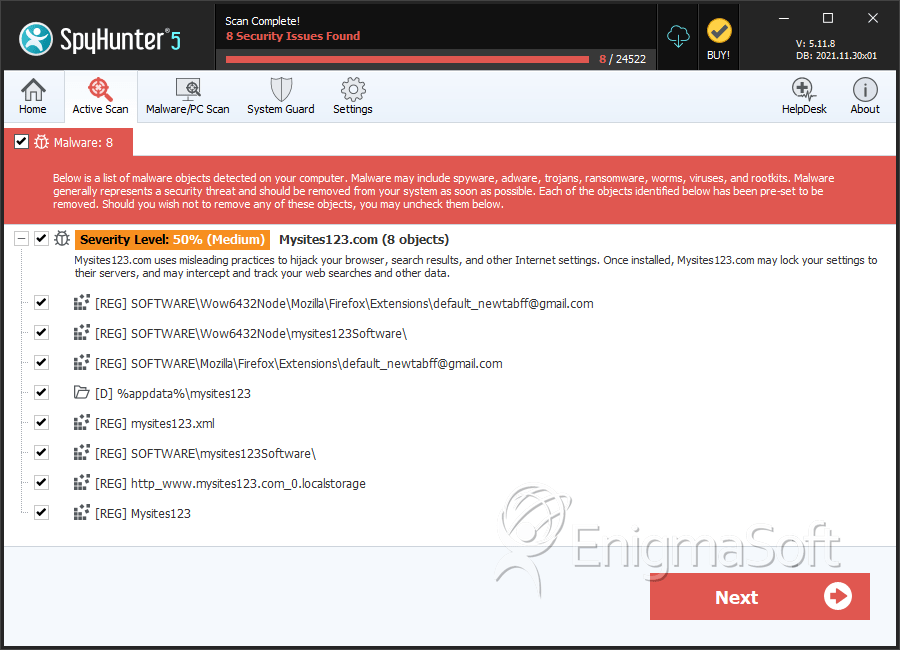
SpyHunter Detects & Remove Mysites123.com
File System Details
| # | File Name | MD5 |
Detections
Detections: The number of confirmed and suspected cases of a particular threat detected on
infected computers as reported by SpyHunter.
|
|---|---|---|---|
| 1. | nsbit_mysites123.exe | 2f76c4cdc300867767b2646a52e97450 | 4 |
| 2. | nsbes_mysites123.exe | 8d8922f509c8105f148c3463610f4251 | 2 |
| 3. | file.exe | 49baec3b3b9b45d00eec317ad2794f75 | 1 |
| 4. | amt_mysites123.exe | eb408ccf3c70027bb5bac3a783a89b5e | 1 |
| 5. | nsbbr_mysites123.exe | 6f5f8343b988aeae63f12a8354681882 | 1 |
| 6. | nsbfr_mysites123.exe | b51f170452d71d3129ab6b444e96b8f5 | 1 |
Registry Details
Directories
Mysites123.com may create the following directory or directories:
| %appdata%\mysites123 |
URLs
Mysites123.com may call the following URLs:
| mysites123.com |


