'FBI Your PC is Blocked' Ransomware
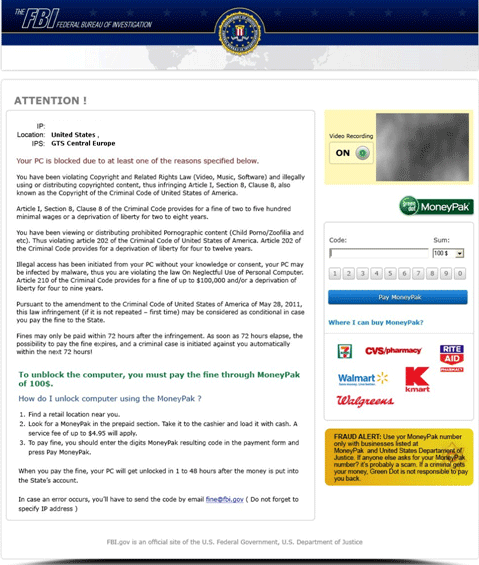 Although Winlockers, such as the many variants of the so-called Ukash Virus, have been very common in the European Union, ESG security researchers have received reports of a similar Winlocker making the rounds in the United States. The 'FBI Your PC is blocked' Ransomware displays a fake message from the FBI. The header of the messages reads:
The FBI
Federal Bureau of Investigation
ATTENTION!
Your PC is blocked due to at least one of the reasons specified below…
The 'FBI Your PC is blocked' Ransomware message goes on to say the infected computer system was involved in distributing illegally copied copyrighted content. Like most fake police notifications, the 'FBI Your PC is blocked' Ransomware will then prevent the PC user from obtaining access to the infected computer unless the victim pays a $100 USD fine through MoneyPak, a legitimate money transfer service.
The 'FBI Your PC is blocked' Ransomware message contains the FBI's official shield and threatening language. It is very similar to dozens of other Winlockers that also imitate law enforcement agencies. However, unlike the many variants of the Ukash Virus, the 'FBI Your PC is blocked' Ransomware does not have the ability to change depending on the victim's IP. Computer users in many different countries will receive the same basic 'FBI Your PC is blocked' Ransomware message. Of course, it is entirely unreasonable to think that an institution like the FBI would threaten its citizens by extorting their money and forcing them to pay through a retail money transfer service. This does not mean that this scam is not effective against inexperienced computer users, however.
Dealing with the 'FBI Your PC is blocked' Ransomware Infection
Like with most Winlocker infections, ESG security researchers advise bypassing the 'FBI Your PC is blocked' Ransomware message and then using a reliable anti-malware application to remove this threat from the infected computer. Some ways to prevent the 'FBI Your PC is blocked' Ransomware message from locking your access to the infected computer include starting up Windows in Safe Mode, starting up Windows from an external memory drive or booting from a network-shared drive. The 'FBI Your PC is blocked' Ransomware infection is not particularly difficult to remove, and most security programs will handle 'FBI Your PC is blocked' Ransomware with ease. The main difficulty, in the first place, lies in reaching those programs, since the 'FBI Your PC is blocked' Ransomware infection disables access to the Windows Task Manager, Desktop, System Restore and other Windows components that may enable you to gain control to your security application.
File System Details
| # | File Name |
Detections
Detections: The number of confirmed and suspected cases of a particular threat detected on
infected computers as reported by SpyHunter.
|
|---|---|---|
| 1. | %Documents and Settings%\All Users\Application Data\[random]\[random].exe | |
| 2. | %Documents and Settings%\All Users\Application Data\[random]\[random].mof |



