BigSeekPro
Threat Scorecard
EnigmaSoft Threat Scorecard
EnigmaSoft Threat Scorecards are assessment reports for different malware threats which have been collected and analyzed by our research team. EnigmaSoft Threat Scorecards evaluate and rank threats using several metrics including real-world and potential risk factors, trends, frequency, prevalence, and persistence. EnigmaSoft Threat Scorecards are updated regularly based on our research data and metrics and are useful for a wide range of computer users, from end users seeking solutions to remove malware from their systems to security experts analyzing threats.
EnigmaSoft Threat Scorecards display a variety of useful information, including:
Ranking: The ranking of a particular threat in EnigmaSoft’s Threat Database.
Severity Level: The determined severity level of an object, represented numerically, based on our risk modeling process and research, as explained in our Threat Assessment Criteria.
Infected Computers: The number of confirmed and suspected cases of a particular threat detected on infected computers as reported by SpyHunter.
See also Threat Assessment Criteria.
| Ranking: | 1,375 |
| Threat Level: | 10 % (Normal) |
| Infected Computers: | 7,145 |
| First Seen: | August 23, 2011 |
| Last Seen: | September 20, 2023 |
| OS(es) Affected: | Windows |
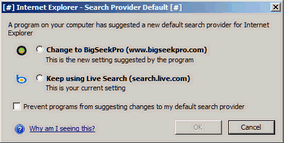 According to ESG security researchers, the BigSeekPro toolbar is not technically a malware infection. However, the BigSeekPro toolbar engages in some practices that are typical of malware programs, such as redirecting your Internet activity or keeping track of the websites that you visit. Unlike most malware, the BigSeekPro toolbar can be easily removed through normal means. Even so, ESG security advisers recommend using an anti-virus program to run an in-depth scan of your hard drives, after uninstalling the BigSeekPro toolbar. This application's behavior is a worrying sign that the BigSeekPro toolbar has the potential to become a problem to your computer system's security.
Table of Contents
How Most Users Acquire the BigSeekPro Toolbar
The BigSeekPro toolbar is what is known as a Browser Helper Object, or BHO. Browser Helper Objects are add-ons for the Internet Explorer browser. A Browser Helper Object is not a bad thing in itself. However, many creators of malware have exploited vulnerabilities in this aspect of the Internet Explorer browser, to create malicious browser helper objects designed to engage in activities that are characteristic of malware, such as spyware or adware. Most computer users acquire the BigSeekPro toolbar through the HyperCam application, a popular video recording program. As part of BigSeekPro toolbar's installation process, HyperCam installs the BigSeekPro Browser Helper Object. As a general rule, ESG malware advisers recommend avoiding software that requires the installation of toolbars for your Internet browsers, especially if the BigSeekPro toolbar cannot be disabled. There is usually an alternate version that will not require the installation of potentially-harmful Browser Helper Objects. If it is absolutely essential that you install this kind of software, it is a good idea to first research the toolbar in question, to make sure that it is not considered malware by PC security researchers.
Securing Your Computer System After Removing the BigSeekPro Toolbar
As was mentioned before, the BigSeekPro toolbar is not considered harmful in itself. The main problem with the BigSeekPro is that BigSeekPro toolbar engages in practices that may put your computer at risk for malware infections and other problems. The BigSeekPro toolbar runs in the background without authorization and can keep track of your online activity. It is because of this that ESG malware analysts consider that users that have installed the BigSeekPro toolbar are at a greater risk for malware infections than most computer users. To make sure that the presence of BigSeekPro has not resulted in a malware infection, ESG PC security researchers advise running regular scans of your computer with a trustworthy anti-malware utility.
SpyHunter Detects & Remove BigSeekPro
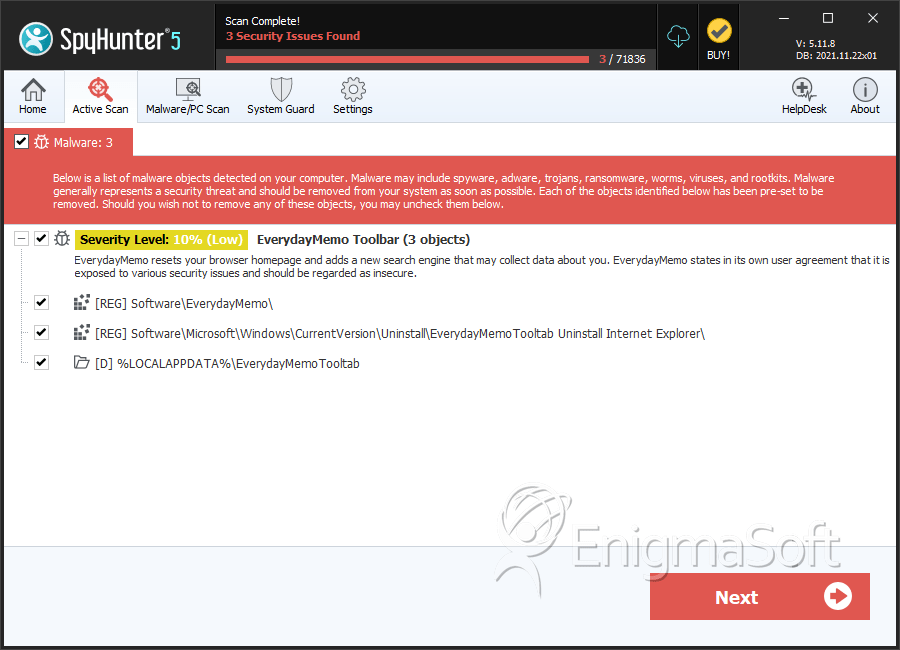
Registry Details
Directories
BigSeekPro may create the following directory or directories:
| %LOCALAPPDATA%\EverydayMemoTooltab |




Submit Comment
Please DO NOT use this comment system for support or billing questions. For SpyHunter technical support requests, please contact our technical support team directly by opening a customer support ticket via your SpyHunter. For billing issues, please refer to our "Billing Questions or Problems?" page. For general inquiries (complaints, legal, press, marketing, copyright), visit our "Inquiries and Feedback" page.