|
|
Tweet |
Activate Ultimate Protection Description
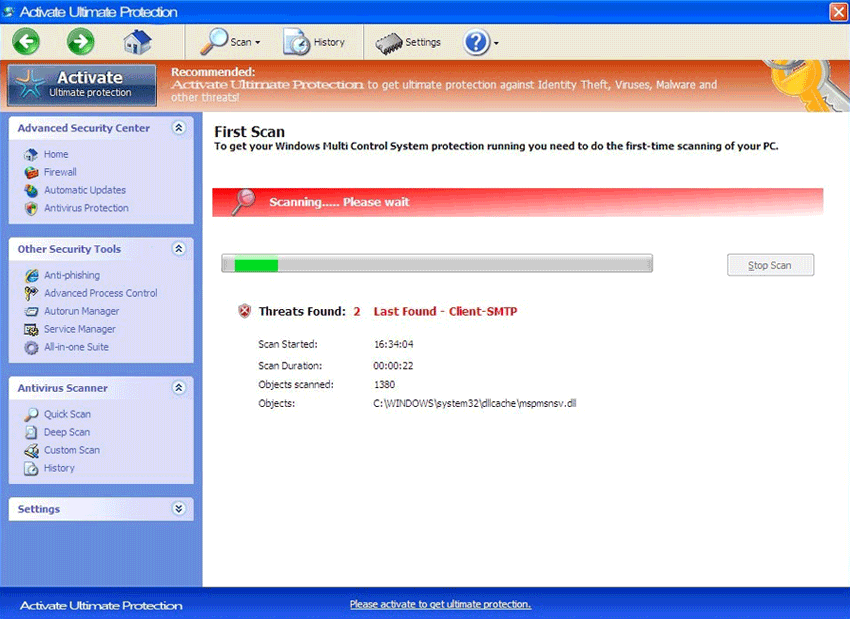
FakeVimes is a large family of fake antispyware programs. Activate Ultimate Protection is a fake component that many of these fake applications contain in their interface. Like all other parts of these kinds of fake antispyware programs, Activate Ultimate Protection has no real anti-malware functions. Basically, Activate Ultimate Protection’s supposed ‘ultimate protection’ is simply part of the same, tired scam that malware in the FakeVimes family has been carrying out since 2009. The main purpose of applications associated with Activate Ultimate Protection is to convince computer users that they need to purchase a useless fake anti-spyware program. To do this, Activate Ultimate Protection will usually be associated with browser redirects, unwanted pop-up windows, irritating error messages, lowered system performance, blocked access to a computer’s files, and frequent crashes. Because of this, ESG team of PC security researchers strongly advises against using Activate Ultimate Protection and removing any malware associated with this threat from your computer immediately with a real anti-malware program.
Pressing the Activate Ultimate Protection Button May Empty Your Bank Account
Activate Ultimate Protection buttons are included in some of the latest versions of malware in the FakeVimes family. These have been released since Fall of 2011 and tend to use a common naming pattern and include a dangerous rootkit component. While malware in the FakeVimes family has been around since 2009, Activate Ultimate Protection buttons are a relatively new ‘feature’, along with ‘Advanced Process Control’ which is actually a way in which these fake anti-spyware programs replace the victim’s Task Manager. Some examples of fake security programs in the FakeVimes family of malware that include Activate Ultimate Protection in their graphic interface include programs like Windows Crucial Scanner, Windows Trojans Inspector, Windows Antivirus Patch, Windows Safety Checkpoint, Windows Safety Manager and Windows Internet Booster.
Using the Activate Ultimate Protection button will simply prompt you to pay for a fake ‘full version’ of the rogue anti-malware program infecting your computer. Of course, since all malware in the FakeVimes family has absolutely no real anti-malware components, upgrading to a ‘full version’ is nothing but a waste of money. ESG security researchers instead recommend using a real anti-malware program to scan your hard drives and remove any malware completely. Apart from its associated FakeVimes rogue security program, Activate Ultimate Protection usually indicates that your computer is infected with various Trojan and rootkit threats.
Type: Rogue AntiSpyware Programs
How Can You Detect Activate Ultimate Protection?
Download SpyHunter’s Detection Scanner
to Detect Activate Ultimate Protection.
Can’t install SpyHunter? Click here to view possible causes of installation issues.
Activate Ultimate Protection Removal Details
Activate Ultimate Protection has typically the following processes in memory:
- %AppData%\Activate Ultimate Protection\ScanDisk_.exe
- %AppData%\Protector-[RANDOM CHARACTERS].exe
- %AppData%\NPSWF32.dll
- %CommonAppData%\58ef5\SP98c.exe
Activate Ultimate Protection creates the following files in the system:
- %AppData%\Microsoft\Internet Explorer\Quick Launch\Activate Ultimate Protection.lnk
- %CommonAppData%\SPUPCZPDET\SPABOIJT.cfg
- %Desktop%\Activate Ultimate Protection.lnk
- %CommonAppData%\58ef5\SPT.ico
- %StartMenu%\Activate Ultimate Protection.lnk
- %AppData%\result.db
- %AppData%\Activate Ultimate Protection\Instructions.ini
- %Programs%\Activate Ultimate Protection.lnk
Activate Ultimate Protection creates the following registry entries:
- HKEY_CURRENT_USER\Software\Microsoft\Windows\CurrentVersion\Uninstall\Activate Ultimate Protection\UninstallString “[unknown dir]\[unknown file name].exe” /del
- HKEY_CURRENT_USER\Software\Microsoft\Windows\CurrentVersion\Uninstall\Activate Ultimate Protection\DisplayVersion 1.1.0.1010
- HKEY_CURRENT_USER\Software\Microsoft\Windows\CurrentVersion\Uninstall
- HKEY_LOCAL_MACHINE\SOFTWARE\Classes\CLSID\{3F2BBC05-40DF-11D2-9455-00104BC936FF}\Implements DocHostUIHandler
- HKEY_LOCAL_MACHINE\SOFTWARE\Classes\CLSID\{3F2BBC05-40DF-11D2-9455-00104BC936FF}\ProgID
- HKEY_LOCAL_MACHINE\SOFTWARE\Microsoft\Tracing\FWCFG
- HKEY_LOCAL_MACHINE\SOFTWARE\Microsoft\Tracing\FWCFG\EnableFileTracing 0
- HKEY_LOCAL_MACHINE\SOFTWARE\Microsoft\Tracing\FWCFG\MaxFileSize 1048576
- HKEY_LOCAL_MACHINE\SOFTWARE\Classes\Dumped_.DocHostUIHandler\ Implements DocHostUIHandler
- HKEY_LOCAL_MACHINE\SOFTWARE\Microsoft\Windows NT\CurrentVersion\Image File Execution Options\AVWEBGRD.EXE
- HKEY_LOCAL_MACHINE\SOFTWARE\Microsoft\Windows NT\CurrentVersion\Image File Execution Options\About.exe\Debugger svchost.exe
- HKEY_LOCAL_MACHINE\SOFTWARE\Microsoft\Windows NT\CurrentVersion\Image File Execution Options\AVCare.exe
- HKEY_LOCAL_MACHINE\SOFTWARE\Microsoft\Windows NT\CurrentVersion\Image File Execution Options\AVENGINE.EXE\Debugger svchost.exe
- HKEY_LOCAL_MACHINE\SOFTWARE\Microsoft\Windows NT\CurrentVersion\Image File Execution Options\AluSchedulerSvc.exe
- HKEY_LOCAL_MACHINE\SOFTWARE\Microsoft\Windows NT\CurrentVersion\Image File Execution Options\AdwarePrj.exe
- HKEY_LOCAL_MACHINE\SOFTWARE\Microsoft\Windows NT\CurrentVersion\Image File Execution Options\AlphaAV\Debugger svchost.exe
- HKEY_CURRENT_USER\Software\Microsoft\Windows\CurrentVersion\Uninstall\Activate Ultimate Protection\Publisher UIS Inc.
- HKEY_CURRENT_USER\Software\Microsoft\Windows\CurrentVersion\Uninstall\Activate Ultimate Protection\DisplayName Activate Ultimate Protection
- “%CommonAppData%\58ef5\SP98c.exe” /s /d
- HKEY_LOCAL_MACHINE\SOFTWARE\Classes\CLSID\{3F2BBC05-40DF-11D2-9455-00104BC936FF}
- HKEY_LOCAL_MACHINE\SOFTWARE\Classes\CLSID\{3F2BBC05-40DF-11D2-9455-00104BC936FF}\LocalServer32\ [unknown dir]\[unknown file name].exe
- file name].DocHostUIHandler
- HKEY_LOCAL_MACHINE\SOFTWARE\Microsoft\Tracing\FWCFG\EnableConsoleTracing 0
- HKEY_LOCAL_MACHINE\SOFTWARE\Microsoft\Tracing\FWCFG\FileTracingMask -65536
- HKEY_LOCAL_MACHINE\SOFTWARE\Classes\Dumped_.DocHostUIHandler
- HKEY_LOCAL_MACHINE\SOFTWARE\Classes\Dumped_.DocHostUIHandler\Clsid\ {3F2BBC05-40DF-11D2-9455-00104BC936FF}
- HKEY_LOCAL_MACHINE\SOFTWARE\Microsoft\Windows NT\CurrentVersion\Image File Execution Options\About.exe
- HKEY_LOCAL_MACHINE\SOFTWARE\Microsoft\Windows NT\CurrentVersion\Image File Execution Options\AAWTray.exe\Debugger svchost.exe
- HKEY_LOCAL_MACHINE\SOFTWARE\Microsoft\Windows NT\CurrentVersion\Image File Execution Options\AVENGINE.EXE
- HKEY_LOCAL_MACHINE\SOFTWARE\Microsoft\Windows NT\CurrentVersion\Image File Execution Options\AlphaAV.exe\Debugger svchost.exe
- HKEY_LOCAL_MACHINE\SOFTWARE\Microsoft\Windows NT\CurrentVersion\Image File Execution Options\Ad-Aware.exe\Debugger svchost.exe
- HKEY_LOCAL_MACHINE\SOFTWARE\Microsoft\Windows NT\CurrentVersion\Image File Execution Options\AlphaAV
- HKEY_CURRENT_USER\Software\Microsoft\Windows\CurrentVersion\Uninstall\Activate Ultimate Protection\InstallLocation [unknown dir]
- HKEY_CURRENT_USER\Software\Microsoft\Windows\CurrentVersion\Uninstall\Activate Ultimate Protection\DisplayIcon [unknown dir]\[unknown file name].exe,0
- HKEY_CURRENT_USER\Software\Microsoft\Windows\CurrentVersion\Run\Activate Ultimate Protection
- HKEY_CURRENT_USER\Software\Microsoft\Windows\CurrentVersion\Uninstall\Activate Ultimate Protection
- HKEY_LOCAL_MACHINE\SOFTWARE\Classes\CLSID\{3F2BBC05-40DF-11D2-9455-00104BC936FF}\LocalServer32
- HKEY_LOCAL_MACHINE\SOFTWARE\Classes\CLSID\{3F2BBC05-40DF-11D2-9455-00104BC936FF}\ProgID\ [unknown
- HKEY_LOCAL_MACHINE\SOFTWARE\Microsoft\Tracing\FWCFG\ConsoleTracingMask -65536
- HKEY_LOCAL_MACHINE\SOFTWARE\Microsoft\Tracing\FWCFG\FileDirectory %windir%\tracing
- HKEY_LOCAL_MACHINE\SOFTWARE\Microsoft\Windows NT\CurrentVersion\Image File Execution Options\AAWTray.exe
- HKEY_LOCAL_MACHINE\SOFTWARE\Classes\Dumped_.DocHostUIHandler\Clsid
- HKEY_LOCAL_MACHINE\SOFTWARE\Microsoft\Windows NT\CurrentVersion\Image File Execution Options\AVWEBGRD.EXE\Debugger svchost.exe
- HKEY_LOCAL_MACHINE\SOFTWARE\Microsoft\Windows NT\CurrentVersion\Image File Execution Options\Ad-Aware.exe
- HKEY_LOCAL_MACHINE\SOFTWARE\Microsoft\Windows NT\CurrentVersion\Image File Execution Options\AVCare.exe\Debugger svchost.exe
- HKEY_LOCAL_MACHINE\SOFTWARE\Microsoft\Windows NT\CurrentVersion\Image File Execution Options\AlphaAV.exe
- HKEY_LOCAL_MACHINE\SOFTWARE\Microsoft\Windows NT\CurrentVersion\Image File Execution Options\AluSchedulerSvc.exe\Debugger svchost.exe
- HKEY_LOCAL_MACHINE\SOFTWARE\Microsoft\Windows NT\CurrentVersion\Image File Execution Options\AdwarePrj.exe\Debugger svchost.exe
Important Article Disclaimer

(2 votes, average: 4.50 out of 5)

Activate Ultimate Protection
Leave a Comment
Note: Abusive comments are not allowed. Please do not post comments regarding technical support issues. ESG customers that have issues with SpyHunter should open a customer support ticket.

