VirusHeat

Domesticus By Domesticus in Rogue Anti-Spyware Program | 123 views
Rate it:
1 Star2 Stars3 Stars4 Stars5 Stars (No Ratings Yet)
Loading ... Loading ...

Do you have VirusHeat?

This “VirusHeat Removal Guide” article will show you how to identify and remove VirusHeat. This guide will be updated as more information is available.

VirusHeat Detection Test

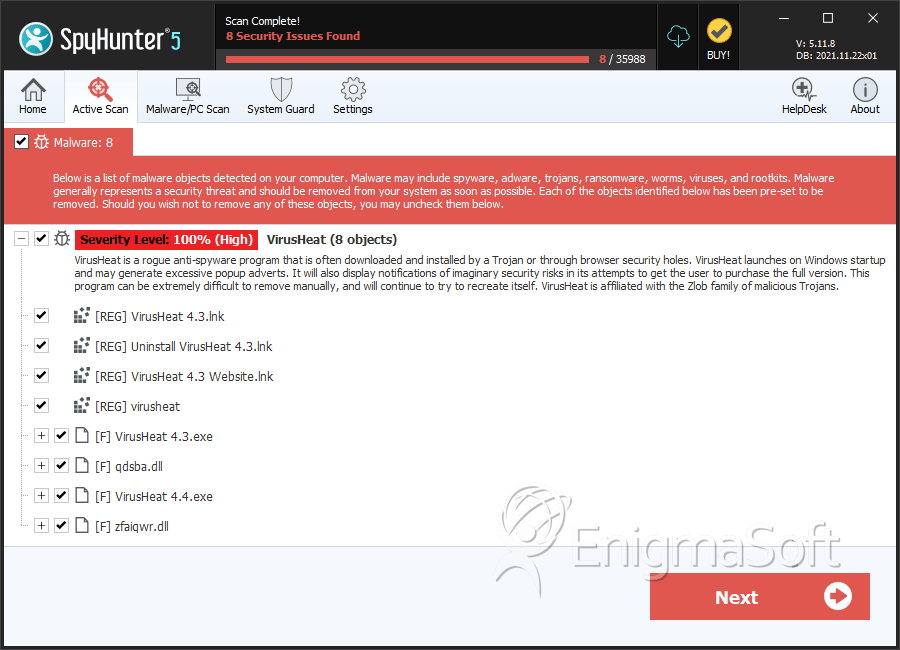
Download SpyHunter’s Spyware Scanner Run SpyHunter’s Spyware Scanner to check for VirusHeat infections on your PC.

VirusHeat Description

VirusHeat

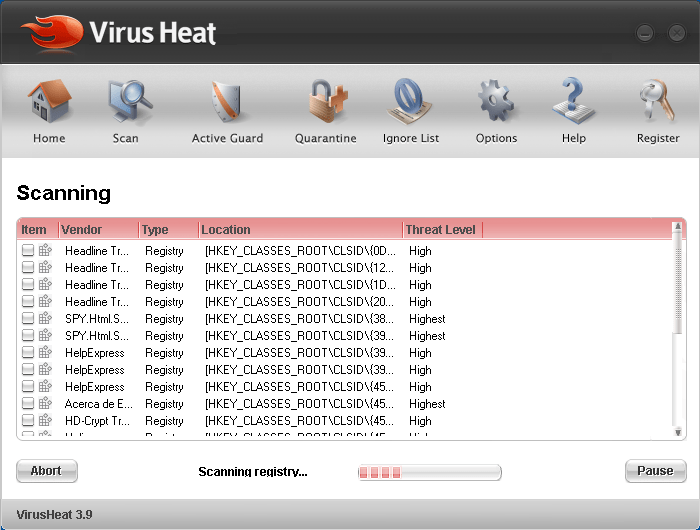
VirusHeat v.3.9 is a rogue anti-spyware application that issues fake computer scan results when you use it on your machine. VirusHeat creators and their marketing affiliates propagate and install VirusHeat’s rogue anti-spyware application through a download that is bundled with a Trojan generated by a Browser Helper object (BHO). Once your computer gets infected with the Trojan, it will start showing up an annoying popup message. Do not click on any of the popups because it will redirect your IE to VirusHeat’s website or another rogue website where you will be fooled into downloading VirusHeat’s anti-spyware application. Parasite Type: A cocktail of Rogue Anti-Spyware Programs & Trojans.

VirusHeat Method of Automatic Removal

The removal of spyware such as VirusHeat can be a difficult process. If you regularly run a spyware scan with a good spyware remover, you can automatically detect VirusHeat and other Spyware, Trojans, Rogue Anti-spyware, Adware, Browser Hijackers and other unwanted programs.

To quickly remove VirusHeat, follow the instructions below:

  1. Download SpyHunter’s Spyware Scanner Download SpyHunter’s Spyware Scanner.

  2. Select “Start Scan” to run a full system VirusHeat scan.

  3. Reboot your computer.

  4. Run another scan to pick up any remaining VirusHeat infections.

** SpyHunter’s Spyware Scanner only allows you to detect VirusHeat and other spyware. In order to remove VirusHeat, we advise you to buy the full-version of SpyHunter. Weekly VirusHeat file updates and technical support are available with SpyHunter’s spyware remover.

VirusHeat Method of Infection

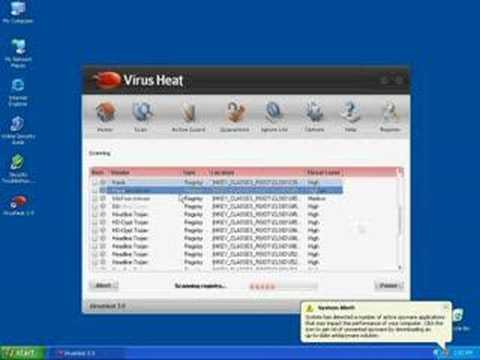
Click on the “How VirusHeat Infects Your Computer” video to see a VirusHeat infection in action! See through the eyes of an unsuspecting Internet user while him/her is being victimized by VirusHeat. Tip: Turn your sound ON and watch the video in Full Screen mode to fully experience how VirusHeat infects a computer. In the “How VirusHeat Infects Your Computer” video, the following VirusHeat actions occur:

  • The Internet user surfs the Web and visits a questionable website. A large amount of rogue anti-spyware programs like VirusHeat is mostly pushed through adult websites.

  • The Internet user downloads a free video codec called “Video ActiveX Enhancement 2.07″ which comes bundled with VirusHeat. Freeware or shareware programs tend to come with other unwanted programs such as VirusHeat. Do not install any free software without reading its EULA. By simply reading a program’s EULA, you can determine whether a program you are installing has spyware bundled with it.

  • The Internet user is infected with the rogue anti-spyware program VirusHeat. VirusHeat runs a scan on the computer and gives a false spyware report claiming that the computer is infected with spyware. Once the scan is completed, a warning message appears with two buttons, one that says “Buy On-Line” and the other “Delete Spyware”. This deceptive tactic is an attempt to scare the Internet user into clicking the “Buy On-Line” button.

  • Fake warning message reads:

    • “Warning! 24 threats found! VirusHeat has detected malicious spyware on your PC. To buy VirusHeat On-Line, click ‘Buy On-Line’.”
  • The Internet user closes all the fake Windows error messages and warnings and is unaware that VirusHeat is still running its malicious tasks in the background. VirusHeat reloads itself on a timer so if the Internet user closes the program it will only take a few moments until it opens again. The average Internet user does not realize when spyware has infected his/her computer until it is too late and the spyware problem has already spread throughout the computer.

  • Internet user opens web browser and is redirected to a rogue website called Puresafetyhere.com. The Internet user is bombard with websites that pop up messages that tries to push a product on him/her. Ignore such messages! We recommend closing these windows by clicking on the X instead of the OK button.


VirusHeat Symptoms

The following VirusHeat symptoms occur:

  • VirusHeat displays a fake system alert similar to a Windows notification message. A red or green flashing icon appears in your system tray. If you click on the icon, a fake system alert pops up and directs you to a rogue website called safetyuptodate.com. In some cases, even when you don’t click on the icon the fake system alert may still pop up. The fake system alert promises to give you a legitimate anti-spyware program that will help you fix spyware problems, but instead it really reports false information to try to trick you into purchasing the program. VirusHeat’s false sytem alert message reads:
    • System Alert: Trojan-Spy.Win32@mx Type: Spyware/Trojan Vulnerable: Windows 95/98/ME/NT/2003/Windows XP Description: Spyware program that sends confidential information to a remote attacker. Protection: Click this baloon to download official security software.”

  • VirusHeat hijacks or modifies your homepage and displays new desktop shortcuts. VirusHeat changes your default homepage to a different homepage and creates new unnecessary shortcuts on your desktop. Sometimes VirusHeat won’t even allow you to change it back to your original homepage. Websites that redirects you to is asecurevalue.com and malwareburn.com.

  • VirusHeat installs a rogue toolbar called Security Toolbar 7.1. Security toolbar 7.1 is a rogue toolbar that comes with two green bars, one that says “block adware” and the other “remove spyware”. If you click on either of them you’re directed to a rogue anti-spyware site such as Malwareburn.com which can install additional malware.

  • VirusHeat bombards your PC with fake Windows warnings messages. Even after you’ve closed all the VirusHeat messages or your PC has been idle for awhile, you’ll still get constant alert popups appearing on your system tray or on your screen.

  • VirusHeat Anatomy

    As new VirusHeat spyware components is reported by our customers and our Spyware Threat Research Labs, we will update this section. Virusheat.com WHOIS Information: Registration Service Provided By: ESTDOMAINS INC Contact: +1.3027224217 Website: http://www.estdomains.com Domain Name: VIRUSHEAT.COM Registrant: PrivacyProtect.org Domain Admin (contact@privacyprotect.org) P.O. Box 97 All Postal Mails Rejected, visit Privacyprotect.org Moergestel null,5066 ZH NL Tel. +45.36946676 Creation Date: 09-Dec-2007 Expiration Date: 09-Dec-2008 Domain servers in listed order: ns4.amigobore.com ns3.amigobore.com ns2.amigobore.com ns1.amigobore.com

    VirusHeat Manual Removal Instructions

    To learn the VirusHeat manual removal process, read the step-by-step instructions provided on this section. Use Caution! Please read the instructions below carefully. Manual removal of VirusHeat is a delicate procedure. Proceed at your own risk. Make sure you backup your system and close all open Internet Explorer windows before you manually remove VirusHeat. If you are still having problems with VirusHeat after completing these instructions, we recommend you download SpyHunter’s Spyware Removal Tool to safely remove VirusHeat. To manually remove VirusHeat, follow these removal steps: Step #1: How to Kill VirusHeat files using Process Explorer.

    • 1a. How to Kill VirusHeat processes.

      1. Download and install Process Explorer.

      2. Open Process Explorer.

      3. Locate the VirusHeat processes listed below.

      4. To kill an VirusHeat process, right-click the VirusHeat process and choose the option “Kill Process Tree”.

      5. Kill the following VirusHeat processes:
        VirusHeat 3.9.exe
    • 1b. How to Kill VirusHeat DLL files.

      1. Right-click the Explorer.exe process and choose the option “Properties”.

      2. Click on the “Threads” Tab, locate and highlight the VirusHeat DLL files listed below.

      3. To kill VirusHeat DLL files, click the “Kill” button.

      4. Kill the following VirusHeat DLL files:
        wuuawkz.dll iinqyl.dll
    • Step #3: How to Delete VirusHeat Directories.

      1. To locate VirusHeat directories, go to “Start” > “My Computer” > “Local Disk (C:)” > “Program Files” > “Show the contents of this folder”.

      2. Search and delete the VirusHeat directories listed below.

      3. Right-click on the VirusHeat folder and select “Delete”. option.

      4. When the message box appears saying “Are you sure you want to remove the folder [FOLDERNAME] and move all its contents to the Recycle Bin?”, click the “Yes” button.

      5. When the message box appears saying “Renaming, moving or deleting [FOLDERNAME] could make some programs not work. Are you sure you want to do this?”, click the “Yes” button.

      6. Search and delete the following VirusHeat directories:
        VirusHeat

    • Step #4: How to Search and Delete C:WINDOWSSystem32iinqyl.dll.

      1. Go back to “Local Disk (C:)” > “Windows” > “System32″ > “Show the contents of this folder”.

      2. Search for iinqyl.dll.

      3. Right-click on the iinqyl.dll file and select the “Delete” option.

    • Step #5: How to Restore Original Default Home Page.

      1. Go to “Start” > “Control Panel” > “Internet Options”.

      2. Click on the General Tab > click the Use Default button under Home Page.

      3. Click “Apply” and then click the “OK” button.

      4. Open a Web browser to verify that your default homepage has been restored.

      Step #6: How to Remove the VirusHeat Icons.

      1. If the VirusHeat icons still remain on your Desktop, you can drag and drop them to the “Recycle Bin”.

      2. Reboot your computer to make sure all changes made for the removal of VirusHeat are complete. If your computer still has issues, you should scan your computer for VirusHeat with a spyware scanner.

    Congratulations!! You’ve completed our VirusHeat manual removal tutorial.

    Submit VirusHeat To Our Spyware Threat Research Labs

    Since VirusHeat spyware components change constantly, you may come across application issues that prevent you from removing VirusHeat completely. You can report VirusHeat spyware components by using SpyHunter’s Free Support Log System. Our Support Log System takes snapshots of all the points of execution on your operating system, allowing us to precisely identify each and any problem. We encourage you to post your Support Logs on this article so we can help you come up with a custom fix. Below are the instructions on how to generate Support Logs using SpyHunter. Open SpyHunter > click on the “Generate Support Log” button > click on the “Copy to Clipboard” button to save your Support Logs > Post your Support Logs to this article.

    Disclaimer

    Warning!! Enigma Software Group can not be held responsible for any problems that may occur by using the information contained within this VirusHeat removal guide. By following any of these VirusHeat removal instructions, you agree to be bound by the disclaimer. If you do not agree, do not follow these VirusHeat removal instructions. We make no guarantees that these VirusHeat removal instructions will completely remove VirusHeat. Spyware changes regularly; therefore, it is difficult to fully clean an infected machine through manual means. In order to effectively clean and secure your computer, we recommend you purchase our spyware remover SpyHunter or seek professional help from a computer expert. ESG Support Center

    Share and Enjoy: These icons link to social bookmarking sites where readers can share and discover new web pages.
    • Digg
    • del.icio.us
    • Furl
    • StumbleUpon
    • Technorati
    • YahooMyWeb
    This entry was posted on 02/9/08 and is filed under Rogue Anti-Spyware Program. You can follow any responses to this entry through the RSS 2.0 feed. You can leave a response, or trackback from your own site.

Leave a Comment

Note: Abusive comments are not allowed. Please do not post comments regarding technical support issues. ESG customers that have issues with SpyHunter should open a customer support ticket.

*
To prove you're a person (not a spam script), type the security word shown in the picture. Click on the picture to hear an audio file of the word.
Click to hear an audio file of the anti-spam word

Poll

How much money have you spent trying to rid your PC of spyware?
View Results

Archives

Home Sitemap RSS Feed Privacy Policy End User License Agreement Copyright 2003-2010. Enigma Software Group USA, LLC. All Rights Reserved.