TrustedAntivirus
Threat Scorecard
EnigmaSoft Threat Scorecard
EnigmaSoft Threat Scorecards are assessment reports for different malware threats which have been collected and analyzed by our research team. EnigmaSoft Threat Scorecards evaluate and rank threats using several metrics including real-world and potential risk factors, trends, frequency, prevalence, and persistence. EnigmaSoft Threat Scorecards are updated regularly based on our research data and metrics and are useful for a wide range of computer users, from end users seeking solutions to remove malware from their systems to security experts analyzing threats.
EnigmaSoft Threat Scorecards display a variety of useful information, including:
Ranking: The ranking of a particular threat in EnigmaSoft’s Threat Database.
Severity Level: The determined severity level of an object, represented numerically, based on our risk modeling process and research, as explained in our Threat Assessment Criteria.
Infected Computers: The number of confirmed and suspected cases of a particular threat detected on infected computers as reported by SpyHunter.
See also Threat Assessment Criteria.
| Ranking: | 1,022 |
| Threat Level: | 100 % (High) |
| Infected Computers: | 23,806 |
| First Seen: | July 24, 2009 |
| Last Seen: | September 19, 2023 |
| OS(es) Affected: | Windows |
 TrustedAntivirus is a malicious application that is disguised as a trustworthy malware removal tool. Commonly, TrustedAntivirus is carried into your computer by various Trojans, exploiting browser security vulnerabilities. TrustedAntivirus has the ability to generate and display fraudulent threat reports that appear in your taskbar and are much like legitimate Windows messages. TrustedAntivirus guarantees to eliminate the threats it "found" if you purchase the full version of the program. Needless to say, the full version of TrustedAntivirus is also fake and cannot perform anti-spyware tasks. We strongly recommend you to remove TrustedAntivirus from your system with no hesitation.
Table of Contents
SpyHunter Detects & Remove TrustedAntivirus
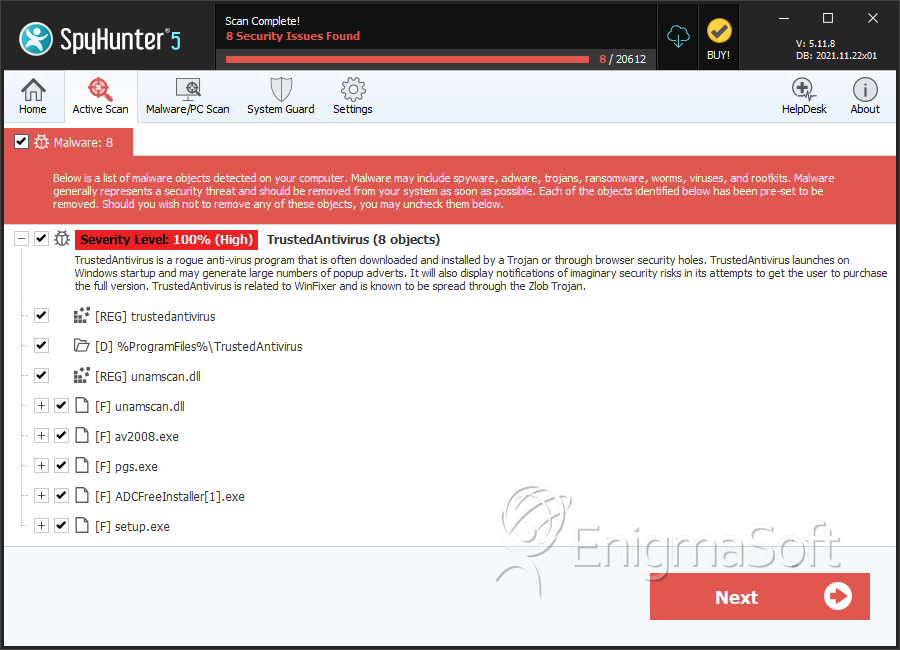
File System Details
| # | File Name | MD5 |
Detections
Detections: The number of confirmed and suspected cases of a particular threat detected on
infected computers as reported by SpyHunter.
|
|---|---|---|---|
| 1. | unamscan.dll | df6958e9ba1d73e7aef47ef6c46281df | 3 |
| 2. | av2008.exe | 3e340fe807ae1121296e5e8f5a763fb8 | 0 |
| 3. | pgs.exe | b50823b9621cffc0874c8900d5a47bd5 | 0 |
| 4. | ADCFreeInstaller[1].exe | 053c4fad4a102e3959de9c6bf0d4612c | 0 |
| 5. | setup.exe | 74ef40ff8b7ffdac3c1c2f7c95676a53 | 0 |
| 6. | install_en[1].exe | fe9522402d14d58acc567795a8d7a181 | 0 |
| 7. | scnkrnl.dll | 422c74dba49ced165c917ee4080ee2c2 | 0 |
Registry Details
Directories
TrustedAntivirus may create the following directory or directories:
| %ProgramFiles%\TrustedAntivirus |





Submit Comment
Please DO NOT use this comment system for support or billing questions. For SpyHunter technical support requests, please contact our technical support team directly by opening a customer support ticket via your SpyHunter. For billing issues, please refer to our "Billing Questions or Problems?" page. For general inquiries (complaints, legal, press, marketing, copyright), visit our "Inquiries and Feedback" page.