Trojan.Ransom.gen!E
Threat Scorecard
EnigmaSoft Threat Scorecard
EnigmaSoft Threat Scorecards are assessment reports for different malware threats which have been collected and analyzed by our research team. EnigmaSoft Threat Scorecards evaluate and rank threats using several metrics including real-world and potential risk factors, trends, frequency, prevalence, and persistence. EnigmaSoft Threat Scorecards are updated regularly based on our research data and metrics and are useful for a wide range of computer users, from end users seeking solutions to remove malware from their systems to security experts analyzing threats.
EnigmaSoft Threat Scorecards display a variety of useful information, including:
Ranking: The ranking of a particular threat in EnigmaSoft’s Threat Database.
Severity Level: The determined severity level of an object, represented numerically, based on our risk modeling process and research, as explained in our Threat Assessment Criteria.
Infected Computers: The number of confirmed and suspected cases of a particular threat detected on infected computers as reported by SpyHunter.
See also Threat Assessment Criteria.
| Threat Level: | 80 % (High) |
| Infected Computers: | 77 |
| First Seen: | September 21, 2012 |
| OS(es) Affected: | Windows |
Trojan.Ransom.gen!E is one of the many variants of ransomware Trojans that have run rampant in the last couple of years. Trojan.Ransom.gen!E, in particular, is a variant that was first detected in April of 2012. Trojan.Ransom.gen!E carries out an attack that does not differ greatly from the most common ransomware infection that can be found in the wild today. The main scam associated with Trojan.Ransom.gen!E consists in trying to convince inexperienced computer users that they need to pay an exorbitant fee by threatening them with a fake message from their country's main police agency. When dealing with variants of the Trojan.Ransom.gen!E Trojan, ESG security analysts recommend ignoring the contents of any messages blocking your access to the infected computer and using a trustworthy anti-malware program that is fully up to date to remove Trojan.Ransom.gen!E from the infected computer.
Most ransomware threats like Trojan.Ransom.gen!E involve taking over the victim's computer, essentially holding it hostage in exchange for a ransom (hence the term 'ransomware'). Trojan.Ransom.gen!E carries out this same scam, displaying a full screen message claiming that the victim's computer has been blocked and that it is necessary to pay a certain amount of money to regain control of the infected computer. Different ransomware variants display differing messages. While some will claim that the victim's computer was involved in illegal activities, other will claim that the victim's operating system is not legitimate, or that a virus infection was detected on the victim's computer and that access to the infected computer was blocked for the victim's own good. Regardless of their methods, ransomware such as Trojan.Ransom.gen!E use lies to trick inexperienced computer users into paying a ransom using money transfer services such as PaySafeCard, Ukash, or Moneypak.
The main problem in removing Trojan.Ransom.gen!E and similar threats is bypassing the harassing message that appears when the PC is booted in order to gain access to anti-malware software on the infected computer. Commonly, this can be done using Safe Mode. Some variants of Trojan.Ransom.gen!E can block Safe Mode. In these cases, an alternative start-up source, such as an external memory drive or the command prompt should be used to access your applications. Once you gain access to your computer, nearly all anti-malware programs can handle a Trojan.Ransom.gen!E infection.
Table of Contents
Aliases
15 security vendors flagged this file as malicious.
| Anti-Virus Software | Detection |
|---|---|
| Panda | Adware/WindowsRecovery |
| AVG | SHeur4.XIF |
| Ikarus | Trojan-Dropper.Win32.Dapato |
| Antiy-AVL | Trojan/Win32.Dapato.gen |
| AntiVir | TR/Ransom.E.3 |
| DrWeb | Trojan.DownLoader5.64227 |
| Comodo | UnclassifiedMalware |
| Kaspersky | Trojan-Dropper.Win32.Dapato.atuu |
| eSafe | Win32.Autorun.Ass |
| Avast | Win32:Ransom-HD [Trj] |
| Symantec | Trojan.FakeAV |
| McAfee | Artemis!B69920463080 |
| CAT-QuickHeal | TrojanDropper.Dapato.atu |
| Sophos | Mal/EncPk-ZC |
| NOD32 | a variant of Win32/Kryptik.AEIQ |
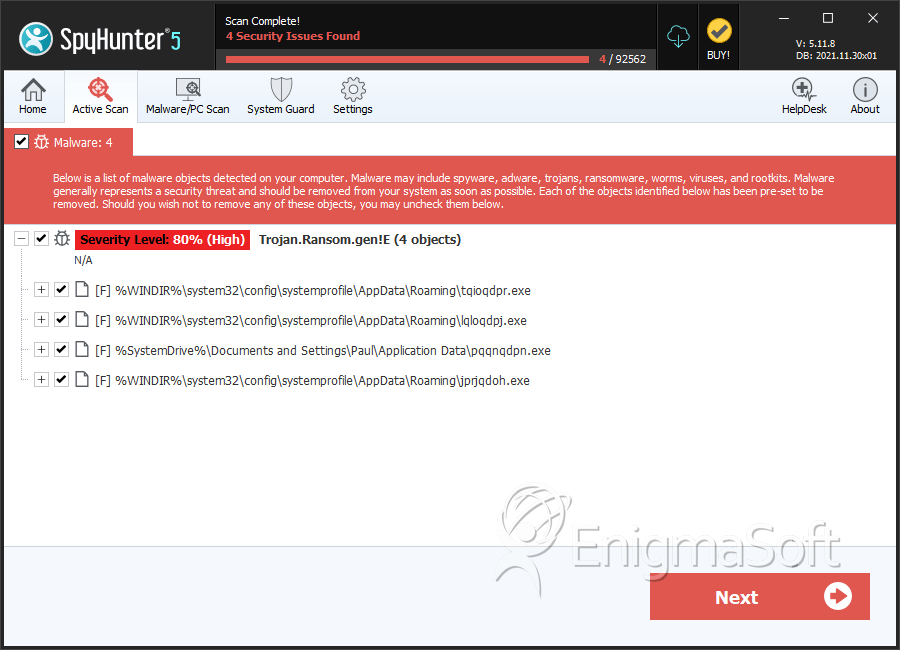
SpyHunter Detects & Remove Trojan.Ransom.gen!E
File System Details
| # | File Name | MD5 |
Detections
Detections: The number of confirmed and suspected cases of a particular threat detected on
infected computers as reported by SpyHunter.
|
|---|---|---|---|
| 1. | tqioqdpr.exe | 54e65594f44b45f4a6c101445e3b2024 | 69 |
| 2. | lqloqdpj.exe | dfa6016a4b8b1e7c6f8df37e9b99f69d | 4 |
| 3. | pqqnqdpn.exe | ad41dd7fb11be7d4fd8357772e4048d0 | 2 |
| 4. | jprjqdoh.exe | b6992046308026e8ecfd916635f01945 | 2 |




Submit Comment
Please DO NOT use this comment system for support or billing questions. For SpyHunter technical support requests, please contact our technical support team directly by opening a customer support ticket via your SpyHunter. For billing issues, please refer to our "Billing Questions or Problems?" page. For general inquiries (complaints, legal, press, marketing, copyright), visit our "Inquiries and Feedback" page.