Smart Internet Protection 2011
Threat Scorecard
EnigmaSoft Threat Scorecard
EnigmaSoft Threat Scorecards are assessment reports for different malware threats which have been collected and analyzed by our research team. EnigmaSoft Threat Scorecards evaluate and rank threats using several metrics including real-world and potential risk factors, trends, frequency, prevalence, and persistence. EnigmaSoft Threat Scorecards are updated regularly based on our research data and metrics and are useful for a wide range of computer users, from end users seeking solutions to remove malware from their systems to security experts analyzing threats.
EnigmaSoft Threat Scorecards display a variety of useful information, including:
Ranking: The ranking of a particular threat in EnigmaSoft’s Threat Database.
Severity Level: The determined severity level of an object, represented numerically, based on our risk modeling process and research, as explained in our Threat Assessment Criteria.
Infected Computers: The number of confirmed and suspected cases of a particular threat detected on infected computers as reported by SpyHunter.
See also Threat Assessment Criteria.
| Threat Level: | 100 % (High) |
| Infected Computers: | 314 |
| First Seen: | January 31, 2011 |
| Last Seen: | May 27, 2023 |
| OS(es) Affected: | Windows |
Smart Internet Protection 2011 (Smart Internet Protection 2011) is a deceptive application created to swindle users. Smart Internet Protection 2011 appears to be a legitimate anti-spyware application however it is not able to detect any real computer malware. Smart Internet Protection 2011 can be obtained from malicious websites or a sneaky Trojan may install it onto a system. Once Smart Internet Protection 2011 has infiltrated a system, Smart Internet Protection 2011 will cause chaos and flood the screen with fake security notifications in order to alarm a victim. Following the fake security alerts, Smart Internet Protection 2011 will prompt a victim to purchase its full version in order to fix or remove the detected threats. Never purchase Smart Internet Protection 2011 and just ignore the security warnings it displays. Smart Internet Protection 2011 can be removed from your PC with a legitimate rogueware removal tool.
Smart Internet Protection 2011 is a member of a huge family of PC threats called FakeVimes. Among Smart Internet Protection 2011 family members are Virus Melt, Presto TuneUp, Fast Antivirus 2009, Extra Antivirus, Windows Security Suite, Smart Virus Eliminator, Packed.Generic.245, Volcano Security Suite, Windows Enterprise Suite, Enterprise Suite, Additional Guard, PC Live Guard, Live PC Care, Live Enterprise Suite, Security Antivirus, My Security Wall, CleanUp Antivirus, Smart Security, Windows Protection Suite, Windows Work Catalyst.
Table of Contents
Aliases
15 security vendors flagged this file as malicious.
| Antivirus Vendor | Detection |
|---|---|
| AVG | Dropper.Small.XNH |
| DrWeb | Trojan.KillProc.14401 |
| BitDefender | Gen:Variant.MSILDrop.8 |
| Kaspersky | HEUR:Trojan.Win32.Generic |
| AVG | PSW.Generic9.CNVE |
| Fortinet | W32/Banker.YAT!tr.spy |
| AntiVir | TR/Agent.AOOI |
| BitDefender | Trojan.Generic.KDV.657800 |
| Kaspersky | Trojan-Spy.Win32.Farko.lu |
| Avast | Win32:Agent-AOOI [Trj] |
| NOD32 | Win32/Spy.Banker.YAT |
| McAfee | Artemis!20116B0960CE |
| Ikarus | Rootkit |
| AntiVir | ADSPY/AdSpy.Gen2 |
| BitDefender | Gen:Adware.Heur.ov8@Wrr8Hjfi |
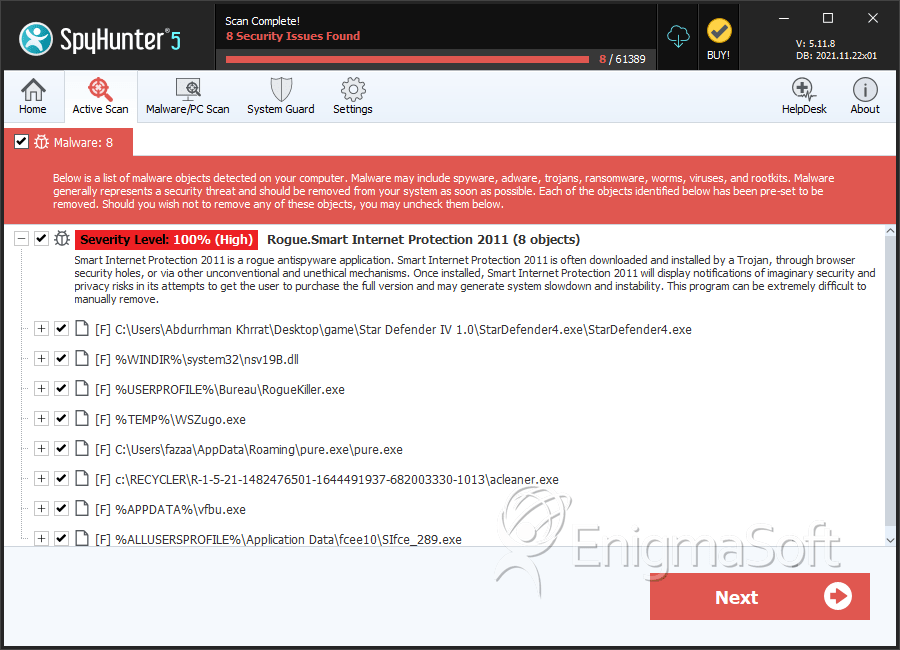
SpyHunter Detects & Remove Smart Internet Protection 2011
File System Details
| # | File Name | MD5 |
Detections
Detections: The number of confirmed and suspected cases of a particular threat detected on
infected computers as reported by SpyHunter.
|
|---|---|---|---|
| 1. | StarDefender4.exe | 590b3fa789fbc013b2ff78d0b9cc9c10 | 97 |
| 2. | nsv19B.dll | 5577299e08dc943b7357bbf1d365fe9c | 26 |
| 3. | RogueKiller.exe | 8066b79c33cb423e98686bc0b2cf511e | 14 |
| 4. | pure.exe | bb5b2961567e68995464801d3bb2a964 | 13 |
| 5. | acleaner.exe | 83c7581549a57b1bab3816a687398682 | 10 |
| 6. | vfbu.exe | 5c48d25eb124b48ebc260684c3fe41cb | 7 |
| 7. | SIfce_289.exe | 01064dfe44ab178f7a2f991b1e0feccf | 7 |
| 8. | AdobeMngPlug.dll | 84ea6bea611fe1e55c215d158fb63ede | 6 |
| 9. | AcroIEHelpe146.dll | 20116b0960ce90e7a746be85fb149770 | 6 |
| 10. | SI306_231.exe | 87996fd3d2627933b343044518828ec0 | 5 |
| 11. | FullEkran.exe | e4d3145cf158bdda827eb50a0b4194c1 | 4 |
| 12. | killexe.exe | ea621efb4e3e2e44cd326798df9639ff | 4 |
| 13. | sssd.exe | 305d06dd766625abdb1fbd0aab43bae1 | 3 |
| 14. | wsynalib.exe | f4f2740bc874bf24456c444e3afe0332 | 3 |
| 15. | YBoom.exe | 567034ff12ae544fd08b905dd2c7d3ed | 2 |
| 16. | WSZugo.exe | 0aa9427c656ef2d6ea0550b3096984a8 | 2 |
| 17. | powerrcfg.exe | 4371fbd8a1359e7af616f7693a9a6ec0 | 1 |
| 18. | vloadb5C.dll | 01de294d6b120b84187cf2be0cf2fd29 | 1 |
| 19. | SI6c2_289.exe | d6d6af86e8d76ef748e554f331ad1b16 | 1 |
| 20. | softupdate106_231.exe | 658cc108705e6c1ce176b0563a14b720 | 1 |
| 21. | SI646_289.exe | aefd0f1d18dba89bda1cdfae8e72f547 | 1 |


