Malware Protector 2008

GoldSparrow By GoldSparrow in Rogue Anti-Spyware Program | 122 views
Rate it:
1 Star2 Stars3 Stars4 Stars5 Stars (No Ratings Yet)
Loading ... Loading ...

Malware Protector 2008 Description


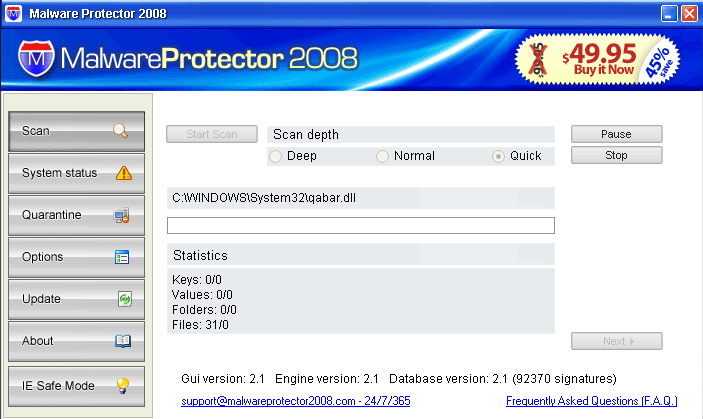
Image Screenshot

[+] Click Image to Enlarge


Malware Protector 2008, or MalwareProtector 2008, is a rogue application from the Trojan.Zlob family of infections. Trojan.Zlob is installed without the user’s knowledge. Instead of getting a fake Microsoft system alert message, Trojan.Zlob has graduated to having a Malware screensaver that displays bugs that crawl all over the user’s screen, as well as a message that reads: “Warning! Spyware detected on your computer!”. Malware Protector 2008 manages to run in the user’s computer system background, and generates fake alert notifications stating that the computer has been infected. Malware Protector 2008 may also bring a toolbar attached (Nmwegbsf Toolbar) with icons named ‘Remove Popups’, ‘Scan Spyware’, ‘Security Test’ and ‘Spam Protection’.

In addition, Malware Protector 2008 generates an interstitial page with the message:
“Reported Insecure Browsing: Navigation blocked.
Insecure Internet activity. Threat of virus attack
Due to insecure Internet browsing your PC can easily get infected with viruses, worms and trojans without your knowledge, and that can lead to system slowdown, freezes and crashes. Also insecure Internet activity can result in revealing your personal information. To get full advanced real-time protection for PC and Internet activity, install an antivirus and antispyware software. We recommend you to protect your PC now and continue safe Internet browsing. Click here to get full advanced real-time protection and continue browsing.
Continue to this website unprotected (not recommended)”

Trojan makers will use any means to advertise and promote the latest rogue anti-spyware programs. Do not let them hold your computer hostage or trick you into purchasing a program that may lead to further exposure to malware threats. Malware Protector 2008 scare tactics are an attempt to persuade the user into purchasing the full Malware Protector 2008 version of the program to remove the supposed threats. Malware Protector 2008 is the threat itself.

Type: Rogue AntiSpyware Programs

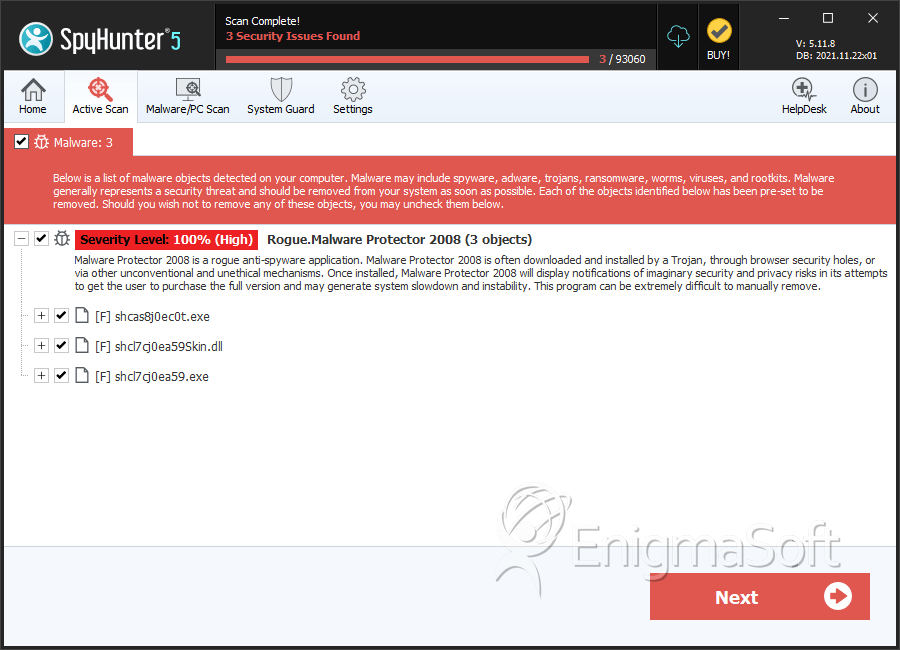
Automatic Detection of Malware Protector 2008


Download SpyHunter’s Detection Scanner
to Detect Malware Protector 2008.


Malware Protector 2008 Technical Report

As new Malware Protector 2008 details are reported by our customers and findings from our Threat Research Center, we will update this section.

The following Malware Protector 2008 files with its MD5s were created in the system:

File Name File Size MD5
shcl7cj0ea59Skin.dll 6262784 9066250e926d9aefa8eac36821f9da0c
shcl7cj0ea59.exe 1564672 c2a7adb6e2cca2ef0a47fcf632de4f8b
shcas8j0ec0t.exe 1167360 f3a85f9c80101de37bc514cc3471f96c

Malware Protector 2008 Video Demo

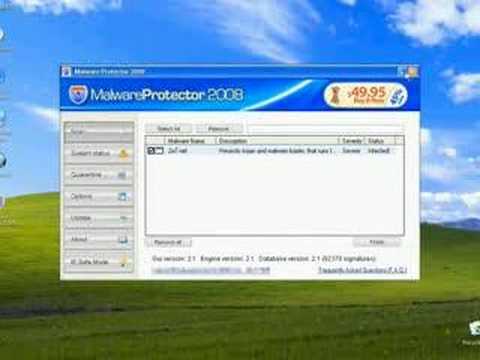
Click on the “How Malware Protector 2008 Infects Your Computer” video to see a Malware Protector 2008 infection in action! See through the eyes of an unsuspecting Internet user while him/her is being victimized by Malware Protector 2008.

At the end of this video, there’s a link to download SpyHunter’s Free Spyware Scanner. SpyHunter’s Free Spyware Scanner is for detection purposes only. To remove Malware Protector 2008, you must purchase SpyHunter’s full version.

Tip: Turn your sound ON and watch the video in Full Screen mode to fully experience how Malware Protector 2008 infects a computer. The video contains clickable buttons.

Malware Protector 2008 has typically the following processes in memory:

  • shcev9j0e1b1.exe
  • %ProgramFiles%\shcev9j0e1b1\msvcp71.dll
  • %ProgramFiles%\shcev9j0e1b1\MFC71ENU.DLL
  • MalwareProtector2008Setup.exe
  • %ProgramFiles%\shcev9j0e1b1\MFC71.dll
  • %ProgramFiles%\shcev9j0e1b1\shcev9j0e1b1.exe
  • shcas8j0ec0t.exe
  • MalwareProtector2008.exe
  • %ProgramFiles%\shcev9j0e1b1\shcev9j0e1b1Skin.dll
  • %ProgramFiles%\shcev9j0e1b1\msvcr71.dll
  • %ProgramFiles%\shcev9j0e1b1\Uninstall.exe

Malware Protector 2008 creates the following registry entries:

  • HKEY_LOCAL_MACHINE\SOFTWARE\Microsoft\Windows\CurrentVersion\Uninstall\shcev9j0e1b1\”DisplayName” = “MProtector”
  • HKEY_LOCAL_MACHINE\SOFTWARE\shcev9j0e1b1\”InstallDir” = “C:\Program Files\shcev9j0e1b1?
  • HKEY_LOCAL_MACHINE\SOFTWARE\shcev9j0e1b1\”RegistrationDiscUrl” = “http://www.malwareprotector2008.com/purchase/”
  • HKEY_LOCAL_MACHINE\SOFTWARE\shcev9j0e1b1\”ScanSystemOnStartup” = “1?
  • HKEY_LOCAL_MACHINE\SOFTWARE\shcev9j0e1b1\”BackgroundScan” = “1?
  • HKEY_LOCAL_MACHINE\SOFTWARE\shcev9j0e1b1\”InstallationID” = “{F2D62961-6358-4CCF-B806-7664421D16B2}”
  • HKEY_LOCAL_MACHINE\SOFTWARE\shcev9j0e1b1\”ProgramVersion” = “2.1?
  • HKEY_LOCAL_MACHINE\SOFTWARE\shcev9j0e1b1\”GuiVersion” = “2.1?
  • HKEY_LOCAL_MACHINE\SOFTWARE\shcev9j0e1b1\”ScanPriority” = “1?
  • HKEY_LOCAL_MACHINE\SOFTWARE\Microsoft\Windows\CurrentVersion\Uninstall\shcev9j0e1b1\”UninstallString” = “C:\Program Files\shcev9j0e1b1\uninstall.exe”
  • HKEY_LOCAL_MACHINE\SOFTWARE\shcev9j0e1b1\”" = “C:\Program Files\shcev9j0e1b1?
  • HKEY_LOCAL_MACHINE\SOFTWARE\shcev9j0e1b1\”RegistrationUrl” = “http://www.malwareprotector2008.com/buy/”
  • HKEY_LOCAL_MACHINE\SOFTWARE\shcev9j0e1b1\”ScanDepth” = “2?
  • HKEY_LOCAL_MACHINE\SOFTWARE\shcev9j0e1b1\”MinimizeOnStart” = “0?
  • HKEY_LOCAL_MACHINE\SOFTWARE\shcev9j0e1b1\”MGuid” = “{0DB56EFC-EE39-447F-94AB-73409F51AC2E}”
  • HKEY_USERS\S-1-5-21-1172441840-534431857-1906119351-500\Software\Microsoft\Windows\ShellNoRoam\MUICache\”C:\Program Files\shcev9j0e1b1\shcev9j0e1b1.exe” = “shcev9j0e1b1?
  • HKEY_LOCAL_MACHINE\SOFTWARE\shcev9j0e1b1\”DatabaseVersion” = “2.1?
  • HKEY_LOCAL_MACHINE\SOFTWARE\shcev9j0e1b1\”ProxyPort” = “0?
  • HKEY_LOCAL_MACHINE\SOFTWARE\Microsoft\Windows\CurrentVersion\Run\”SMshcev9j0e1b1? = “C:\Program Files\shcev9j0e1b1\shcev9j0e1b1.exe”
  • HKEY_LOCAL_MACHINE\SOFTWARE\shcev9j0e1b1\”ADVid” = “”
  • HKEY_LOCAL_MACHINE\SOFTWARE\shcev9j0e1b1\”domain” = “malwareprotector2008.com”
  • HKEY_LOCAL_MACHINE\SOFTWARE\shcev9j0e1b1\”SoftID” = “MProtector”
  • HKEY_LOCAL_MACHINE\SOFTWARE\shcev9j0e1b1\”AutomaticallyUpdates” = “1?
  • HKEY_LOCAL_MACHINE\SOFTWARE\shcev9j0e1b1\”BackgroundScanTimeout” = “1?
  • HKEY_LOCAL_MACHINE\SOFTWARE\shcev9j0e1b1\”LastTimeStamp” = “B8?
  • HKEY_LOCAL_MACHINE\SOFTWARE\shcev9j0e1b1\”EngineVersion” = “2.1?
  • HKEY_LOCAL_MACHINE\SOFTWARE\shcev9j0e1b1\”ProxyName” = “”
  • HKEY_LOCAL_MACHINE\SOFTWARE\shcev9j0e1b1\”DaysInterval” = “7?

Important Article Disclaimer

article disclaimer
ESG Support Center

Malware Protector 2008 or MalwareProtector2008 Method of Infection

Click on the “How Malware Protector 2008 Infects Your Computer” video to see a Malware Protector 2008 infection in action! See through the eyes of an unsuspecting Internet user while him/her is being victimized by Malware Protector 2008. Tip: Turn your sound ON and watch the video in Full Screen mode to fully experience how Malware Protector 2008 infects a computer. In the “How Malware Protector 2008 Infects Your Computer” video, the following Malware Protector 2008 actions occur:

  • The Internet user surfs the Web and visits a questionable website. A large amount of rogue anti-spyware programs like Malware Protector 2008 are mostly pushed through adult websites.

  • The Internet user downloads a free video codec called “Video ActiveX Enhancement 2.07″ which comes bundled with a Trojan called Zlob and Malware Protector 2008. Freeware or shareware programs tend to come with other unwanted programs such as Malware Protector 2008 . Do not install any free software without reading its EULA. By simply reading a program’s EULA, you can determine whether a program you are installing has spyware bundled with it.

  • The Internet user is infected with the rogue anti-spyware program Malware Protector 2008. Malware Protector 2008 runs a scan on the computer and gives a false spyware report claiming that the computer is infected with spyware. Once the scan is completed, a warning message appears that lists the spyware ‘found’ and the user has to either click on a link or a button to remove it. This deceptive tactic is an attempt to scare the Internet user into clicking on the link or button to purchase Malware Protector 2008.

  • The Internet user closes all the fake Windows error messages and warnings and is unaware that Malware Protector 2008 is still running its malicious tasks in the background. Malware Protector 2008 reloads itself on a timer so if the Internet user closes the program it will only take a few moments until it opens again. The average Internet user does not realize when spyware has infected his/her computer until it is too late and the spyware problem has already spread throughout the computer.

  • The Internet user closes all the fake Windows error messages and warnings and is unaware that Malware Protector 2008 is still running its malicious tasks in the background. Malware Protector 2008 reloads itself on a timer so if the Internet user closes the program it will only take a few moments until it opens again. The average Internet user does not realize when spyware has infected his/her computer until it is too late and the spyware problem has already spread throughout the computer.

  • Internet user opens web browser and is redirected to rogue websites. The Internet user is bombarded with websites that pop up messages that tries to push a product on him/her. Ignore such messages! We recommend closing these windows by clicking on the X instead of the OK button.

Malware Protector 2008 Symptoms

The following Malware Protector 2008 symptoms occur:

  • Malware Protector 2008 displays a message that reads: “Warning! Spyware detected on your computer!” on the user’s computer screen.

  • Malware Protector 2008 generates a screensaver that displays bugs crawling over the computer screen.

  • Malware Protector 2008 may hijack or modify your homepage. Sometimes Malware Protector 2008 won’t even allow you to change it back to your original homepage. Websites that redirects you to rogue websites.

  • Once the malware has been loaded, MalwareProtector 2008 immediately displays new desktop shortcuts, icons and interface.

  • Malware Protector 2008 may install a rogue toolbar called Nmwegbsf Toolbar with with icons named ‘Remove Popups’, ‘Scan Spyware’, ‘Security Test’ and ‘Spam Protection’. If you click on either of them you’re directed to a rogue websites which can install additional malware.

  • Malware Protector 2008 displays message occupying the entire screen page that to advertise and promote its product.

Share and Enjoy: These icons link to social bookmarking sites where readers can share and discover new web pages.
  • Digg
  • del.icio.us
  • Furl
  • StumbleUpon
  • Technorati
  • YahooMyWeb
This entry was posted on 06/4/08 and is filed under Rogue Anti-Spyware Program. You can follow any responses to this entry through the RSS 2.0 feed. You can leave a response, or trackback from your own site.

Leave a Comment

Note: Abusive comments are not allowed. Please do not post comments regarding technical support issues. ESG customers that have issues with SpyHunter should open a customer support ticket.

*
To prove you're a person (not a spam script), type the security word shown in the picture. Click on the picture to hear an audio file of the word.
Click to hear an audio file of the anti-spam word

Poll

How much money have you spent trying to rid your PC of spyware?
View Results

Archives

Home Sitemap RSS Feed Privacy Policy End User License Agreement Copyright 2003-2009. Enigma Software Group USA, LLC. All Rights Reserved.