Immunizr
Threat Scorecard
EnigmaSoft Threat Scorecard
EnigmaSoft Threat Scorecards are assessment reports for different malware threats which have been collected and analyzed by our research team. EnigmaSoft Threat Scorecards evaluate and rank threats using several metrics including real-world and potential risk factors, trends, frequency, prevalence, and persistence. EnigmaSoft Threat Scorecards are updated regularly based on our research data and metrics and are useful for a wide range of computer users, from end users seeking solutions to remove malware from their systems to security experts analyzing threats.
EnigmaSoft Threat Scorecards display a variety of useful information, including:
Ranking: The ranking of a particular threat in EnigmaSoft’s Threat Database.
Severity Level: The determined severity level of an object, represented numerically, based on our risk modeling process and research, as explained in our Threat Assessment Criteria.
Infected Computers: The number of confirmed and suspected cases of a particular threat detected on infected computers as reported by SpyHunter.
See also Threat Assessment Criteria.
| Threat Level: | 60 % (Medium) |
| Infected Computers: | 7 |
| First Seen: | July 24, 2009 |
| Last Seen: | January 10, 2019 |
| OS(es) Affected: | Windows |
Immunizr is a clone of the popular rogue security application SpyShield. This fake security tool is part of a well-known computer scam, which involves convincing gullible computer users to purchase fake security programs. Immunizr has been known to infect computer systems located in Germany, displaying windows, error messages, fake security alerts and an interface that are entirely in German. However, underneath its exterior, Immunizr is no different than the majority of rogue security programs that exist in the present. ESG PC security researchers recommend treating an Immunizr infection as you would remove any other rogue security program. A fully-updated anti-malware application, while running Windows in Safe Mode, will usually take care of most Immunizr infections. However, Immunizr may be associated with other malware attackers. It is important to scan your computer completely and to be on the watch for any suspicious behavior, immediately after an Immunizr infection was removed.
Table of Contents
How the Immunizr Scam Works
As was mentioned before, Immunizr is part of a well-known computer scam. Programs like Immunizr are known as rogue security programs. Rogue security programs are malware infections that do the complete opposite of what they advertise. These fake security programs claim that they can fix malware problems on your computer system, while, in reality, are malware themselves. An Immunizr infection will often involve other Trojans and even rootkit infections on the victim's computer system which, by working together, can quickly cripple an otherwise healthy computer system. Immunizr, then, displays a large number of alarming messages and fake system alerts. These will try to convince the victim that a full-scale malware infection is present and that Immunizr can remove it, as long as the victim purchases a "full version" of this useless application. Immunizr will also run a fake system scan which, after a fake progress bar (which is nothing more than an animation done for show), will claim that the victim's computer is in dire straits. In fact, the victim's computer is under attack, but from Immunizr itself. According to ESG PC security researchers, Immunizr is little more than a collection of dangerous scripts and associated Trojans, which act together to take control of a computer system . Knowing this, you can avoid becoming a victim of Immunizr. ESG security researchers strongly advise to ignore all messages displayed by this fake security application and use a real, reliable anti-malware program that is fully up-to-date to remove Immunizr for good
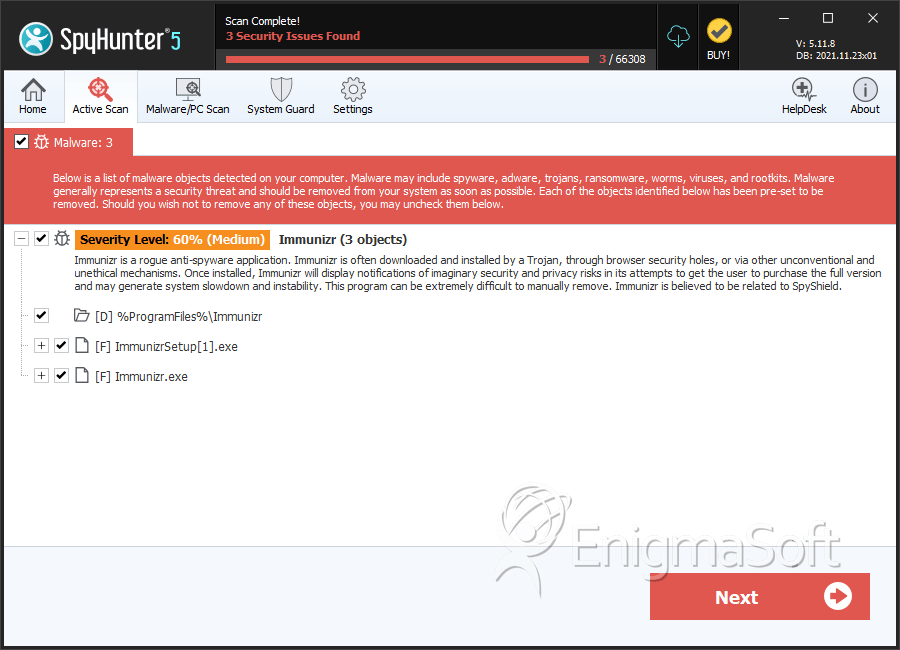
SpyHunter Detects & Remove Immunizr
File System Details
| # | File Name | MD5 |
Detections
Detections: The number of confirmed and suspected cases of a particular threat detected on
infected computers as reported by SpyHunter.
|
|---|---|---|---|
| 1. | ImmunizrSetup[1].exe | e319c294bcfe4af6f53ab5f7e249b4d6 | 0 |
| 2. | Immunizr.exe | 8de49d342a37eb25b44fbdadd0193b5c | 0 |
Directories
Immunizr may create the following directory or directories:
| %ProgramFiles%\Immunizr |




