Best Malware Protection
Threat Scorecard
EnigmaSoft Threat Scorecard
EnigmaSoft Threat Scorecards are assessment reports for different malware threats which have been collected and analyzed by our research team. EnigmaSoft Threat Scorecards evaluate and rank threats using several metrics including real-world and potential risk factors, trends, frequency, prevalence, and persistence. EnigmaSoft Threat Scorecards are updated regularly based on our research data and metrics and are useful for a wide range of computer users, from end users seeking solutions to remove malware from their systems to security experts analyzing threats.
EnigmaSoft Threat Scorecards display a variety of useful information, including:
Ranking: The ranking of a particular threat in EnigmaSoft’s Threat Database.
Severity Level: The determined severity level of an object, represented numerically, based on our risk modeling process and research, as explained in our Threat Assessment Criteria.
Infected Computers: The number of confirmed and suspected cases of a particular threat detected on infected computers as reported by SpyHunter.
See also Threat Assessment Criteria.
| Threat Level: | 100 % (High) |
| Infected Computers: | 106 |
| First Seen: | March 16, 2011 |
| OS(es) Affected: | Windows |
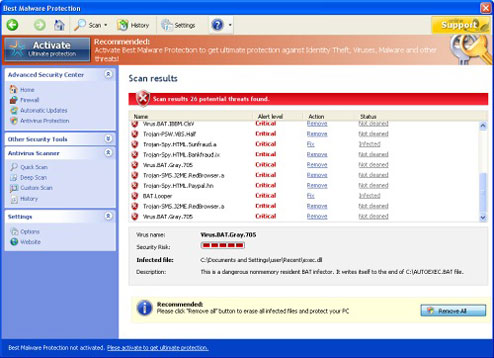 Is Best Malware Protection pestering you for money? If you have Best Malware Protection on your computer, don't trust what Best Malware Protection tells you, and don't pay the money Best Malware Protection demands. Despite Best Malware Protection's realistic appearance, Best Malware Protection is fake anti-virus software, and Best Malware Protection is a scam. The most important thing you need to know about Best Malware Protection, aside from the fact that you should not pay for it, is that Best Malware Protection is not made by Microsoft and not a Windows component. Best Malware Protection tries to give the impression that Best Malware Protection is a legitimate Windows utility, so that you will believe the lies Best Malware Protection tells you about your computer's security. Regardless of what Best Malware Protection may tell you, and regardless of what Best Malware Protection might look like, Best Malware Protection has absolutely no connection to Microsoft.
Table of Contents
Signs of an Infection with Best Malware Protection
When Best Malware Protection has infected your computer, you will not be able to ignore Best Malware Protection. Because Best Malware Protection alters the registry to make sure that Best Malware Protection will run every time Windows starts, you will see the phony user interface for Best Malware Protection every time you start your computer. The interface is designed to look as though it is an ordinary window displayed in the Windows operating system, and it has the styling and fonts used by Windows, as well as all the same buttons along the top, and standard icons for other folders and options down the left side. Furthermore, Best Malware Protection's interface is designed to give the impression that it is somehow an extra level of protection on top of the Windows security options and settings. The first header on the left of the interface says "Advanced Security Center, and in a few places, Best Malware Protection will be referred to as "ultimate protection," as if Best Malware Protection is somehow an extra security option built into Windows. Don't let the interface fool you, because Best Malware Protection is completely fake.
This bogus interface that Best Malware Protection uses is where the fake security software will run Best Malware Protection's fake system scans. The scans will always show results, and the results will typically include made-up virus names. Regardless of the actual state of your PC's security, Best Malware Protection will say that Best Malware Protection has found numerous threats. If you opt to remove these "threats," Best Malware Protection will say that the only way to do that is for you to pay to activate Best Malware Protection. It will even direct you to a payment website, where you can pay for Best Malware Protection by credit card. However, no matter how much you pay, the threats that Best Malware Protection warns you about are not real, and Best Malware Protection is not capable of cleaning up your system.
While you try to use your computer, Best Malware Protection will get in the way of everything that you try to do. It will show extremely frequent pop-up alerts and warnings, which will state that your computer is infected with a virus, or that some remote server or computer is trying to attack your PC. These alerts will repeatedly prompt you to "activate" Best Malware Protection in order to avert disaster. Also, Best Malware Protection will show alerts when you try to open other programs, and Best Malware Protection will prevent them from opening. This includes any real anti-virus software you might have, as well as really critical things like Task Manager. Don't think that Best Malware Protection will let you go for help online, either; when you open up your web browser, Best Malware Protection will either redirect you to Best Malware Protection's own payment sites, or it will prevent you from going where you want to go under the false pretense that the destination website is malicious.
Origins of the Infection and the Malware
So, if you didn't download Best Malware Protection, you're probably wondering how Best Malware Protection got onto your computer in the first place,. Best Malware Protection infects computers by using a Trojan to get a foot in the door. The Trojan that supports Best Malware Protection may be hidden in fake online "free scan" advertisements and websites, or Best Malware Protection may be bundled with some other ordinary-looking thing that you download. Once the Trojan is downloaded, it does the work of getting Best Malware Protection installed and set up. The next thing you will know is Best Malware Protection claiming to be a Windows utility and preventing you from using your PC.
Best Malware Protection is not a new rogue anti-virus program; Best Malware Protection is just a reworking of an existing, slightly older one. Best Malware Protection is nearly identical to its predecessors from the FakeVimes family, which include Virus Melt, Presto TuneUp, Fast Antivirus 2009, Extra Antivirus, Windows Security Suite, Smart Virus Eliminator, Packed.Generic.245, Volcano Security Suite, Windows Enterprise Suite, Enterprise Suite, Additional Guard, PC Live Guard, Live PC Care, Live Enterprise Suite, Security Antivirus, My Security Wall, CleanUp Antivirus, Smart Security, Windows Protection Suite, Windows Work Catalyst. Like Best Malware Protection's malware relatives, Best Malware Protection was originated in Russia, and Best Malware Protection supports a Russian scam.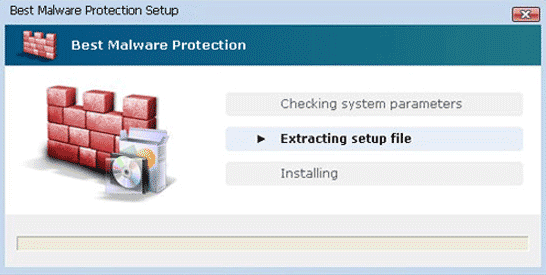
SpyHunter Detects & Remove Best Malware Protection
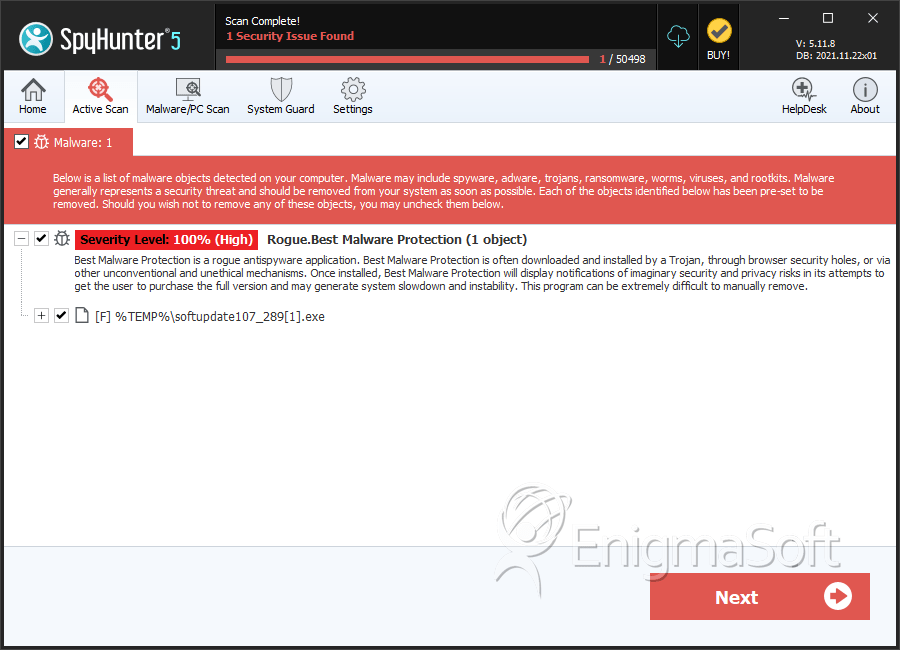
File System Details
| # | File Name | MD5 |
Detections
Detections: The number of confirmed and suspected cases of a particular threat detected on
infected computers as reported by SpyHunter.
|
|---|---|---|---|
| 1. | softupdate107_289[1].exe | 208119230359543015816bc19559b185 | 106 |



