AntiSpyware Pro XP Info & Removal Guide
The purpose of this “AntiSpyware Pro XP” article is to educate users on how to identify and remove AntiSpyware Pro XP. This guide will be updated as more information becomes available. If you have any information about AntiSpyware Pro XP or you would like to share your experience dealing with AntiSpyware Pro XP, we encourage you to post your comments. If you find this article useful and wish to conveniently view our recently added or updated articles, subscribe to our RSS feed.
Do you have AntiSpyware Pro XP?
AntiSpyware Pro XP Description
AntiSpyware Pro XP or AntiSpywareProXP, is a rogue anti-spyware program known to trick users into believing they are infected with numerous spyware infections. AntiSpyware Pro XP uses deceiving tactis, such as fake popups and fake scan results displaying imaginary threats supposedly found in the user’s computer system. The user may have been infected with AntiSpyware Pro XP by a Trojan Zlob or Vundo through browser security holes or he/she may have downloaded AntiSpyware Pro XP’s trial version from a malicious website thinking it would solve his/her spyware situation.AntiSpyware Pro XP’s fake popups and scan results may redirect the user to several fake security websites, such as Scan-Antispyware-Free-Scanner.com, to urge him/her to purchase AntiSpyware Pro XP’s full version. AntiSpyware Pro XP may cause computer slowdowns. AntiSpyware Pro XP is clone of AntiSpyware 2008 XP.
Type: Rogue AntiSpyware Programs

Detect AntiSpyware Pro XP Using SpyHunter
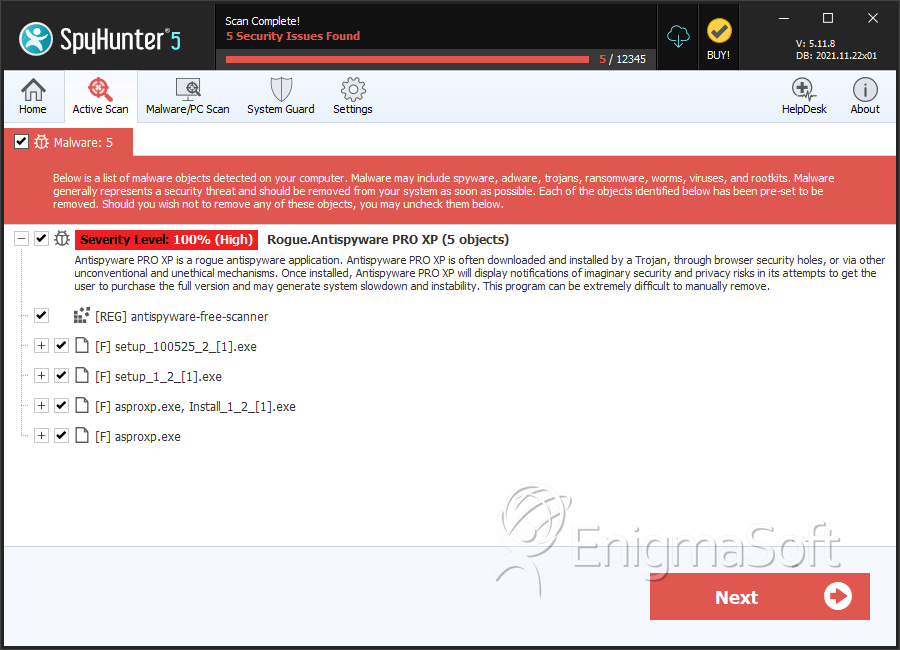
The detection of AntiSpyware Pro XP may be a difficult process and its removal may prove to be even more problematic, especially if it’s done without the assisstance of a removal tool. If you use a spyware removal tool such as SpyHunter, you can have SpyHunter automatically detect the files of AntiSpyware Pro XP and any other type of malware, spyware, adware, computer worm, rootkit, trojan, browser helper object infection that may be hidden on your PC. Why you should try SpyHunter’s Detection Scanner.To safely detect AntiSpyware Pro XP, follow the instructions below:
- Once you download SpyHunter’s Detection Scanner, select “Start Scan” to run a full system scan to search for AntiSpyware Pro XP and any other security threat that may be on your PC.
- Once SpyHunter has detected AntiSpyware Pro XP, you will need to purchase SpyHunter to continue on to the removal process.
- To complete the cleaning process, reboot your computer and run SpyHunter again to check for any remaining AntiSpyware Pro XP infections.
Start of page
Still Can’t Remove AntiSpyware Pro XP?
Exclusive Offer for SpyHunter Customers: FREE Custom Malware Fixes!
Have SpyHunter’s Spyware HelpDesk create FREE custom malware fixes tailored to your PC!
Spyware HelpDesk is both a service and a tool which allows our technicians to generate custom fixes specific to your PC. These custom fixes are transmitted to your SpyHunter utility which will disable and eradicate your malware threat completely off your PC. In order to better understand the process involved in generating custom fixes with SpyHunter’s Spyware HelpDesk, read how to use SpyHunter’s Spyware HelpDesk to create a custom malware fix for AntiSpyware Pro XP.
Some types of threats hide pieces of code from Windows, install additional components, and others have polymorphic capabilities to make removal harder. You can read the various scenarios as to why you can’t remove AntiSpyware Pro XP with SpyHunter or manually. With SpyHunter’s Spyware Helpdesk, you’ll be able have a custom fix that is specific to your spyware infection on your PC.
Start of page
AntiSpyware Pro XP Anatomy
As new AntiSpyware Pro XP details are reported by our customers and findings from our Threat Research Center, we will update this section.AntiSpyware Pro XP Solution: With SpyHunter you can remedy AntiSpyware Pro XP in one simple press of a button. We recommend you download SpyHunter’s Spyware Detection Tool to safely detect AntiSpyware Pro XP.
MD5 Details of AntiSpyware Pro XP Files
The following AntiSpyware Pro XP files with its MD5s were created in the system:| File Name | File Size | MD5 |
|---|
| setup_1_2_[1].exe | 90624 | 6113ff3c5a84f5acc263a8de0ecb5079 |
| asproxp.exe | 958464 | 1185a3a511e252e0b55e523fdbace7ea |
| Install_1_2_[1].exe | 958464 | 1185a3a511e252e0b55e523fdbace7ea |
| asproxp.exe | 961536 | fd74ae5678ac82ce73df29e0f66f539a |
| setup_100525_2_[1].exe | 118784 | 07688ebb24f877feb60b321877068588 |
Start of page
AntiSpyware Pro XP Video Demo
Click on the “How AntiSpyware Pro XP Infects Your Computer” video to see a AntiSpyware Pro XP infection in action! See through the eyes of an unsuspecting Internet user while him/her is being victimized by AntiSpyware Pro XP.At the end of this video, there’s a link to download SpyHunter’s Free Spyware Scanner. SpyHunter’s Free Spyware Scanner is for detection purposes only. To remove AntiSpyware Pro XP, you must purchase SpyHunter’s full version.
Tip: Turn your sound ON and watch the video in Full Screen mode to fully experience how AntiSpyware Pro XP infects a computer. The video contains clickable buttons.
Start of page
AntiSpyware Pro XP Installation Process
Listed below are files needed for the installation of AntiSpyware Pro XP. You can use this information to manually search and remove AntiSpyware Pro XP from your PC.Use Caution! Some technical expertise is needed. Manual removal of AntiSpyware Pro XP is a delicate procedure and does not guarantee complete removal of the malware, since some malicious files tend to hide or may have the ability to recreate themselves. It is strongly advised that you backup your PC before you attempt to manually remove AntiSpyware Pro XP. ESG is not responsible for any damage to your computer resulting in any way from your use of this AntiSpyware Pro XP installation process.
If you are still having problems with AntiSpyware Pro XP, we recommend you download SpyHunter’s Spyware Detection Tool to safely detect AntiSpyware Pro XP. SpyHunter can facilitate the process of detecting and ultimately removing the unwanted files without having to deal with sensitive areas within your system.
If SpyHunter does not fully fix your problem, there may be many reasons as to its inability to remove the unwanted files. With SpyHunter’s Spyware HelpDesk, as a custom-automated-fix tool, you can achieve complete removal.
On the AntiSpyware Pro XP files listed below, you will find that some files may have environment variables (ex. “%Program Files%”). Read more on “Environment Variables List” for information on what each environment variable means.
Remove AntiSpyware Pro XP directories, paths or folders
When AntiSpyware Pro XP is executed, it creates the following directories, paths or folders:Find out how to remove AntiSpyware Pro XP directories, paths or folders
- %AllUsersProfile%\Application Data\Software Licensors\Antispyware PRO XP
Stop AntiSpyware Pro XP processes
AntiSpyware Pro XP creates the following cookies:Find out how to remove AntiSpyware Pro XP processes
- antispyware-2008.exe
- %profile%\application data\secure solutions\AntispywareProXP\as2008xp.exe
- asproxp.exe
- setup_100527_3_.exe
- setup.exe
- c:\Documents and Settings\All Users\Application Data\services\services.dll
- antispywareproxp.exe
- ntdll64.dll
- c:\Documents and Settings\All Users\Application Data\Software Licensors\Antispyware PRO XP\asproxp.exe
Delete AntiSpyware Pro XP Dlls
The following AntiSpyware Pro XP DLL files are created:Find out how to remove AntiSpyware Pro XP dlls
- c:\Documents and Settings\All Users\Application Data\services\services.dll
- ntdll64.dll
Remove other malicious AntiSpyware Pro XP files
The following AntiSpyware Pro XP files are created:Find out how to remove AntiSpyware Pro XP malicious files
- antispyware-2008.exe
- %profile%\application data\secure solutions\AntispywareProXP\as2008xp.exe
- %programs%\antispyware 2008\antispyware-2008.lnk
- c:\Documents and Settings\All Users\Application Data\Software Licensors\Antispyware PRO XP\BASE
- c:\Documents and Settings\All Users\Application Data\Software Licensors\Antispyware PRO XP\asproxp.exe
- c:\Documents and Settings\All Users\Application Data\services
- asproxp.exe
- setup_100527_3_.exe
- setup.exe
- %profile%\application data\microsoft\internet explorer\quick launch\antispyware-2008.lnk
- c:\Documents and Settings\All Users\Application Data\Software Licensors\Antispyware PRO XP
- c:\Documents and Settings\All Users\Application Data\Software Licensors\Antispyware PRO XP\DELETED
- c:\Documents and Settings\All Users\Application Data\Software Licensors\Antispyware PRO XP\LOG\20080909202141140.log
- Antispyware PRO XP
- antispywareproxp.exe
- ntdll64.dll
- %desktopdirectory%\antispyware-2008.lnk
- c:\Documents and Settings\All Users\Application Data\Software Licensors
- c:\Documents and Settings\All Users\Application Data\Software Licensors\Antispyware PRO XP\SAVED
- c:\Documents and Settings\All Users\Application Data\Software Licensors\Antispyware PRO XP\LOG
- c:\Documents and Settings\All Users\Application Data\services\services.dll
AntiSpyware Pro XP creates the following registry entry so that it executes whenever Windows starts:
- HKEY_CURRENT_USER\Software\Microsoft\Windows\CurrentVersion\Run “s9201″
Remove other registry keys created by AntiSpyware Pro XP
AntiSpyware Pro XP creates the following registry keys:Find out how to remove AntiSpyware Pro XP registry keys
- HKEY_CURRENT_USER\Software\Microsoft\Windows\CurrentVersion\Run “s9201″
- HKEY_CURRENT_USER\Software\Software Licensors\Antispyware PRO XP
- Software Licensors\Antispyware PRO XP
- HKEY_CURRENT_USER\Software\Software Licensors
- HKEY_CURRENT_USER\Software\Software Licensors\Installer
Important Article Disclaimer

Start of page

English 

AntiSpyware Pro XP Info & Removal Guide