Alureon
Threat Scorecard
EnigmaSoft Threat Scorecard
EnigmaSoft Threat Scorecards are assessment reports for different malware threats which have been collected and analyzed by our research team. EnigmaSoft Threat Scorecards evaluate and rank threats using several metrics including real-world and potential risk factors, trends, frequency, prevalence, and persistence. EnigmaSoft Threat Scorecards are updated regularly based on our research data and metrics and are useful for a wide range of computer users, from end users seeking solutions to remove malware from their systems to security experts analyzing threats.
EnigmaSoft Threat Scorecards display a variety of useful information, including:
Ranking: The ranking of a particular threat in EnigmaSoft’s Threat Database.
Severity Level: The determined severity level of an object, represented numerically, based on our risk modeling process and research, as explained in our Threat Assessment Criteria.
Infected Computers: The number of confirmed and suspected cases of a particular threat detected on infected computers as reported by SpyHunter.
See also Threat Assessment Criteria.
| Threat Level: | 90 % (High) |
| Infected Computers: | 89 |
| First Seen: | July 24, 2009 |
| Last Seen: | December 25, 2020 |
| OS(es) Affected: | Windows |
Alureon is one of the most dangerous malware infections. The Alureon Trojan and rootkit can search a computer system's network traffic and extract account information, passwords, online banking data and credit card information. The Alureon Trojan is responsible for several well-publicized attacks on computer systems using Windows operating systems. Microsoft has released several patches for their operating system, in order to undo some of the effects of this dangerous malware invader. According to PC security researchers, as of 2010, Alureon was responsible for the second-largest botnet and a host of spam email and DDoS attacks.
Table of Contents
A Timeline of the Alureon Rootkit
According to PC security researchers, the first infections of the Alureon rootkit were first detected in 2006. Most computer systems become infected with the Alureon malware threat after downloading and installing a Trojan included with rogue security programs. Clones of Security Essentials 2010, a fairly typical fake security application, have been known to infect a computer system with Alureon. Once this Trojan enters a computer system, Alureon takes over the spoolsv.exe Windows service and injects a malicious code into the infected computer. It can then corrupt system drivers, such as atapi.sys, in order to carry out its rootkit implementation. Once the computer system is infected with the Alureon Trojan and rootkit, this malware threat will often cause browser redirects and lead its victims to malicious fake search engine websites. The Alureon rootkit has also been known to block automatic Windows updates and to prevent its victim from launching known anti-malware applications.
Detecting and Removing Alureon
The Alureon Trojan and rootkit caught the attention of PC security researchers, when Alureon was responsible for extensive crashes on Windows systems after the security update MS10-015. Since then, Microsoft has altered their update to prevent its installation, in case of an Alureon infection. However, the criminals behind this malware threat have also fixed this bug. As of 2010, malware analysts have reported that Alureon can now bypass the kernel-mode driver signing the requirement that is characteristic of the Windows 7 operating system. This makes Alureon particularly difficult to remove through normal means. The Alureon rootkit can remain undetected indefinitely. However, examining the infected computer's network traffic can show its presence. A specialized rootkit-removal tool may be necessary, before a legitimate anti-malware program is able to find and remove the Alureon infection.
Aliases
15 security vendors flagged this file as malicious.
| Anti-Virus Software | Detection |
|---|---|
| Fortinet | W32/Daws.BOLW!tr |
| Ikarus | Trojan.WinNT.Alureon |
| Microsoft | Trojan:WinNT/Alureon |
| McAfee-GW-Edition | Heuristic.BehavesLike.Win32.ModifiedUPX.C |
| AntiVir | TR/Symmi.17638.8 |
| BitDefender | Gen:Variant.Symmi.17638 |
| Kaspersky | Trojan-Dropper.Win32.Daws.bolw |
| Avast | Win32:Kryptik-LJL [Trj] |
| Symantec | WS.Reputation.1 |
| McAfee | Artemis!B0DD981293FF |
| Panda | Trj/Genetic.gen |
| AVG | Generic32.LJL |
| Fortinet | W32/TDSS.AWYC!tr |
| Sophos | Mal/Generic-S |
| Kaspersky | Trojan-Dropper.Win32.TDSS.awyc |
SpyHunter Detects & Remove Alureon
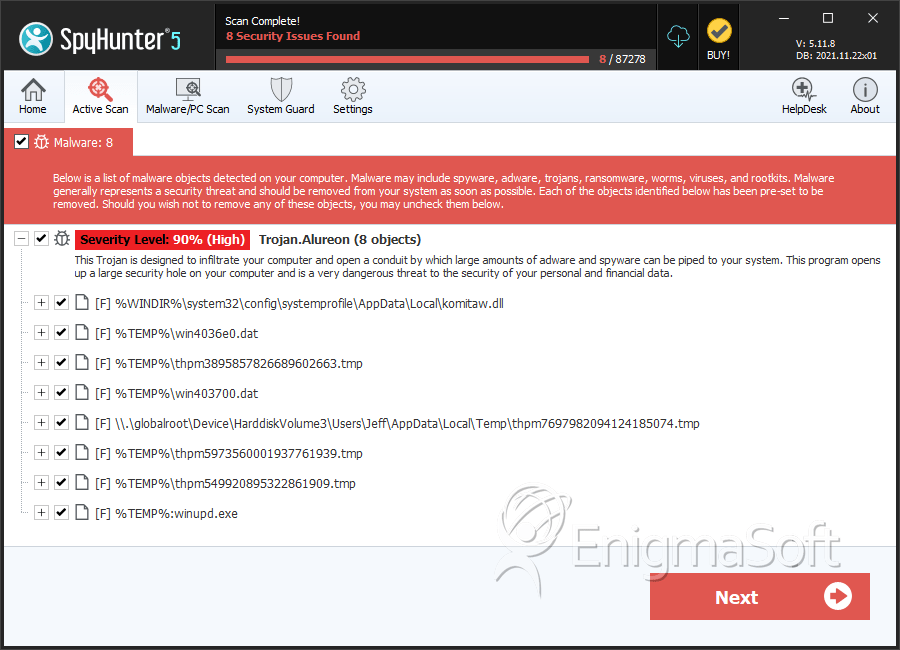
File System Details
| # | File Name | MD5 |
Detections
Detections: The number of confirmed and suspected cases of a particular threat detected on
infected computers as reported by SpyHunter.
|
|---|---|---|---|
| 1. | komitaw.dll | d823c950238ef9afa45cdc509f04a05c | 24 |
| 2. | win4036e0.dat | 6884f687736d2fb972c904e2e1d5a59b | 16 |
| 3. | thpm3895857826689602663.tmp | 46675e831a2b30d0457c8fa21ee527e9 | 12 |
| 4. | win403700.dat | c97844bdc7793ae395bdcd345decbca8 | 8 |
| 5. | win4036e0.dat | 3bfe572d5600f77c8a2d9e81000e1e89 | 5 |
| 6. | win4036e0.dat | 3cc43862518c71a5309590f835875703 | 2 |
| 7. | thpm7697982094124185074.tmp | 1ee5efbdfc7c9c77e3737da1e1374fa1 | 1 |
| 8. | thpm5973560001937761939.tmp | d458c6eb75444101d6d27c8eca66d3f8 | 1 |
| 9. | thpm549920895322861909.tmp | aee5779422e12b1a874ec5911897e9bf | 1 |
| 10. | win4036e0.dat | aba4f8996de1af5fc3a6ab122025485f | 1 |
| 11. | %TEMP%:winupd.exe | 1ffd2c773aaf54bf2f6329c091ffdee3 | 1 |
| 12. | 0.20486604276581433 | 27939705590a4974edb156ea339dca85 | 1 |
| 13. | winhbt.exe | 5283b1dff46814166a75a4b52ef34f0b | 0 |
| 14. | wow64main.exe | 227ef1a68b0bbeaa4ffe2fd70ccecc1c | 0 |
| 15. | wow64main.exe | 839e68b258ca56a5693a47bd610415f5 | 0 |
| 16. | wow64main.exe | acedcadac22f048b3f8cbaf3b0d17729 | 0 |
| 17. | geyekrxnrwowrd.dll | 39fbb470fe4ccf16e050765b15d1729a | 0 |
| 18. | tempo-139671.tmp | c776a1cc39ba2f07473640e31d01f5c6 | 0 |
| 19. | dmgmi.exe | dc3db45bc4a374558ef68a81b778ed27 | 0 |
| 20. | senekaovrgoend.sys | c1cf34e2585abad18a912ee59535ebbf | 0 |
| 21. | wow64main.exe | de65e23c77dfc4cb4ba6077283b3bcb8 | 0 |
| 22. | 00195d36.exe | fb42eeab698100873bf979d5ba0f0661 | 0 |
| 23. | richtx64.exe | 68ba7355d861d924f721720d4b64bb06 | 0 |
| 24. | richtx64.exe | c63cd2dac85d84eeb1cd377a1c893a54 | 0 |
| 25. | richtx64.exe | 0bb6c6eda62730fd75c7f119bd154cae | 0 |
| 26. | richtx64.exe | 9b3b7ed96e87fb7c22ee4e06dab9c994 | 0 |
| 27. | kernel64xp.dll | c1f8d3c96f8ce34de36e1ef9ccc1d5ca | 0 |




