Adware.Component.Toolbars
Threat Scorecard
EnigmaSoft Threat Scorecard
EnigmaSoft Threat Scorecards are assessment reports for different malware threats which have been collected and analyzed by our research team. EnigmaSoft Threat Scorecards evaluate and rank threats using several metrics including real-world and potential risk factors, trends, frequency, prevalence, and persistence. EnigmaSoft Threat Scorecards are updated regularly based on our research data and metrics and are useful for a wide range of computer users, from end users seeking solutions to remove malware from their systems to security experts analyzing threats.
EnigmaSoft Threat Scorecards display a variety of useful information, including:
Ranking: The ranking of a particular threat in EnigmaSoft’s Threat Database.
Severity Level: The determined severity level of an object, represented numerically, based on our risk modeling process and research, as explained in our Threat Assessment Criteria.
Infected Computers: The number of confirmed and suspected cases of a particular threat detected on infected computers as reported by SpyHunter.
See also Threat Assessment Criteria.
| Ranking: | 4,156 |
| Threat Level: | 20 % (Normal) |
| Infected Computers: | 1,774 |
| First Seen: | July 24, 2009 |
| Last Seen: | September 18, 2023 |
| OS(es) Affected: | Windows |
Adware.Component.Toolbars is a false security threat created and launched by the rogue anti-spyware application Smart Defender PRO, in order to scare users into purchasing the malicious program. Adware.Component.Toolbars notification reads as follows:
"INFILTRATION ALERT. Your computer is being attacked from Internet. It could be a password-stealing attack, a trojan-dropper and so on. DETAILS: Attack from 119.226.114.205; Attacked port: 21373; Threat: Adware.Component.Toolbars. Do you want this program to block this attack?"
Unfortunately, ignoring this message is not an option, while accepting the prompts will cause you to purchase and download the fake spyware remover Smart Defender PRO. It is important that you remove both Adware.Component.Toolbars and Smart Defender PRO as soon as they are detected.
Table of Contents
Aliases
15 security vendors flagged this file as malicious.
| Anti-Virus Software | Detection |
|---|---|
| Panda | Generic Malware |
| AhnLab-V3 | Malware/Win32.Suspicious |
| AntiVir | ADSPY/Bho.Sweetie |
| DrWeb | Adware.Softomate.101 |
| F-Secure | Toolbar:W32/Mostofate.M |
| Comodo | ApplicUnsaf.Win32.Adware.Mostofate.E |
| eSafe | Win32.ADSPYBho.Sweet |
| K7AntiVirus | Trojan |
| McAfee | Generic.dx!fnp |
| AVG | Generic.BXK |
| Ikarus | not-a-virus:AdWare.Win32.SideSearch |
| Antiy-AVL | AdWare/SideSearch.g.gen |
| AntiVir | ADSPY/Toolbar.A.41 |
| BitDefender | Application.Generic.320642 |
| Kaspersky | not-a-virus:WebToolbar.Win32.Toolbar.a |
SpyHunter Detects & Remove Adware.Component.Toolbars
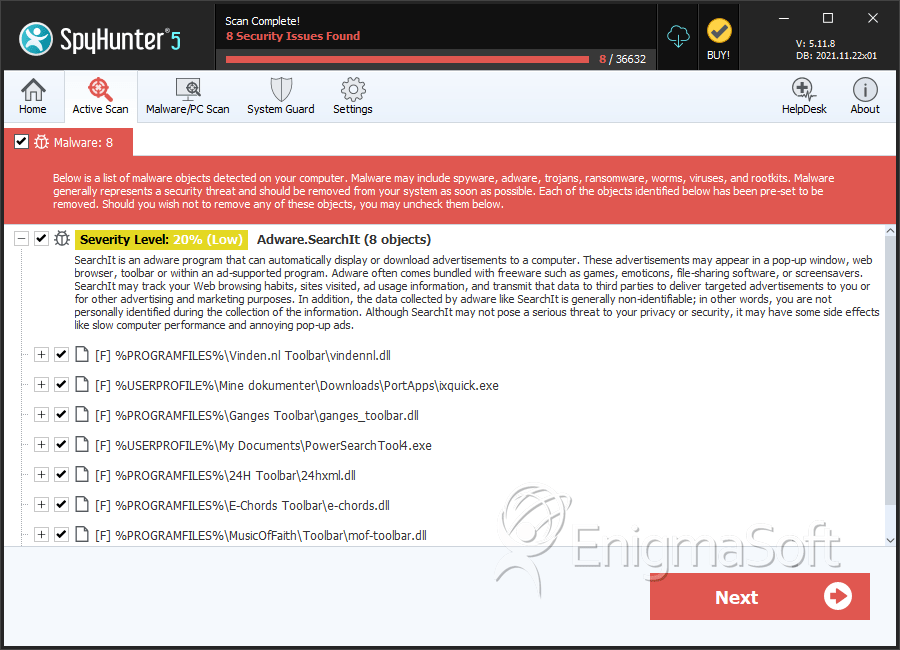
File System Details
| # | File Name | MD5 |
Detections
Detections: The number of confirmed and suspected cases of a particular threat detected on
infected computers as reported by SpyHunter.
|
|---|---|---|---|
| 1. | vindennl.dll | 1fa477d2da085229a34f41cfdd1edff5 | 23 |
| 2. | toolbar.dll | 759983a88e4eea7a304438858ad019b6 | 6 |
| 3. | ixquick.exe | 023b5f80a3d6fb6eb2f73fecd716b3f7 | 3 |
| 4. | PowerSearchTool4.exe | ca850c66b61fbb1b2bc5386cbd688e16 | 3 |
| 5. | ganges_toolbar.dll | 66d8226a022115427d7e0749de8a9187 | 2 |
| 6. | 24hxml.dll | 4af1bd58e9a3a833976b692acd637094 | 2 |
| 7. | toolbar.dll | be8a8e331c0ae20676f0776259ffae93 | 2 |
| 8. | e-chords.dll | 65f1874576c73bca90834157a912d850 | 1 |
| 9. | mof-toolbar.dll | e7716befe1ed58e9bb5dfb97b84046de | 1 |
| 10. | algeriechat.exe | 3ad0356f0fa558827f1529d1bbd4e004 | 1 |
| 11. | click108.dll | 1368f89a21eef199301006c54684adb0 | 1 |
| 12. | toolbar.dll | dbc6238922c5b69085b85767ba88b74f | 0 |




