How To Remove DLLs
A DLL (Dynamic Link Library) file is an executable file that allows programs to perform predefined functions so that they may operate in the fashion that they were designed to do. DLL files are not loaded into your system’s memory which saves RAM space. Multiple programs are able to utilize one DLL file. Malicious applications such as browser plugins or browser hijackers are sometimes made up of DLL files that change settings allowing outside attackers access to your system.
Removal of unwanted DLL files is an essential step to remove an infection or spyware parasite. Manual removal of an unwanted DLL file can be performed if the DLL file is unregistered first.
Unregister and Remove Unwanted DLL files manually.
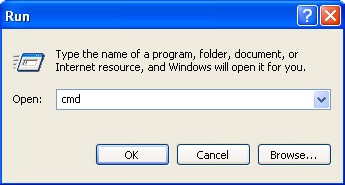
- Locate the unwanted DLL file by opening the command prompt window. Click "Start" menu > select "Run" > type in "cmd" > click "OK".
- Locate the exact unwanted DLL file path [as shown in Figure 1]. Type in "cd" to change the directory and then press the "space" button. Enter the exact path (folder location) to the unwanted DLL file and press "enter".
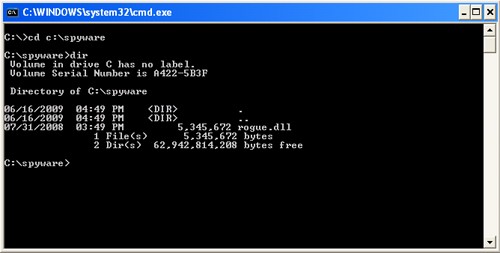
Figure 1. - While in the directory for the unwanted DLL file, type in "regsvr32 /u [name_of_DLL]" and press "enter" [as shown in Figure 2].
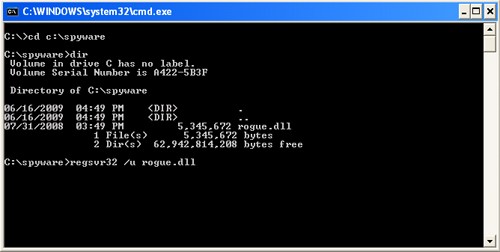
Figure 2.
A message should appear after successfully unregistering the unwanted DLL file.
If you experience issues after attempting manual removal of an unwanted DLL file, then you may download SpyHunter's spyware scanner to automatically detect the infected file.