Fake 'Account Notification' Phishing Email with Malicious Attachment Floods our Inboxes
Several of our support staff and technicians, who like to set up their emails to forward to a desired Gmail account, have received a phishing email message that attempts to warn them that someone has accessed their accounts and to download an attachment for further instructions. Sure, that sounds like a good idea....not!
Similar to the tricky phishing scam emails we've encountered before, spammers will use fear tactics to urge the recipient to download the malicious attachment and, as an extra layer of misdirection, the sender is from someone the account owner has communicated with, primarily an address from their Contact list.
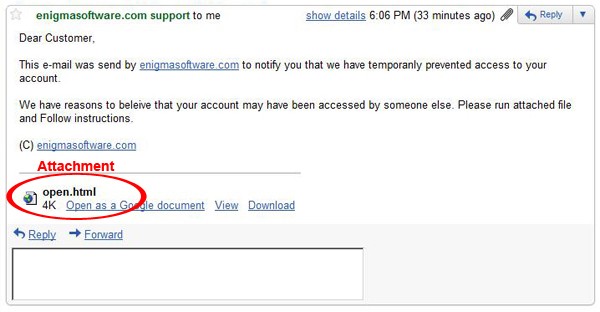
The spam message was supposedly from "enigmasoftwaregroup.com support" reading:
Dear Customer,
This e-mail was send by enigmasoftware.com to notify you that we have temporarily prevented access to your account.
We have reasons to beleive that your account may have been accessed by someone else. Please open attached file (open.html) and Follow instructions.
enigmasoftware.com
Figure 1. Spam email message forwarded to Gmail account with malicious attachment.
As security researchers and support team, we began to analyze the suspicious message for elements to prove to ourselves whether the email was a phishing scam or not. Here are the phishing characteristics that we noticed in the fake 'account notification' phishing email:
- The "reply-to" contained an unknown email address. The "reply-to" address is listed as "transliterationsx9@reeder-cpa.com", which definitely isn't an email that comes from anybody we know or from an official Gmail admin account.
- Misspelled words found within the content. The phishing message has the word 'believe' misspelled. Phishing messages are sent out by the millions so phishers aren't likely to bother maintaining grammatical and spelling accuracy. Most often phishing scammers know English as a second language and poor grammar is a dead giveaway that you're dealing with a scam. Also, phishers use random nonsense text and misspelled words in the email's subject line and content to trick spam filters.
- Entice, alarm, or urge the recipient to divulge personal information. The fake 'account notification' phishing message alerts the recipient that there's 'temporarily prevented access' to the account and the 'account may have been accessed by someone else'. Phishing scams often use scare tactics to trick you to get you to unwittingly provide personal details. One must always be suspicious of an email that asks for personal information.
- The spam message includes an attachment that the recipient is asked to open or download. The fake 'account notification' phishing message urges the recipient to open the attached file 'open.html' to restore the account. Whenever an email states that an attachment needs to be downloaded, it's a clear sign that you're dealing with a fraudulent email. Phishing emails send attachments or links to a suspicious website that may contain malicious code and expose your computer to spyware.
No mention of the actual name of the account owner. The phishing message addresses the recipient as "Customer" instead of addressing the recipient by his/her name. A company will address an account owner with their first and/or last name, not by email address or a generic name.
One of our technicians discovered two other emails similar to the one mentioned above in Figure 1. If you notice in Figure 2. below, the phishing email looks as if it came directly from our home domain 'enigmasoftware.com' and provides a link that looks suspicious.
Figure 2. Phishing email message forwarded to Gmail account with malicious links.
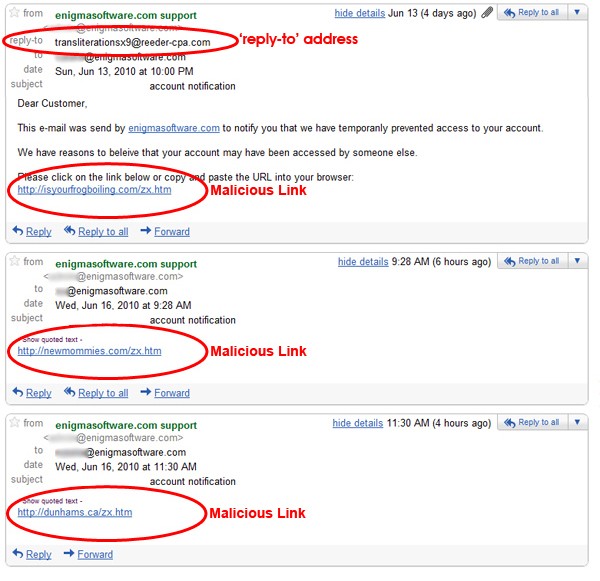
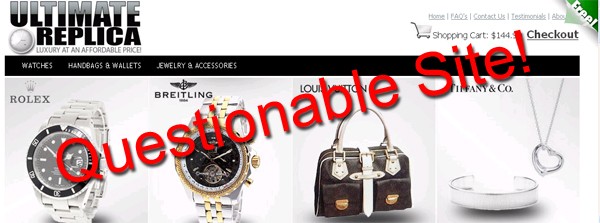
The link 'hxxp://isyourfrogboiling.com/zx.htm' (do not visit) found on the phishing message in Figure 2. appears to sell replica watches as shown in Figure 3 below. It may be possible that the site was designed to steal your personal information upon attempting to purchase one of the replica watches.
Figure 3. Potentially malicious replica watch site.
As a Gmail user, have you noticed any phishing emails similar to ones that we recently received? If so, share your experience with us by posting a comment below. Also, you can report phishing emails to the actual Google team using the "Report phishing" option in your account, or simply delete it.