Vista Security 2011

By Domesticus | 1,740 views
Rate it:
1 Star2 Stars3 Stars4 Stars5 Stars (4 votes, average: 4.25 out of 5)
Loading ... Loading ...
Traduza a:     English  |   Español
More... More

Descrição do Vista Security 2011


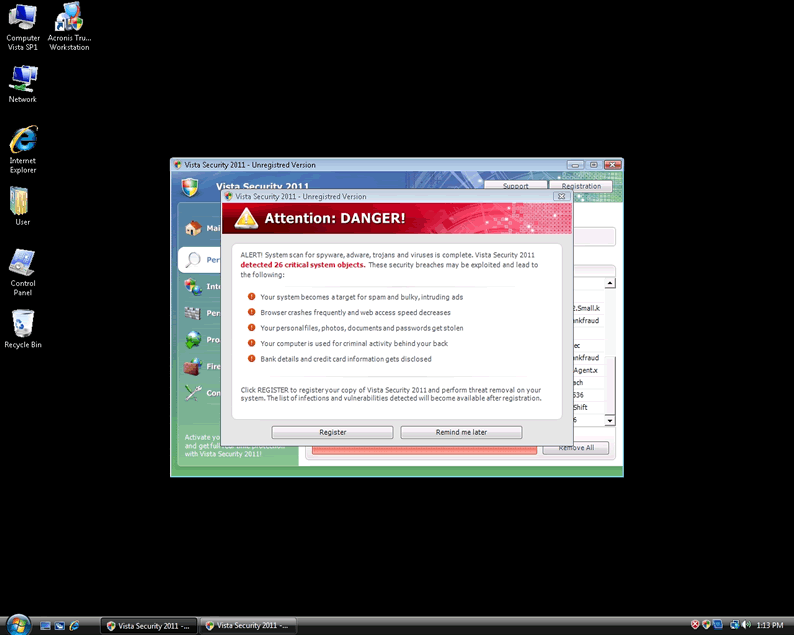
Screenshot da Imagem
[+] Clique na Imagem Para Aumentar


O Vista Security 2011 é um falso aplicativo de segurança, conhecido por impedir a instalação de programas de segurança confiáveis. O nome ‘Vista’ do Vista Security 2011 pode enganar os usuários de computador e faze-los acreditar que ele é um aplicativo confiável, devido à semelhança com o nome ‘Windows Vista’. Os usuários de computador devem estar cientes de que o Vista Security 2011 não auxilia na detecção e na remoção de malware do computador. O Vista Security 2011 foi criado pelos hackers, com a intenção de explorar os usuários de computador crédulos, através do uso de táticas agressivas, tais como falsas mensagens de alerta popup e falsos resultados de parasitas em varreduras de sistema.
Um usuário de computador pode tentar remover manualmente o VistaSecurity2011, mas isso revelou-se difícil e arriscado e às vezes pode, potencialmente, danificar o Windows, pela exclusão de determinadas entradas de registro. O Vista Security 2011 não deve ser comprado por qualquer motivo. Iniciar o computador no modo seguro pode pode eliminar a capacidade do Vista Security 2011 de impedir a instalação de outros aplicativos de segurança.

Tipo: Rogue AntiSpyware Programs

Como Você Pode Detectar o Vista Security 2011?


Baixe o Escaner de Detecção do SpyHunter
para Detectar o Vista Security 2011.


O Vista Security 2011 tem normalmente na memória, os processos que se seguem:

  • c:\Program Files\Vista Security 2011\VS2011.exe
  • c:\WINDOWS\system32\winlogon86.exe
  • c:\[RANDOM CHARACTERS].exe
  • c:\WINDOWS\system32\winupdate86.exe
  • %AppData%\Local\[RANDOM CHARACTERS].exe
  • Vista Security 2011.exe
  • c:\WINDOWS\system32\[RANDOM CHARACTERS].exe
  • c:\WINDOWS\system32\winhelper86.dll

O Vista Security 2011 criou as entradas de registro que se seguem:

  • HKEY_LOCAL_MACHINE\SOFTWARE\Microsoft\Windows\CurrentVersion\Uninstall\Vista Security 2011
  • HKEY_LOCAL_MACHINE\SOFTWARE\Microsoft\Windows\CurrentVersion\Run “winupdate86.exe”
  • HKEY_CURRENT_USER\Software\Classes\.exe\shell\open\command “IsolatedCommand” = ‘”%1″ %*’
  • HKEY_CURRENT_USER\Software\Classes\exefile “(Default)” = ‘Application’
  • HKEY_CURRENT_USER\Software\Classes\exefile\DefaultIcon “(Default)” = ‘%1′
  • HKEY_CURRENT_USER\Software\Classes\exefile\shell\open\command “IsolatedCommand” = ‘”%1″ %*’
  • HKEY_CLASSES_ROOT\.exe\shell\open\command “(Default)” = ‘”%UserProfile%\Local Settings\Application Data\[RANDOM 3 LETTERS].exe” /START “%1″ %*’
  • HKEY_CLASSES_ROOT\.exe\shell\runas\command “IsolatedCommand” = ‘”%1″ %*’
  • HKEY_CLASSES_ROOT\exefile\shell\open\command “IsolatedCommand” = ‘”%1″ %*’
  • HKEY_LOCAL_MACHINE\SOFTWARE\Clients\StartMenuInternet\FIREFOX.EXE\shell\open\command “(Default)” = ‘”%UserProfile%\Local Settings\Application Data\[RANDOM 3 LETTERS].exe” /START “C:\Program Files\Mozilla Firefox\firefox.exe”‘
  • HKEY_CURRENT_USER\Software\Vista Security 2011
  • HKEY_CURRENT_USER\Software\VS2011
  • HKEY_CURRENT_USER\Software\Classes\.exe “(Default)” = ‘exefile’
  • HKEY_CURRENT_USER\Software\Classes\.exe\shell\runas\command “IsolatedCommand” = ‘”%1″ %*’
  • HKEY_CURRENT_USER\Software\Classes\exefile “Content Type” = ‘application/x-msdownload’
  • HKEY_CURRENT_USER\Software\Classes\exefile\shell\runas\command “(Default)” = ‘”%1″ %*’
  • HKEY_CLASSES_ROOT\.exe\DefaultIcon “(Default)” = ‘%1′
  • HKEY_CLASSES_ROOT\.exe\shell\open\command “IsolatedCommand” = ‘”%1″ %*’
  • HKEY_CLASSES_ROOT\exefile\shell\runas\command “IsolatedCommand” = ‘”%1″ %*’
  • HKEY_LOCAL_MACHINE\SOFTWARE\Clients\StartMenuInternet\IEXPLORE.EXE\shell\open\command “(Default)” = ‘”%UserProfile%\Local Settings\Application Data\[RANDOM 3 LETTERS].exe” /START “C:\Program Files\Internet Explorer\iexplore.exe”‘
  • HKEY_CURRENT_USER\Software\Microsoft\Windows\CurrentVersion\Run “Vista Security 2011″
  • HKEY_LOCAL_MACHINE\SOFTWARE\Vista Security 2011
  • HKEY_CURRENT_USER\Software\Classes\.exe “Content Type” = ‘application/x-msdownload’
  • HKEY_CURRENT_USER\Software\Classes\.exe\shell\runas\command “(Default)” = ‘”%1″ %*’
  • HKEY_CURRENT_USER\Software\Classes\.exe\DefaultIcon “(Default)” = ‘%1′ = ‘”%UserProfile%\Local Settings\Application Data\[RANDOM 3 LETTERS].exe” /START “%1″ %*’
  • HKEY_CURRENT_USER\Software\Classes\exefile\shell\open\command “(Default)” = ‘”%UserProfile%\Local Settings\Application Data\[RANDOM 3 LETTERS].exe” /START “%1″ %*’
  • HKEY_CURRENT_USER\Software\Classes\exefile\shell\runas\command “IsolatedCommand” – ‘”%1″ %*’
  • HKEY_CLASSES_ROOT\.exe\shell\runas\command “(Default)” = ‘”%1″ %*’
  • HKEY_CLASSES_ROOT\exefile “Content Type” = ‘application/x-msdownload’
  • HKEY_CLASSES_ROOT\exefile\shell\open\command “(Default)” = ‘”%UserProfile%\Local Settings\Application Data\[RANDOM 3 LETTERS].exe” /START “%1″ %*’
  • HKEY_LOCAL_MACHINE\SOFTWARE\Clients\StartMenuInternet\FIREFOX.EXE\shell\safemode\command “(Default)” = ‘”%UserProfile%\Local Settings\Application Data\[RANDOM 3 LETTERS].exe” /START “C:\Program Files\Mozilla Firefox\firefox.exe” -safe-mode’

Artigo Importante Sobre Isenção de Responsabilidade

This entry was last updated on 09/1/11 and posted on 11/10/10. RSS 2.0 feed. You can leave a response, or trackback from your own site.

Leave a Comment

Note: Abusive comments are not allowed. Please do not post comments regarding technical support issues. ESG customers that have issues with SpyHunter should open a customer support ticket.

*
To prove you're a person (not a spam script), type the security word shown in the picture. Click on the picture to hear an audio file of the word.
Click to hear an audio file of the anti-spam word

Follow ESG

Home | SpyHunter Risk Assessment Model | Privacy Policy | End User License Agreement | Additional Terms and Conditions
Copyright 2003-2012. Enigma Software Group USA, LLC. All Rights Reserved.

