Locating the Username and Password in the Receipt E-Mail
This article shows you how to locate the right Username and Password in the Receipt E-Mail to be used on the "SpyHunter Account Settings".
Below is a copy of the Receipt E-Mail:
- The Username and Password on the top of the Receipt (#1) is the account information that you will use on the "SpyHunter Account Settings". It will also be used to log on to our website for future downloads and technical support requests.
Note: When setting up the "SpyHunter Account Settings", make sure that there are no spaces before or after your username/email or password.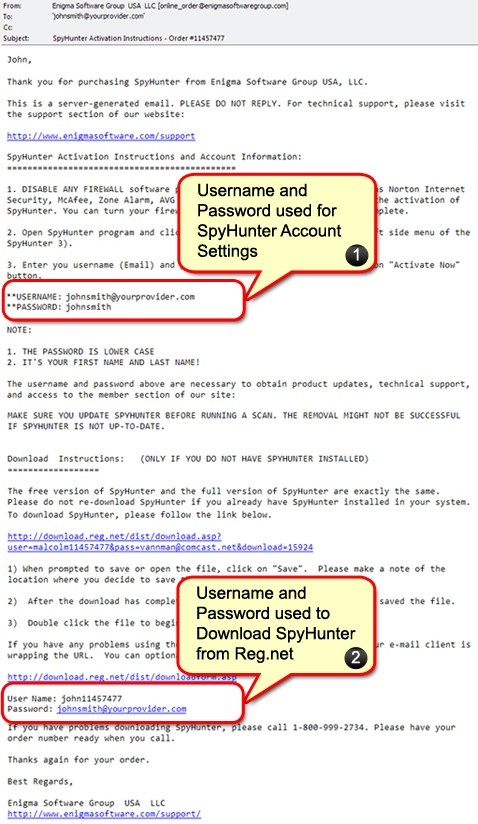
For further directions and visual aid of the account setting process, go to HOW TO Set Up Your Account Settings on SpyHunter.
- The Username and Password on the bottom of the Receipt (#2) is the account information that you will use to download the SpyHunter program from Esellerate.net's website www.esellerate.net.
Note: DO NOT use this USERNAME AND PASSWORD on the "SpyHunter Account Settings", nor to log onto our website.