Vista Security 2011

By Domesticus | 1,740 views
Rate it:
1 Star2 Stars3 Stars4 Stars5 Stars (4 votes, average: 4.25 out of 5)
Loading ... Loading ...
Traduzca a:     English  |   Português
More... More

Vista Security 2011 Descripción


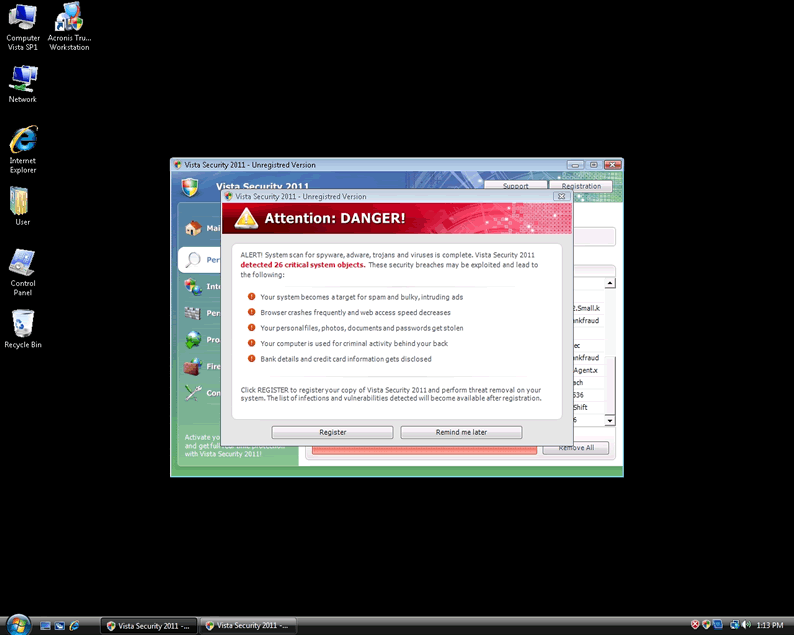
Pantallazo de imagen
[+] Clicquear Imagen para Ampliarla


El Vista Security 2011 es una aplicación falsa de seguridad, conocida por bloquear la instalación de programas de seguridad de buena reputación. El nombre “Vista” del Vista Security 2011 puede engañar a los usuarios informáticos en la creencia de que es una aplicación de confianza, debido a la similitud con el nombre de “Windows Vista”. Los usuarios de computadoras deben darse cuenta de que Vista Security 2011 no ayuda en la detección y eliminación de malware de computadora. Vista Security 2011 fue creado por los hackers con la intención de extorsionar los usuarios de ordenador crédulos, a través del uso de tácticas agresivas como falsos mensajes emergentes de alerta y los resultados de análisis falsos de parásito de sistema.

Un usuario de computadora puede intentar eliminar manualmente VistaSecurity2011 pero ha demostrado ser difícil y arriesgado, a veces potencialmente perjudiciando a Windows por la eliminación de ciertas entradas del registro. Usted nunca deber comprar Vista Security 2011 por cualquier motivo. Cargar un ordenador en modo seguro puede eliminar la capacidad del Vista Security 2011 de bloquear la instalación de otras aplicaciones de seguridad.

Tipo: Rogue AntiSpyware Programs

Cómo Puedes Detectar Vista Security 2011?


Descargue el Escáner de Detección del SpyHunter
para Detectar Vista Security 2011.


Vista Security 2011 tiene típicamente los siguientes procesos en la memoria:

  • c:\Program Files\Vista Security 2011\VS2011.exe
  • c:\WINDOWS\system32\winlogon86.exe
  • c:\[RANDOM CHARACTERS].exe
  • c:\WINDOWS\system32\winupdate86.exe
  • %AppData%\Local\[RANDOM CHARACTERS].exe
  • Vista Security 2011.exe
  • c:\WINDOWS\system32\[RANDOM CHARACTERS].exe
  • c:\WINDOWS\system32\winhelper86.dll

Vista Security 2011 crea las siguientes entradas de registro:

  • HKEY_LOCAL_MACHINE\SOFTWARE\Microsoft\Windows\CurrentVersion\Uninstall\Vista Security 2011
  • HKEY_LOCAL_MACHINE\SOFTWARE\Microsoft\Windows\CurrentVersion\Run “winupdate86.exe”
  • HKEY_CURRENT_USER\Software\Classes\.exe\shell\open\command “IsolatedCommand” = ‘”%1″ %*’
  • HKEY_CURRENT_USER\Software\Classes\exefile “(Default)” = ‘Application’
  • HKEY_CURRENT_USER\Software\Classes\exefile\DefaultIcon “(Default)” = ‘%1′
  • HKEY_CURRENT_USER\Software\Classes\exefile\shell\open\command “IsolatedCommand” = ‘”%1″ %*’
  • HKEY_CLASSES_ROOT\.exe\shell\open\command “(Default)” = ‘”%UserProfile%\Local Settings\Application Data\[RANDOM 3 LETTERS].exe” /START “%1″ %*’
  • HKEY_CLASSES_ROOT\.exe\shell\runas\command “IsolatedCommand” = ‘”%1″ %*’
  • HKEY_CLASSES_ROOT\exefile\shell\open\command “IsolatedCommand” = ‘”%1″ %*’
  • HKEY_LOCAL_MACHINE\SOFTWARE\Clients\StartMenuInternet\FIREFOX.EXE\shell\open\command “(Default)” = ‘”%UserProfile%\Local Settings\Application Data\[RANDOM 3 LETTERS].exe” /START “C:\Program Files\Mozilla Firefox\firefox.exe”‘
  • HKEY_CURRENT_USER\Software\Vista Security 2011
  • HKEY_CURRENT_USER\Software\VS2011
  • HKEY_CURRENT_USER\Software\Classes\.exe “(Default)” = ‘exefile’
  • HKEY_CURRENT_USER\Software\Classes\.exe\shell\runas\command “IsolatedCommand” = ‘”%1″ %*’
  • HKEY_CURRENT_USER\Software\Classes\exefile “Content Type” = ‘application/x-msdownload’
  • HKEY_CURRENT_USER\Software\Classes\exefile\shell\runas\command “(Default)” = ‘”%1″ %*’
  • HKEY_CLASSES_ROOT\.exe\DefaultIcon “(Default)” = ‘%1′
  • HKEY_CLASSES_ROOT\.exe\shell\open\command “IsolatedCommand” = ‘”%1″ %*’
  • HKEY_CLASSES_ROOT\exefile\shell\runas\command “IsolatedCommand” = ‘”%1″ %*’
  • HKEY_LOCAL_MACHINE\SOFTWARE\Clients\StartMenuInternet\IEXPLORE.EXE\shell\open\command “(Default)” = ‘”%UserProfile%\Local Settings\Application Data\[RANDOM 3 LETTERS].exe” /START “C:\Program Files\Internet Explorer\iexplore.exe”‘
  • HKEY_CURRENT_USER\Software\Microsoft\Windows\CurrentVersion\Run “Vista Security 2011″
  • HKEY_LOCAL_MACHINE\SOFTWARE\Vista Security 2011
  • HKEY_CURRENT_USER\Software\Classes\.exe “Content Type” = ‘application/x-msdownload’
  • HKEY_CURRENT_USER\Software\Classes\.exe\shell\runas\command “(Default)” = ‘”%1″ %*’
  • HKEY_CURRENT_USER\Software\Classes\.exe\DefaultIcon “(Default)” = ‘%1′ = ‘”%UserProfile%\Local Settings\Application Data\[RANDOM 3 LETTERS].exe” /START “%1″ %*’
  • HKEY_CURRENT_USER\Software\Classes\exefile\shell\open\command “(Default)” = ‘”%UserProfile%\Local Settings\Application Data\[RANDOM 3 LETTERS].exe” /START “%1″ %*’
  • HKEY_CURRENT_USER\Software\Classes\exefile\shell\runas\command “IsolatedCommand” – ‘”%1″ %*’
  • HKEY_CLASSES_ROOT\.exe\shell\runas\command “(Default)” = ‘”%1″ %*’
  • HKEY_CLASSES_ROOT\exefile “Content Type” = ‘application/x-msdownload’
  • HKEY_CLASSES_ROOT\exefile\shell\open\command “(Default)” = ‘”%UserProfile%\Local Settings\Application Data\[RANDOM 3 LETTERS].exe” /START “%1″ %*’
  • HKEY_LOCAL_MACHINE\SOFTWARE\Clients\StartMenuInternet\FIREFOX.EXE\shell\safemode\command “(Default)” = ‘”%UserProfile%\Local Settings\Application Data\[RANDOM 3 LETTERS].exe” /START “C:\Program Files\Mozilla Firefox\firefox.exe” -safe-mode’

Importante Aviso de Renuncia de Responsabilidades

This entry was last updated on 09/1/11 and posted on 11/10/10. RSS 2.0 feed. You can leave a response, or trackback from your own site.

Leave a Comment

Note: Abusive comments are not allowed. Please do not post comments regarding technical support issues. ESG customers that have issues with SpyHunter should open a customer support ticket.

*
To prove you're a person (not a spam script), type the security word shown in the picture. Click on the picture to hear an audio file of the word.
Click to hear an audio file of the anti-spam word

Follow ESG

Home | SpyHunter Risk Assessment Model | Privacy Policy | End User License Agreement | Additional Terms and Conditions
Copyright 2003-2012. Enigma Software Group USA, LLC. All Rights Reserved.

